A workflow can get weirdly stuck in the handoff between tools: one app makes the image, another trims the edges, a third adds text, and a fourth gets blamed for a mismatch it never saw coming. That is usually the real bottleneck. Not “which AI tool is best” in some abstract sense, but which toolchain gets a visual job from prompt to publish without turning the whole thing into a small desktop migration.
This article keeps the focus on lean decisions. The goal is not to collect every shiny image app available in 2026. It is to pick a useful stack for the kind of image work you actually need, then keep it moving. For a broader planning view, the AI image use cases guide helps frame the jobs first, and the AI image use cases examples page shows what those jobs look like in practice.
What “best” actually means for AI image use cases
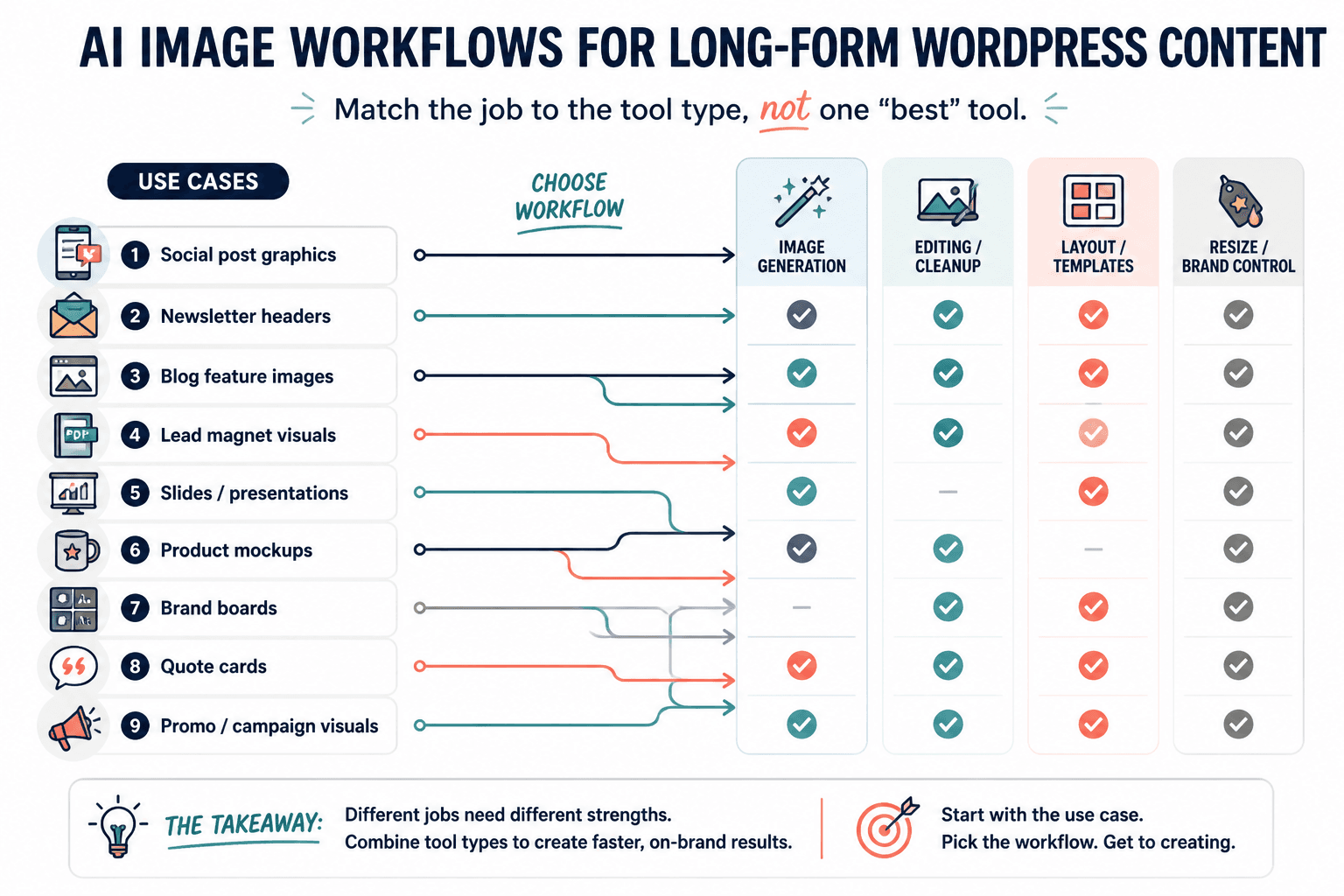
“Best” changes depending on the job. A tool can be excellent at generating concept art and still be annoying for branded blog headers. Another can handle layout beautifully and be mediocre at raw generation. So the useful test is not feature count. It is whether the tool removes friction from a specific workflow.
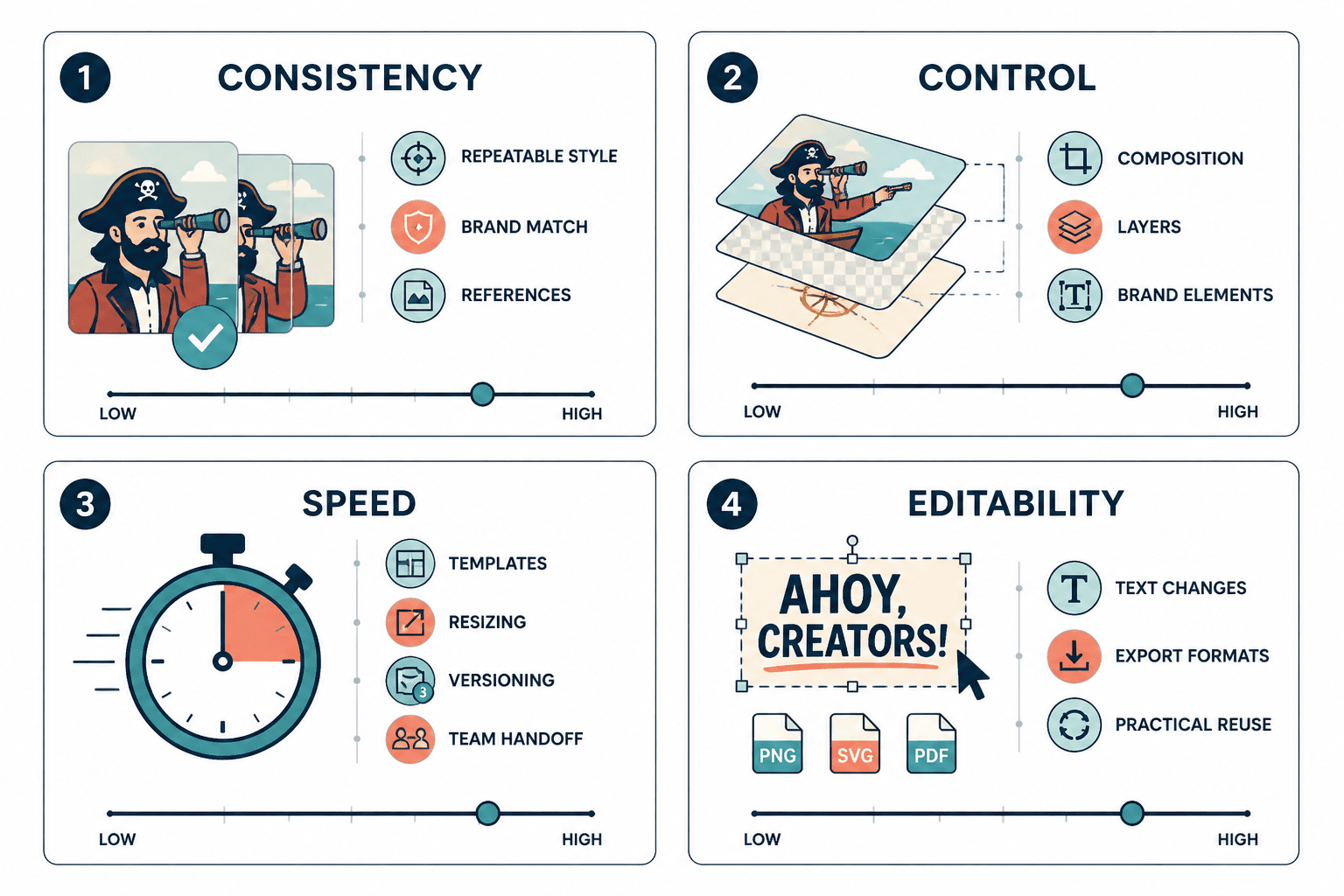
For AI image work, that usually comes down to five questions:
- Can it generate the kind of visual you need quickly?
- Can it keep the result usable for real content, not just demos?
- Can it fit into a layout, brand system, or template without extra cleanup?
- Can it edit, resize, or polish the image without a separate rescue mission?
- Can it save time on repeatable work instead of creating new chores?
That last point matters most. Plenty of tools are “powerful” in the way a kitchen full of unlabeled drawers is powerful. The work still has to happen somewhere.
1. AI image generators
AI image generators are the starting point when the visual does not exist yet. They are useful for concepting, illustrations, mood images, mock visuals, and quick content assets when speed matters more than perfect art direction.
Look for generators that are strong at:
- prompt following
- style consistency
- aspect ratio control
- reasonable commercial output quality
- easy export into design tools
Good generators are especially helpful when a post or campaign needs a visual fast but the final polish will happen elsewhere. Adobe’s Firefly documentation, for example, is built around using generative tools inside creative workflows rather than treating generation as the last step by itself. That is the right mental model even when the brand names change.
2. Design and layout tools
Design tools are where AI images become usable content. This category matters for social graphics, blog headers, promos, newsletter art, lead magnets, and anything that needs text, spacing, and a coherent finish.
The best design tools for AI image use cases do three things well:
- place the image inside a clean layout
- make branding repeatable
- reduce fiddly resizing and export problems
These tools are often the difference between “nice image” and “publishable asset.” If a generator gives you raw material, the design tool is where the material stops being raw.
3. Editing and cleanup tools
Editing tools are the rescue crew. They fix weird hands, crop problems, background issues, lighting mismatches, and the general nonsense that shows up when an image is almost right.
This category is essential when you already have a generated image or a product photo and just need to make it presentable. It is also where many creators waste time by doing cleanup in the wrong app. If the tool can remove an object, extend a background, or sharpen a composition faster than a full redesign, it earns its keep.
Adobe Photoshop’s current generative features and similar cleanup tools show the direction here: less starting over, more fixing the part that is broken. That saves sanity, which counts as a business asset on some days.
4. Mockup and product visual tools
Mockup tools are the practical middle ground for selling, showcasing, or explaining something tangible. They are useful for ebooks, printables, packaging, merch, digital products, and course assets where “here is what it looks like in context” matters more than artistic novelty.
This category is best when you need:
- product previews
- cover concepts
- in-context branding visuals
- quick commercial presentation assets
These tools often prevent a common mistake: using a cool AI image where a simple product mockup would do the job better and faster. A clean mockup usually beats a dramatic scene that does not explain the offer.
5. Template and workflow tools
Template and workflow tools are not flashy, but they are the part of the stack that keeps recurring image work from becoming a weekly reinvention project. They matter when you produce the same kind of asset over and over: blog headers, quote graphics, product promos, ad variants, thumbnails, or series-based content.
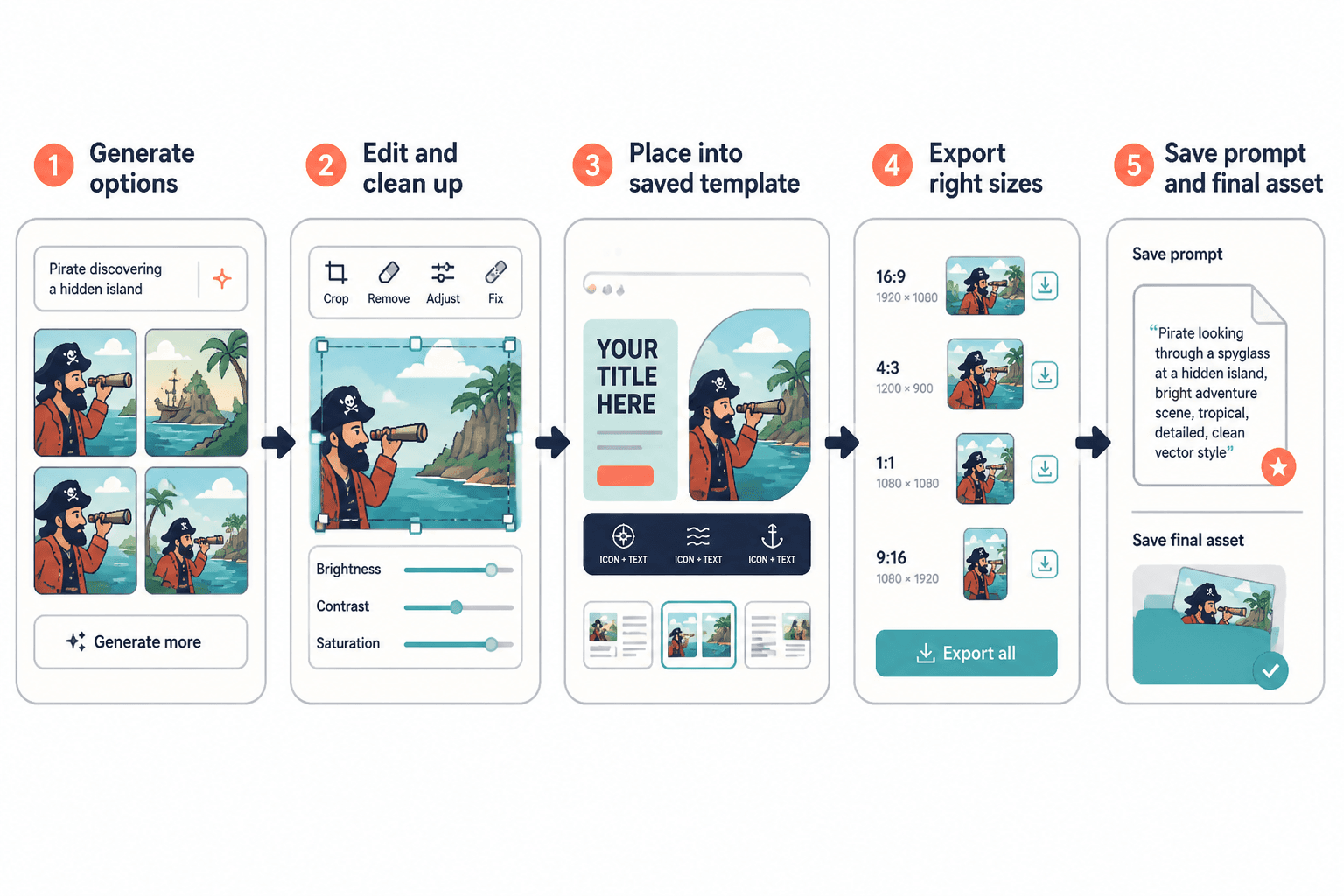
Look for support for:
- saved layouts
- brand kits
- duplicate-and-edit workflows
- foldering or asset storage
- easy version control
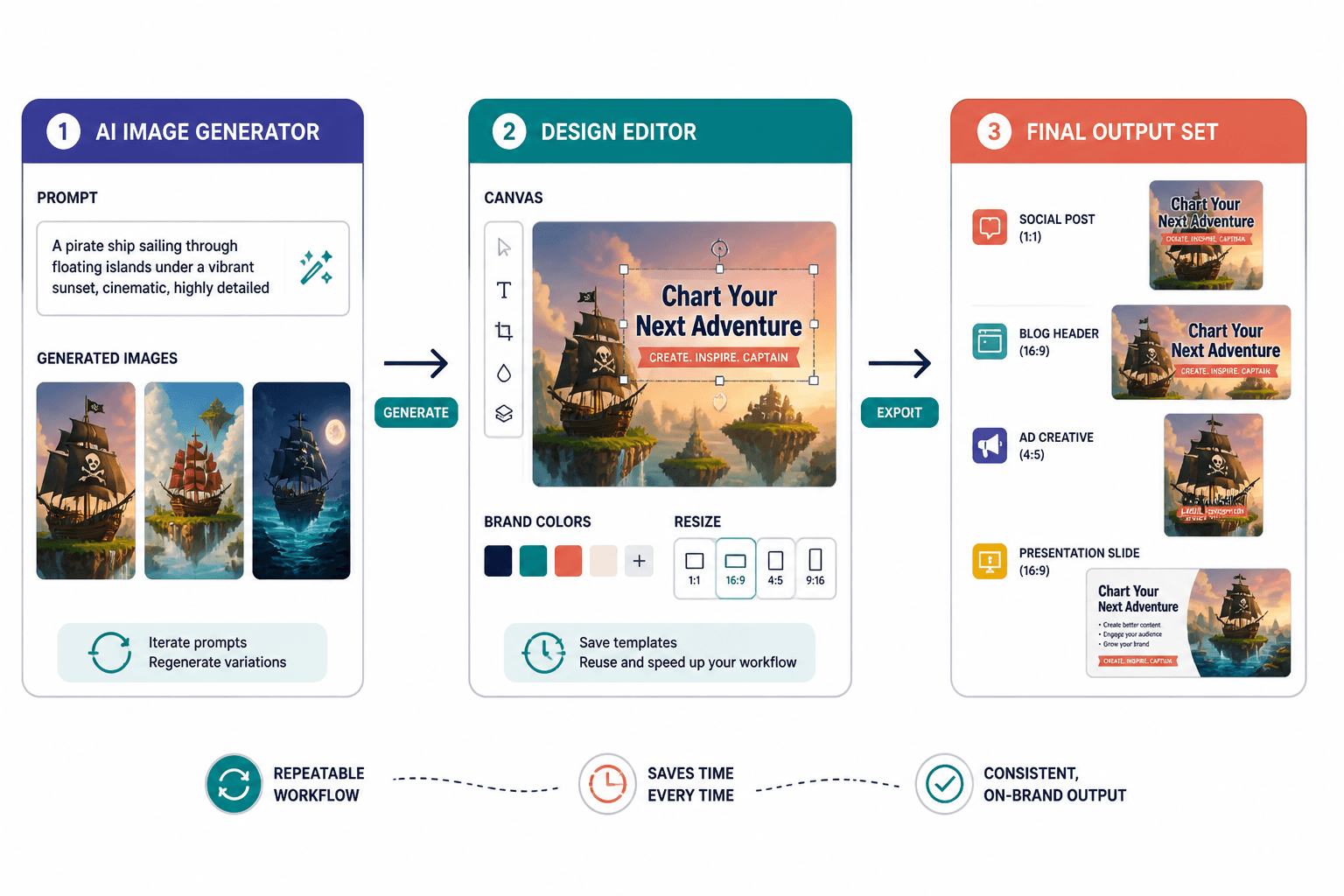
When this layer is working, the system feels boring in the best way. The image gets made, cleaned, placed, exported, and stored without everyone pretending the folder structure is “temporary.”
How to choose the right stack for your actual use case
The strongest AI image setup is usually not one app. It is a small stack with clear jobs.
Fast content graphics
Use this stack when the goal is speed and volume: social posts, simple headers, newsletter graphics, or blog support visuals.
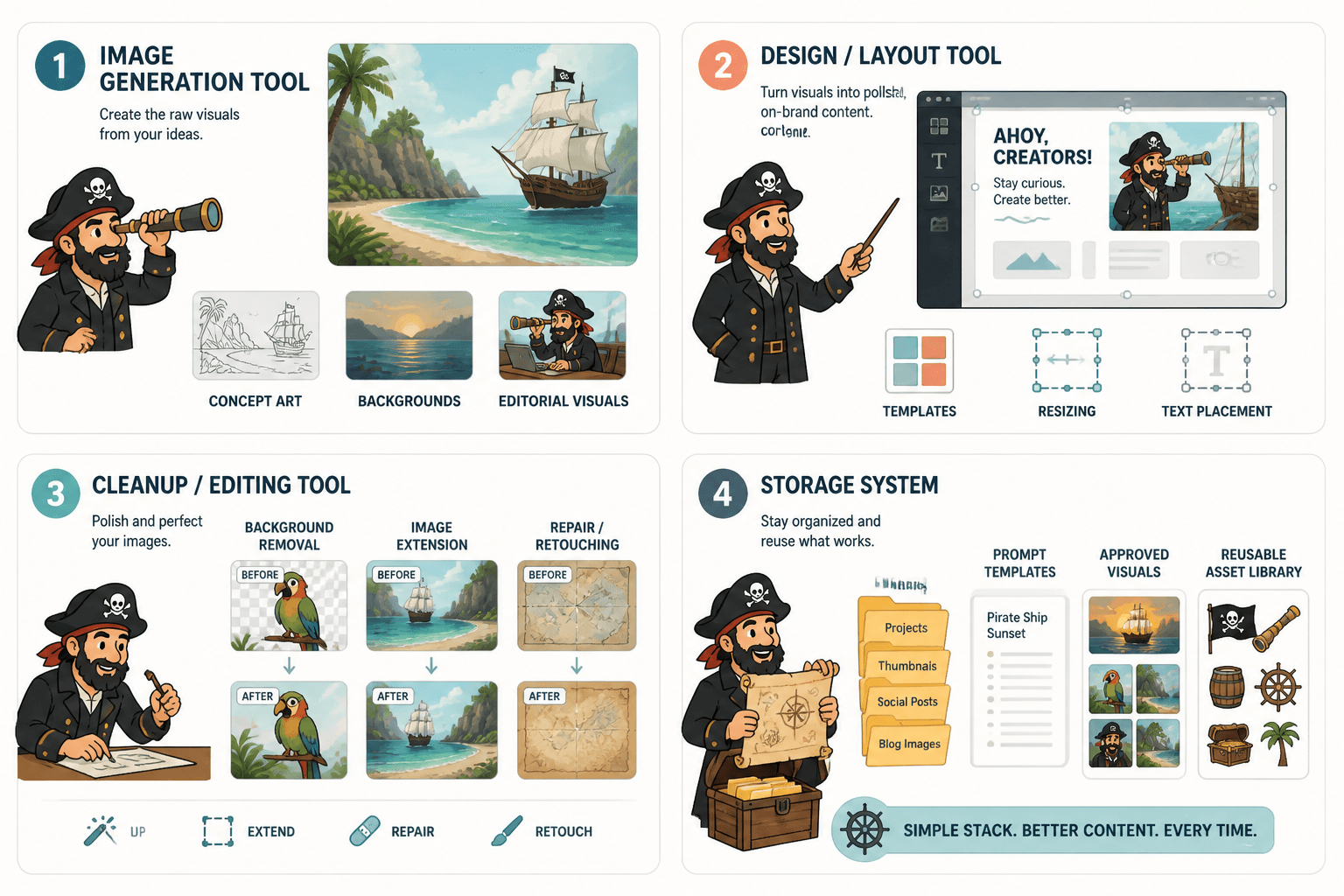
- Generator: create the image quickly
- Design tool: add copy and brand elements
- Editor: fix obvious problems
That stack keeps the work simple. If the generator is good enough and the layout tool is flexible, you do not need a giant system to make a useful image.
Branded blog and social visuals
For recurring editorial visuals, prioritize consistency over novelty. A strong design tool matters more than a hyper-creative generator if the job is to make content feel like it belongs to the same brand every time.
In practice, that means choosing:
- a generator with predictable output
- a design tool with reusable templates
- an editor for cleanup and resizing
If you want a deeper planning frame for this kind of work, the parent guide on AI image use cases is the better starting point than tool shopping alone.
Product and offer promotion
If the image exists to help sell or explain something, the stack should lean toward mockups, clean layouts, and fast polish. In this case, the “best” tool is often the one that makes the offer legible fastest.
- use a mockup tool if context matters
- use a design tool if copy and structure matter
- use an editor if the base visual needs cleanup before it can sell anything
This is where a do-everything generator can be overkill. A plain mockup with crisp layout often beats a visually ambitious image that leaves the audience squinting.
Template-driven recurring work
When the same type of image appears again and again, templates become the real force multiplier. That includes series graphics, promo sets, content thumbnails, seasonal campaign visuals, and educational diagrams.
The lean stack here is:
- one generator for source visuals
- one design tool for repeatable layouts
- one storage system for templates and exports
This is where workflow discipline matters more than novelty. New features are fun. Not having to rebuild the same asset from scratch every Thursday is better.
A practical selection checklist
Before choosing a tool, test it against the actual image job, not a marketing promise.
- Does it solve the first bottleneck in the workflow?
- Can it fit into your current publishing stack?
- Does it handle the type of image you make most often?
- Can you reuse outputs or templates without extra cleanup?
- Does the pricing make sense for the volume you need?
For pricing and feature details, it is worth checking the official product pages directly rather than trusting comparison-table folklore. OpenAI, Adobe, Canva, and similar platforms update capabilities often enough that stale summaries age badly.
If you want a broader map of how the categories connect, the sibling pages on examples and the parent guide on use cases provide the surrounding context. This article is the “which tool type goes where” layer.
The short version
The best AI tools for AI image use cases are the ones that remove the most annoying step in your actual workflow. Sometimes that is generation. Sometimes it is layout. Sometimes it is cleanup. Sometimes it is just a template that stops the same work from being rebuilt by hand.
So pick the smallest stack that clears the bottleneck. The whole point is to make the image job easier, not to assemble a museum of apps that each claim to be one click away from genius.