
A CTA draft can start in a notes app, get rewritten in an AI editor, get copied into a page builder, and then die quietly in a browser tab called “final-final.” That is usually the real problem: not a shortage of tools, but a messy handoff between them. The useful move is to build a lean system that helps you draft a cleaner CTA, test a few sensible variants, and ship the one that actually earns the click.
This guide stays focused on that workflow. Not “which app is trendy this quarter,” but which tools help at each stage of CTA writing, where they fit, and where they do not. For the broader strategy side of CTA writing, start with the CTA writing guide. If you want practical wording patterns, the CTA writing examples page is the better companion.
What AI tools can actually help with in CTA writing
AI tools are useful when they reduce friction, not when they pretend to be your conversion strategy. In CTA writing, they help most with:
- Ideation: generating several workable CTA angles quickly.
- Variation: creating shorter, firmer, or more specific alternatives.
- Tone control: making a CTA sound more direct, calmer, warmer, or more urgent.
- Pattern recognition: spotting when a line is vague, overexplained, or too generic.
- Testing support: helping you prepare variants for A/B tests.
- Workflow speed: moving from draft to page without a long rewrite detour.
What they do not do: invent a strong offer, rescue a confused audience, or make “Learn More” feel less like a shrug in button form.
How to choose a lean CTA toolchain
The best stack is usually smaller than people want it to be. A good CTA workflow only needs a few jobs covered:
- Draft the CTA from the offer and the page goal.
- Generate alternatives that differ in angle, not just punctuation.
- Check the wording against the page context.
- Publish and test if the traffic volume justifies it.
- Read the behavior data before deciding the line is brilliant or broken.
If a tool does not improve one of those steps, it is probably decorative. Decorative software is a hobby, not a system.
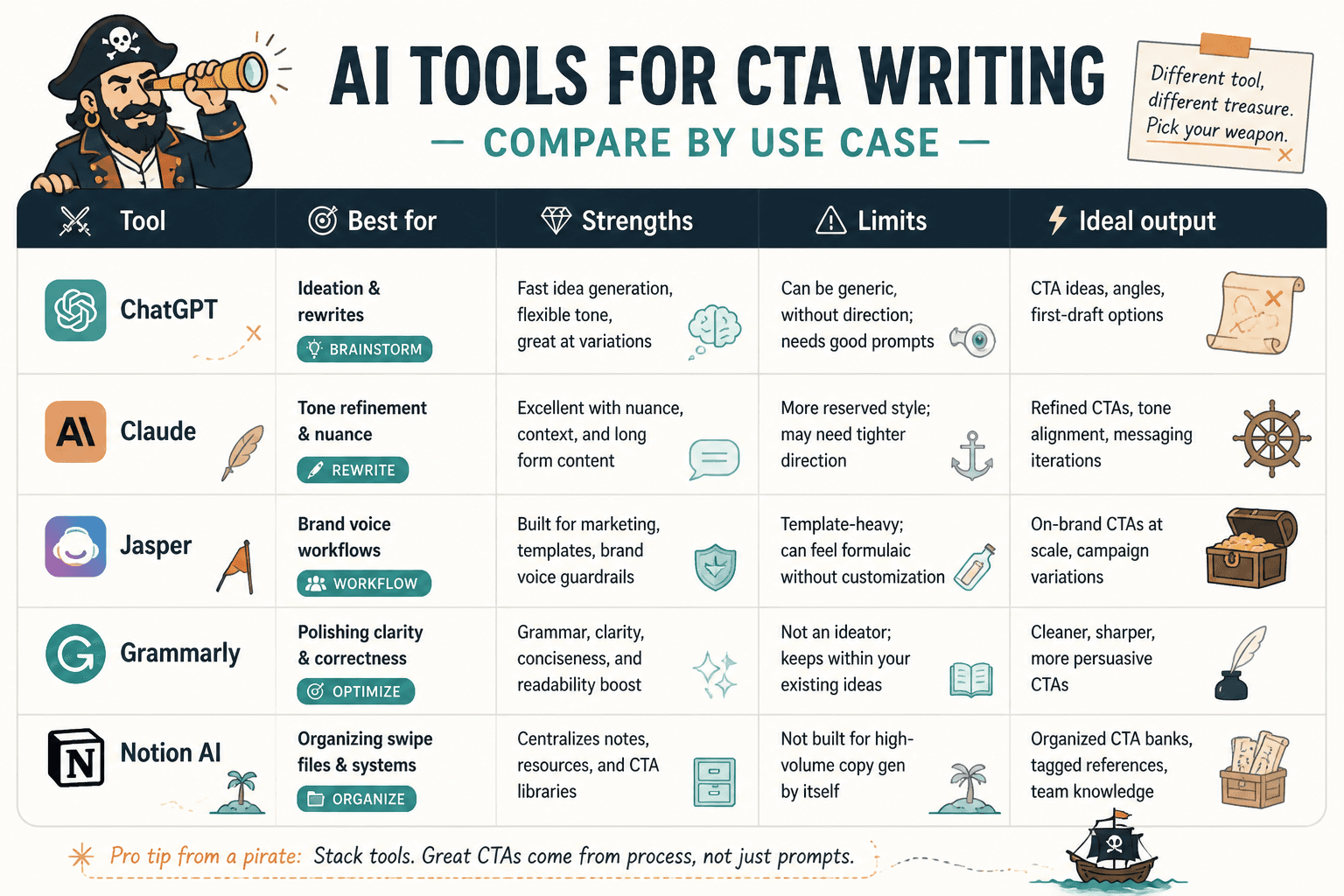
Best AI tools for CTA writing by use case
1. AI writing tools for CTA ideation and variation
These are the fastest way to get past a blank button field or a clumsy first draft. They are best for generating options, not for making final judgment calls.
Good use cases:
- Turning one vague CTA into five sharper versions.
- Rewriting a line for different audience temperatures.
- Testing whether the CTA should emphasize speed, value, clarity, or risk reduction.
What to look for:
- Strong instruction-following.
- Easy regeneration without losing context.
- Support for rewriting by tone, length, or intent.
Best fit: solo creators, marketers, and small teams who need fast CTA drafts before editing them by hand.
2. Template and swipe-file tools
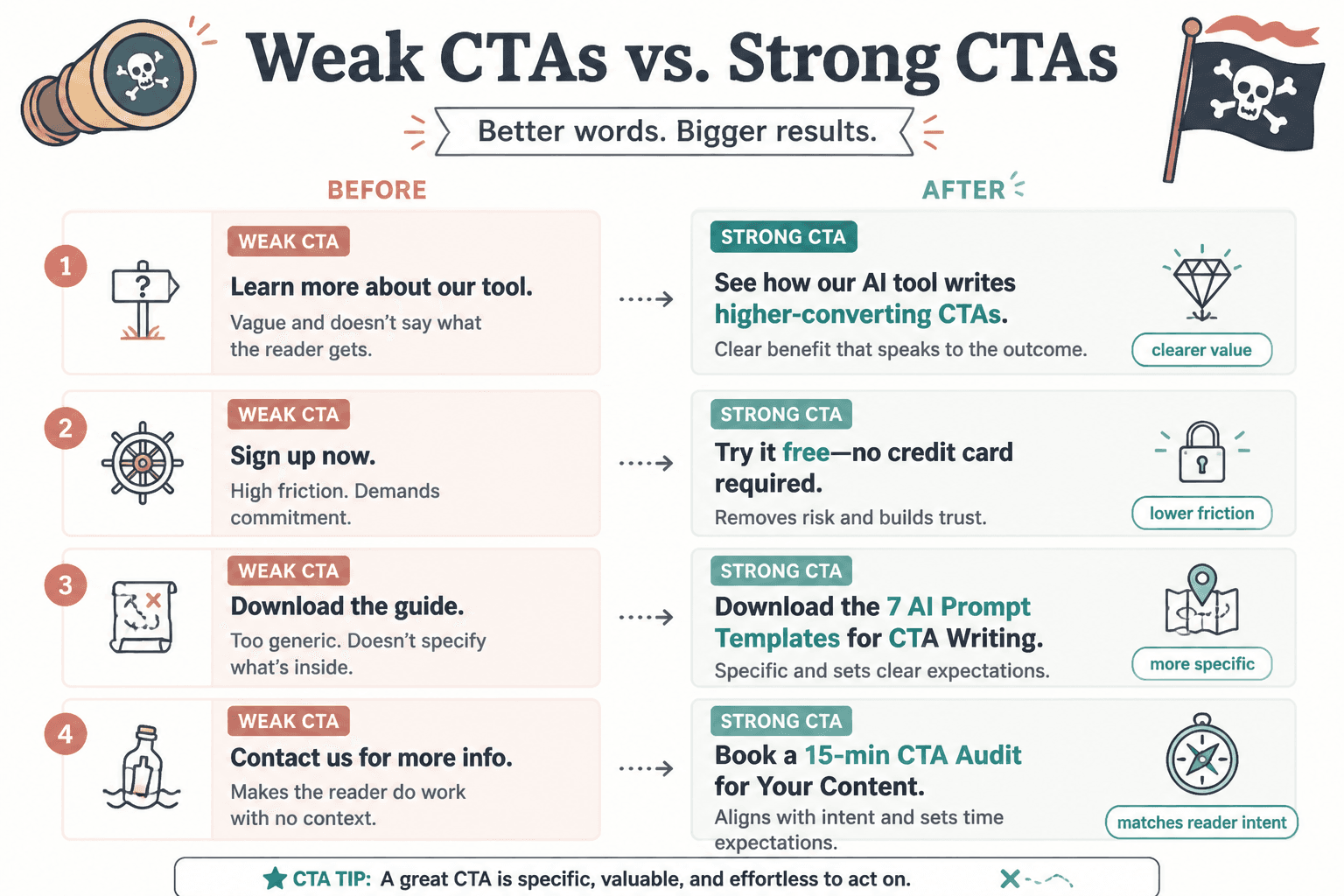
Templates are helpful when they stay flexible. The point is not to stamp every CTA into the same shape; the point is to avoid reinventing the structure every time.
Useful template patterns include:
- Action + outcome: “Get the checklist”
- Low-friction invitation: “See what’s inside”
- Specific asset: “Download the brief”
- Benefit-led button: “Start saving time”
- Qualification CTA: “See if this fits”
For a deeper breakdown of template structure, the sibling piece on CTA writing and the companion on CTA examples cover the copy logic in more detail.
3. A/B testing tools
If you have enough traffic, testing tools are where CTA opinions go to become evidence. They help you compare variants instead of debating them forever in a content doc.
Use them for:
- Button label tests.
- CTA placement tests.
- Short vs. specific vs. benefit-led language.
- Offer framing around the CTA.
What matters: clean setup, clear results, and enough traffic to make the test meaningful. A test with no volume is just an elaborate way to feel scientific.
4. Heatmap and session recording tools
These tools help you see whether people even reach the CTA and what they do around it. That matters because a weak CTA is not always a wording problem. Sometimes the issue is that the page is asking for attention too late, too early, or in the wrong place.
Look for:
- Scroll depth patterns.
- Click concentration near the CTA.
- Dead zones where readers drop off.
- Repeated hesitation around button placement or nearby copy.
Behavior tools are especially useful when the CTA copy looks fine on paper but underperforms on the page.
5. Analytics and funnel tracking tools
Analytics tools answer the question that matters most: did the CTA do its job? They help connect copy changes to actual outcomes instead of gut feel.
Useful signals:
- Click-through rate.
- Form completion rate.
- Landing page conversion rate.
- Drop-off after the CTA click.
For any CTA experiment, the click itself is only the beginning. The real question is whether the next step holds up.
6. Form and landing page builders with CTA flexibility
Some of the best CTA work happens inside the page builder, because that is where the wording, layout, and friction all collide. A good builder lets you test the CTA without needing a developer every time you want to change one verb.
Useful features:
- Editable button text and microcopy.
- Flexible placement.
- Variant support for landing pages or forms.
- Fast publishing for quick iteration.
This is where copy and implementation finally stop pretending they are separate departments.
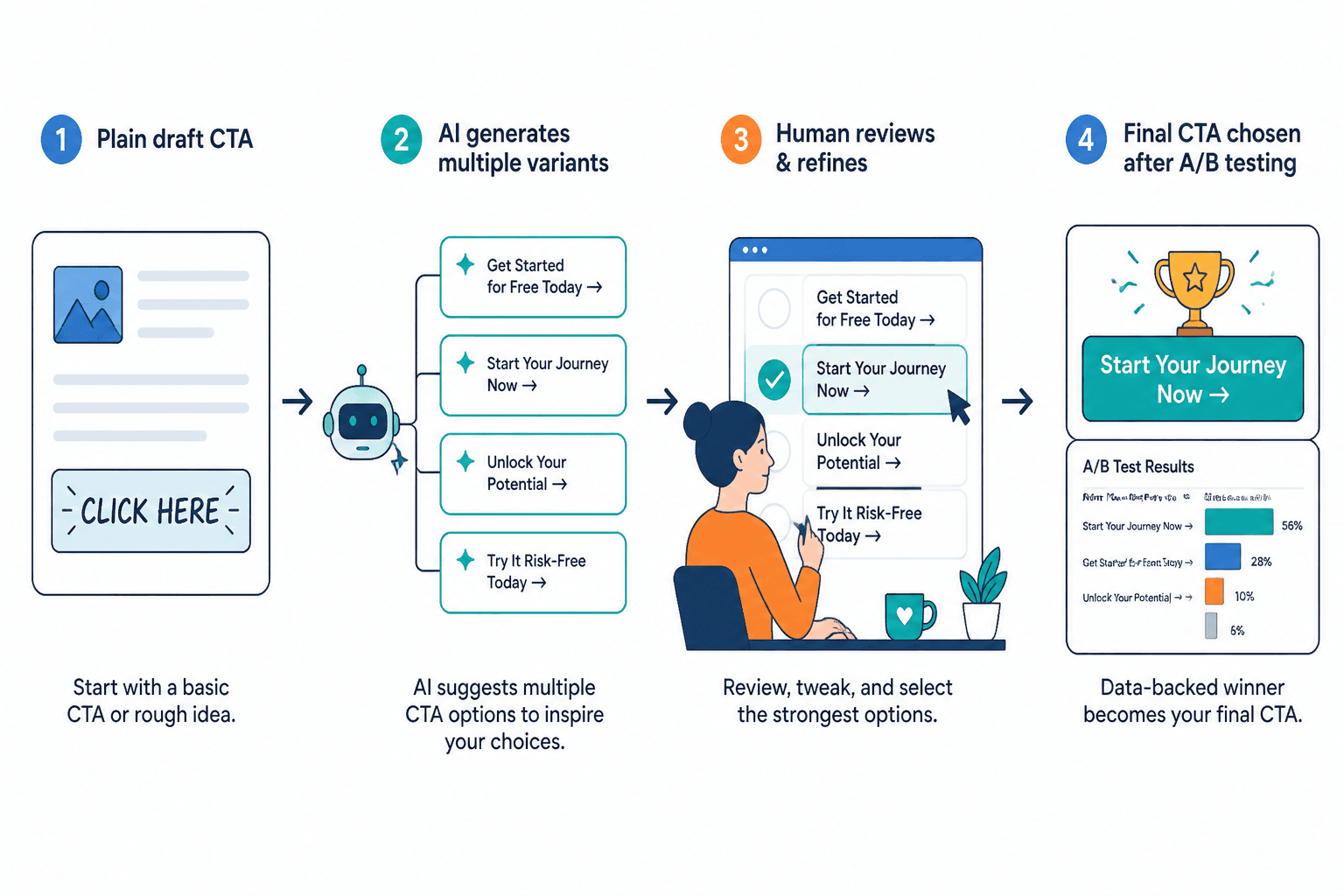
A simple CTA workflow from draft to test
Here is the lean version that tends to work without turning into a ritual:
- Write the core CTA by hand. Start with what the reader gets.
- Ask the AI tool for 5 to 10 variations. Push for different angles, not tiny wording swaps.
- Remove the weak ones. Anything vague, generic, or overhyped goes straight out.
- Match the CTA to the page intent. A high-commitment page should not end with a timid button.
- Build the variant in your page tool. Keep the implementation simple.
- Test only the changes that matter. Do not test six things at once and call it insight.
- Read the results in context. A higher click rate is good only if the downstream step still works.
If you want a more structural look at the process, the parent guide on CTA writing is the better anchor. If you want wording inspiration before you test, use the examples page.
Common CTA problems AI tools will not fix
AI is useful, but it is not a wizard with a conversion wand. The following problems need actual judgment:
- Weak offer: a CTA cannot save something nobody wants.
- Unclear audience: the line gets vague when the target is vague.
- Too much friction: forms, page layout, and reassurance copy still matter.
- Mismatched intent: a CTA can be perfectly written and still not suit the page.
- Generic positioning: if everything sounds interchangeable, the CTA will too.
This is why a toolchain should be lean. More software does not solve a confused offer. It just helps you produce a more polished version of the confusion.
Recommended stack by workflow type
For solo creators
- One AI writing tool for drafts and rewrites.
- One template or swipe-file source.
- One analytics tool if you have traffic to measure.
For small marketing teams
- AI writing tool for variation.
- Page builder with easy CTA edits.
- A/B testing tool for higher-value pages.
- Heatmaps or session recordings for behavior clues.
For conversion-focused teams
- AI tool for ideation and variant generation.
- Testing platform for structured experiments.
- Behavior analytics for placement and friction.
- Funnel tracking for downstream validation.
For a broader category view, the companion piece on copy tools and conversion tools for CTA writing is the natural next stop once you are beyond pure writing and into testing and measurement.
Bottom line
The best AI tools for CTA writing are the ones that make the process simpler without making the judgment worse. A good stack helps you draft faster, test smarter, and spot weak copy before it gets attached to a page and declared “done.”
Start with one writing tool, one template source, and one measurement layer if you need it. Keep the system small enough to use and sharp enough to matter. That is the whole trick, really: not a pile of apps, just a working path from idea to button.