
A creator is trying to choose between two tools before a launch, while a buyer is trying to decide whether the tool everyone keeps recommending is actually worth the money. Those are different moments, but they share the same pressure: limited time, too many claims, and not enough confidence. What changes the decision is rarely another feature list. It is context. A good tool review shows where the tool fits, where it does not, and what tradeoff is worth accepting without regret.
That is why tool reviews belong inside a creator funnel instead of floating around as isolated content. Used well, they can attract search traffic, build trust, support email capture, and move readers toward a product, service, or deeper recommendation. Used badly, they become decorative copy with affiliate links attached. The difference is usually structure.
If you want the wider system around this topic, start with the tool reviews parent guide. For comparison framing, see how to compare tool reviews without bias. For examples of what helps a buyer decide, use tool review examples that actually help a buyer decide.
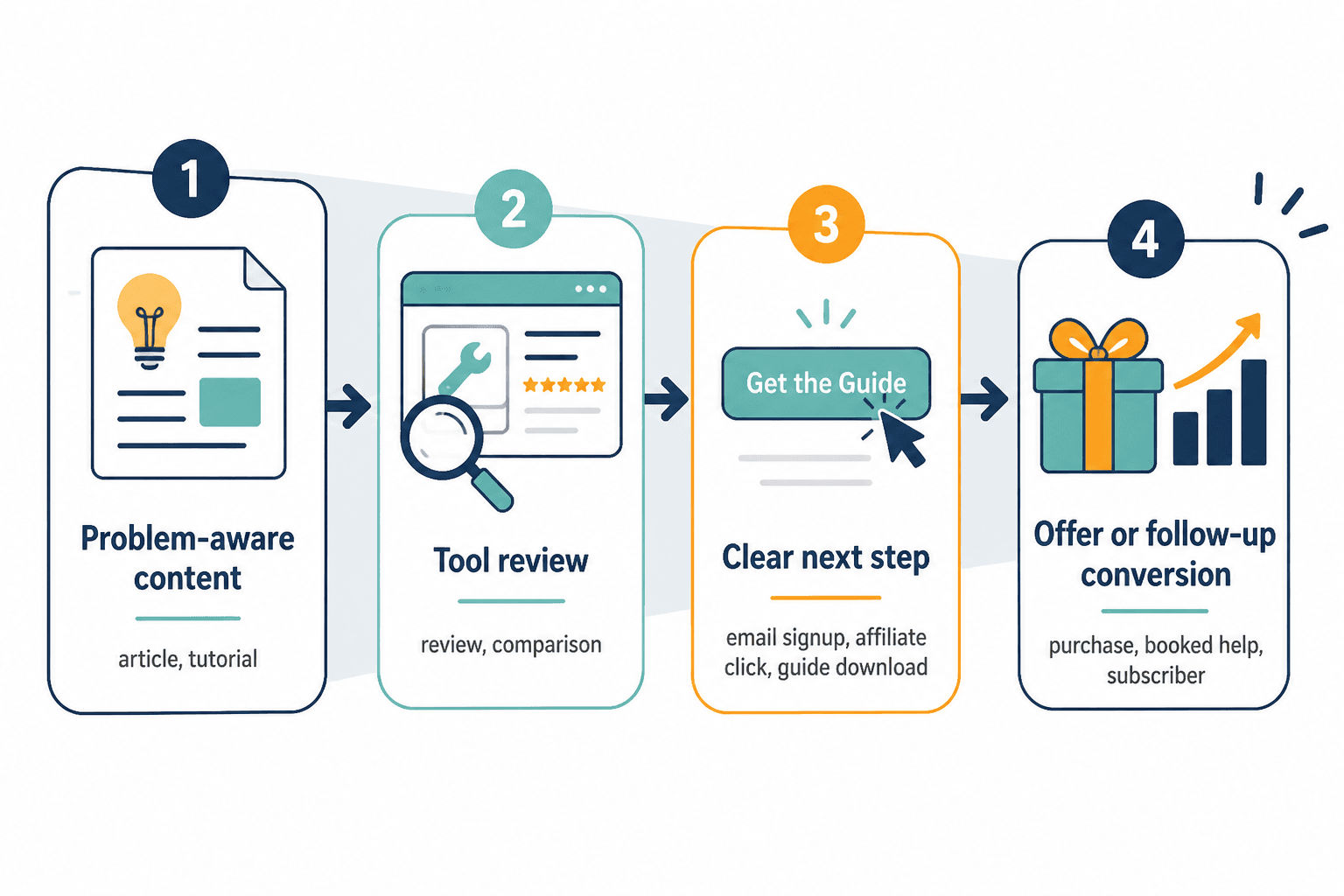
Why tool reviews belong in a creator funnel
Most people do not land on a review page because they are in a mood for literature. They arrive because they need to make a decision. That makes tool reviews unusually useful in a funnel: they catch readers when intent is already present, then help convert that intent into action.
In practical terms, a strong review can do three jobs at once:
- Attract readers who are actively comparing options.
- Build trust by answering the questions other pages skip.
- Route readers toward a tool, email list, offer, or comparison page.
That routing matters. A review that ends with a vague “hope this helps” does not really function as funnel content. A review that points to a relevant next step does. The next step might be an affiliate click, a demo request, a newsletter signup, or a comparison page that helps the reader narrow the field further.
Google’s Search Essentials and helpful content guidance both reward pages that satisfy a real need rather than pages built to pad a keyword theme. That is a useful reminder here: the page should help the reader decide, not merely mention the product enough times to call it covered. Google’s helpful content guidance is a decent north star if the page starts drifting into fluff.
What a tool review actually does in the funnel
A tool review is not just “top-of-funnel content with a rating.” It can sit in several places at once, depending on how you shape it.
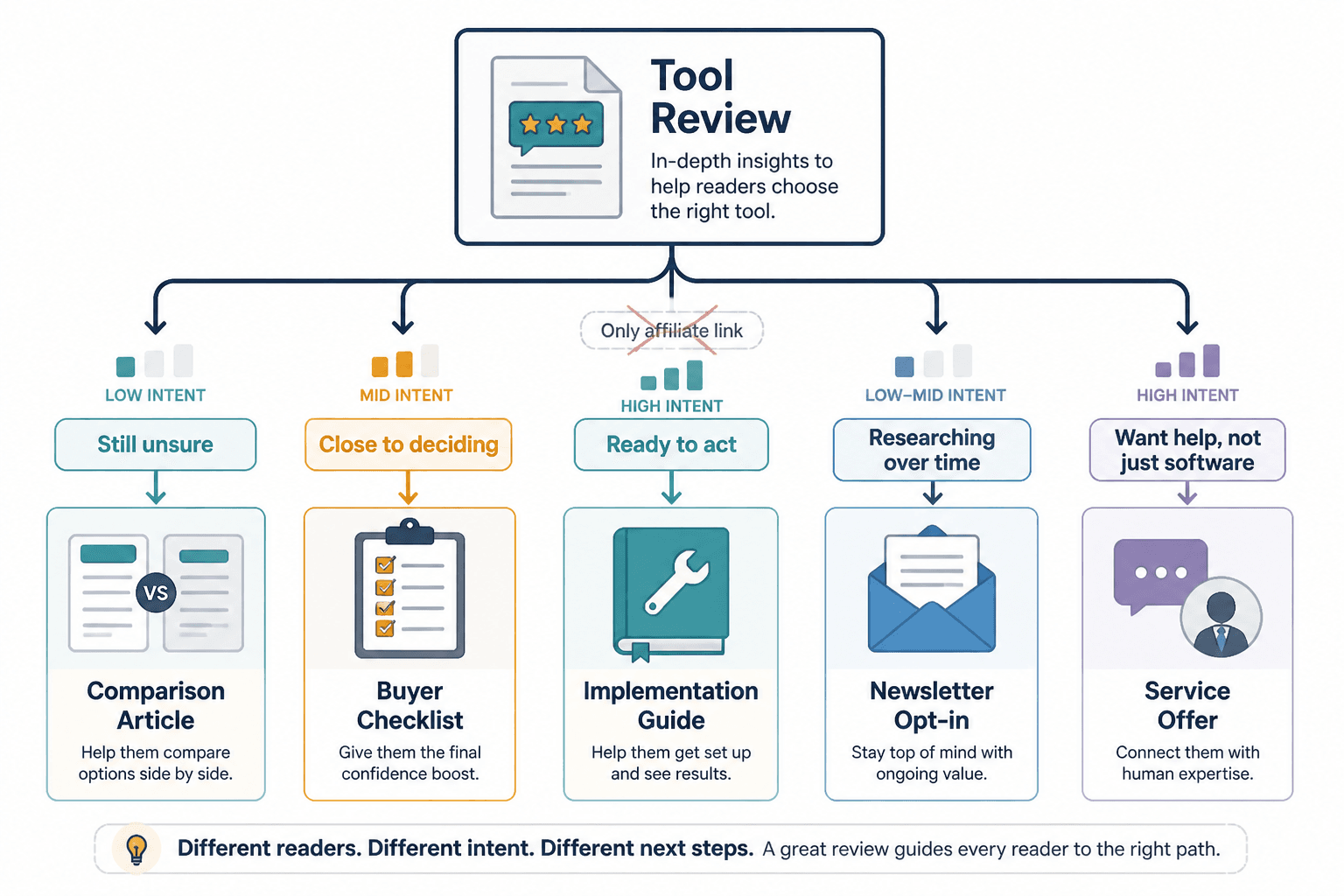
For a cold reader, the review can explain the problem in human terms and show whether the tool solves that problem cleanly. For a warmer reader, it can settle the final comparison: this one, not that one. For an existing subscriber, it can support a recommendation and reduce friction before the offer.
That flexibility is the reason tool reviews are so useful in creator funnels. One article can:
- capture search intent for a specific tool,
- support a broader “best tools” page,
- feed an email sequence about workflows or buying decisions, and
- point readers toward a paid recommendation, template, or service.
Seen that way, the review is not the end of the journey. It is a junction.
Start with buyer intent, not the tool
The easiest way to make a review thin is to start with the tool and ask later why the reader should care. The better move is to start with the decision.
That means choosing the review angle before the outline gets too cute. Ask:
- What problem is the reader trying to solve?
- What alternatives are they considering?
- What would make this tool a yes or a no?
- What level of experience does the reader already have?
If the reader is comparing options under time pressure, they do not need a museum tour of the tool. They need enough context to decide whether the thing fits their use case. That is why a review written around buyer questions usually performs better than a review written around product features.
A good practical test: if the opening could apply to any tool in the category without changing much, the angle is too broad. Narrow it until the stakes are obvious.
For a sharper comparison framework, the sibling piece on how to compare tool reviews without bias pairs well with this page.
A review structure that earns trust before revenue
People do not trust a review because it has an affiliate link. They trust it because it answers the annoying questions clearly and does not hide the tradeoffs. Structure helps with that.
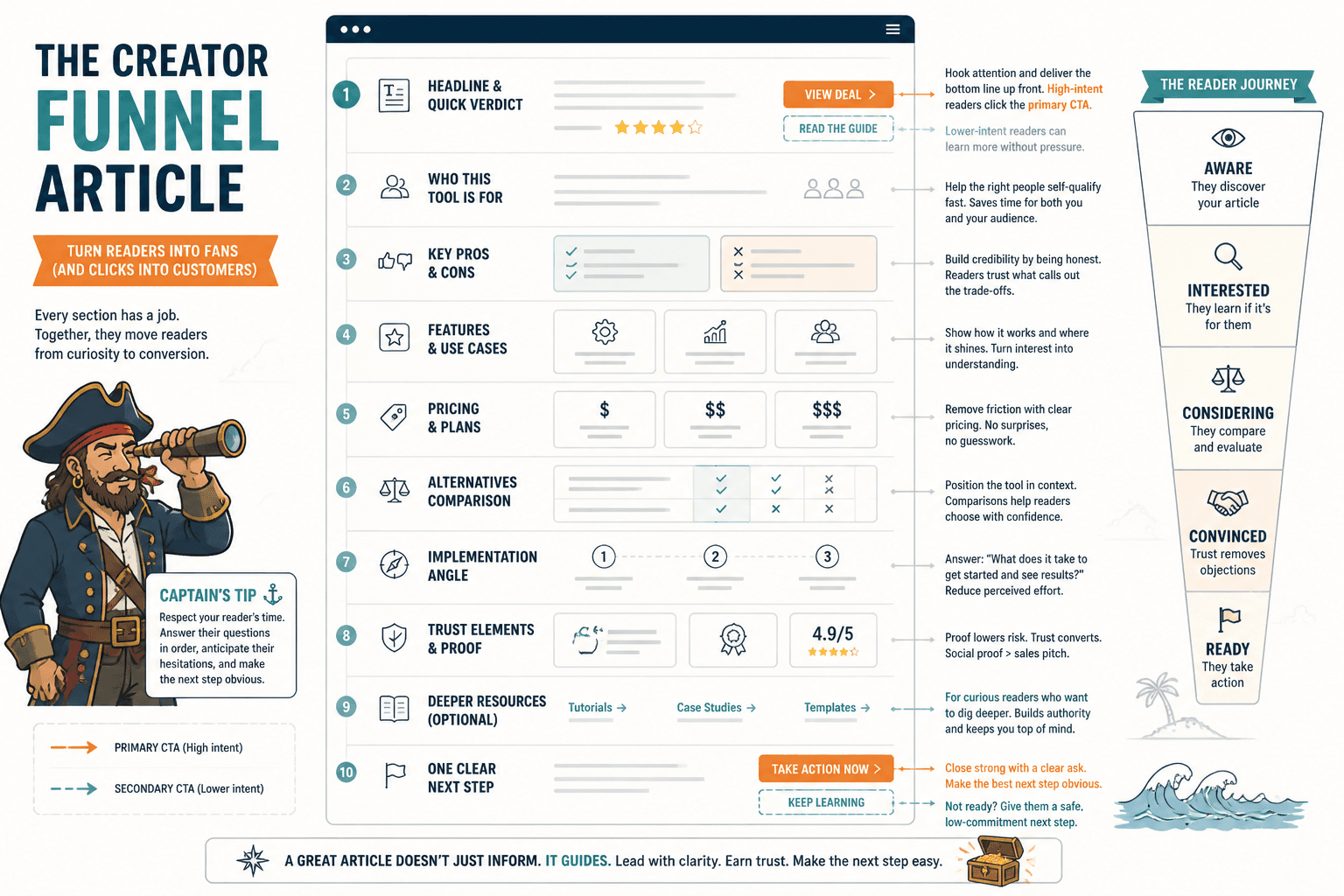
1. State the use case quickly
Lead with the situation the tool is for. Not the brand story, not the generic praise, just the use case. A reader should know fast whether the page is about their problem or not.
2. Define what the tool is good at
Be direct about the main job the tool does well. That reduces the chance of overselling and makes the recommendation more believable.
3. Say what it is not for
This section is where trust starts to pay rent. A review that admits fit boundaries is usually more helpful than one that pretends the product solves everything.
4. Show proof or demonstration
Use screenshots, examples, or a short walkthrough when the tool’s value is hard to infer from features alone. The goal is not decoration. It is clarity.
5. Compare the tradeoff
Every tool has a compromise: price, speed, learning curve, flexibility, integrations, or depth. Name the one that matters most so readers can decide what they are willing to tolerate.
6. Give a clear next step
End with a path. That might be “try the free plan,” “see the comparison page,” “read the workflow guide,” or “join the list for the checklist.” The point is to avoid a dead end.
Use the review as a bridge to other assets
A single review should not have to carry the whole funnel alone. It can do more useful work when it connects to related assets.
Some natural extensions:
- Comparison posts for readers who are still deciding between two or three tools.
- Best-of roundups for broader category intent.
- Email follow-ups that explain a workflow, case, or buying factor in more depth.
- Lead magnets such as checklists, swipe files, or evaluation templates.
- Service pages when the review supports a consulting or implementation offer.
This is where internal linking earns its keep. A reader who is not ready to buy does not need to bounce into the void. Give them the comparison page, the guide, or the next decision layer. The parent guide at tool reviews is a natural hub for that structure.
If you are building the broader content set around this topic, the other useful sibling page is best tool reviews for creators in 2026. Use it when the intent is category-level discovery rather than one-tool evaluation.
Where to place CTAs without making the page feel rented out
CTA placement is where many review pages lose their nerve. Either they hide the action until the reader is gone, or they shove it into the first screen like a telemarketing call.
A better approach is simple:
- Early CTA: only if the reader already has high intent and the next step is obvious.
- Mid-page CTA: after you have explained fit, tradeoff, and evidence.
- Final CTA: after the recommendation, when the reader has enough context to act.
For most creator funnels, the strongest CTA is not the most aggressive one. It is the one that matches the reader’s stage. A warm reader might click a trial link. A colder reader may prefer a comparison page or checklist first. Matching the CTA to intent usually converts better than pretending every reader is equally ready.
If the page includes affiliate links, disclosure should be clear and plain. The FTC’s disclosure guidance for influencers and online endorsements is the safe baseline. For review content specifically, clarity is the point: tell readers when you may earn from the click, and do it without theatrics.
What makes a review feel thin
The symptoms are familiar. The page repeats the product name too often, lists features without context, uses generic praise, and ends before the reader has anything solid to hold onto. That is not a trust problem in the abstract. It is a missing-decision problem.
Common thin-review habits:
- Leading with enthusiasm instead of fit.
- Using feature lists where tradeoffs should be.
- Avoiding negatives so hard that the review stops sounding real.
- Writing the same intro every time because the template is doing the thinking.
- Placing monetization before usefulness.
The fix is not to write longer. It is to answer more of the buyer’s actual questions. If the reader already knows the product category, do not waste their time with a generic overview. Give them the part they came for.
This is also where examples help. The page on tool review examples that actually help a buyer decide is useful if you want to see how concrete language changes the reader’s confidence.
A practical publishing checklist
Before a review goes live, check the basics that actually affect funnel performance:
- Does the opening name the decision the reader is making?
- Is the main use case clear within the first screen or two?
- Have you named at least one meaningful tradeoff?
- Is there at least one real example, screenshot, or walkthrough?
- Do CTAs match the reader’s likely intent?
- Are related internal links placed where they help the decision?
- Is disclosure clear and easy to spot?
- Does the closing section give a next step instead of a shrug?
That checklist keeps the page from drifting into a brand brochure with punctuation.
Make the review do one job well, then let it branch
The best tool reviews in a creator funnel are not trying to be everything at once. They are trying to be the right page for a specific decision. That is enough. Once the reader trusts the page, the review can branch into comparisons, email capture, recommendations, or service offers without feeling forced.
So the order is straightforward: define the decision, answer the buyer questions, show the tradeoff, and then point to the next step. The review is the bridge. The funnel is what happens because the bridge actually holds.