
Most tool reviews are not reviews. They are feature tours with affiliate links glued on the bottom.
That is a problem if you are a creator trying to build trust, earn clicks, and maybe make some money without sounding like a human coupon code. Readers do not need another recycled “top 10 tools” list where every option is somehow amazing, intuitive, powerful, and perfect for everyone. That kind of content is why people skim, roll their eyes, and leave.
Best creator tools and review frameworks for Tool Reviews is really about two things: using the right tools to make your review process easier, and using a sharp framework so your review is actually useful. You need both. Good tools help you capture proof, organize comparisons, and publish faster. A good framework stops you from producing beige sludge with screenshots.
This guide will help you choose the creator tools that support review content well, build a review process that feels credible, and write reviews people can actually act on. If you review software, templates, creator products, platforms, AI tools, or business tools, this is the stuff that matters.
Want the broader roadmap? Start with the parent guide.
Why most tool reviews fall apart
The usual failure is not lack of effort. It is lack of structure.
Creators often test a tool casually, take a few screenshots, list features, and call it a review. But readers are trying to answer more specific questions:
- Who is this tool actually for?
- What job does it do well?
- Where does it get annoying?
- Is it worth the price?
- How does it compare to the obvious alternatives?
- Would I still recommend it after using it for real work, not just a 14-minute trial?
If your review does not answer those questions, it is not very useful. It might still rank. It might still get clicks. But it will not build much trust, and trust is the part that pays later.
That is why the best creator tools and review frameworks for Tool Reviews are not just software picks. They are part of a system. The tools capture evidence. The framework creates clarity. The combination makes your review believable.
The two halves of a strong review system
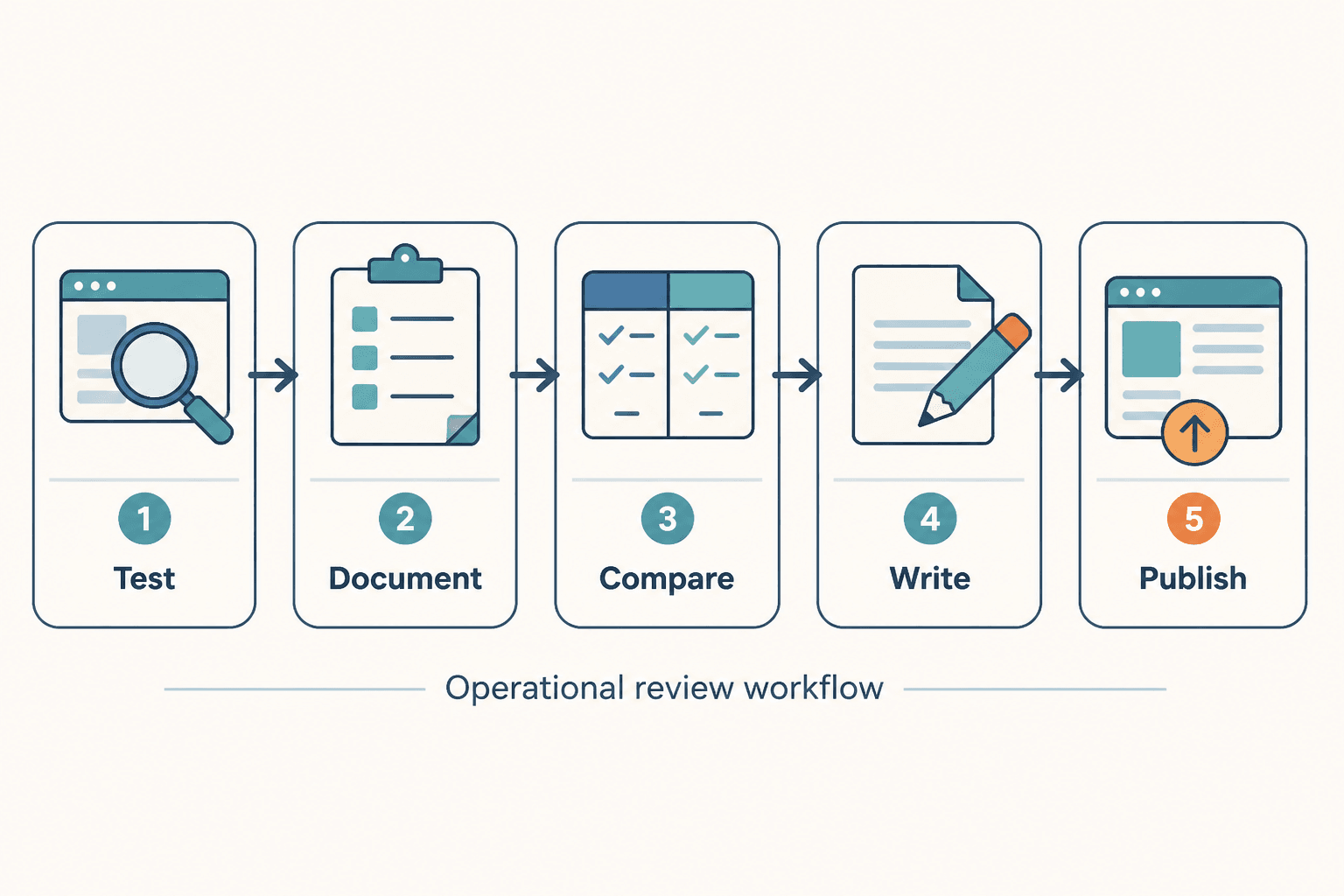
A solid tool review workflow usually has two halves:
- Operational tools to test, document, compare, write, and publish
- Review frameworks to evaluate the tool in a consistent, reader-friendly way
Miss the first half and your workflow becomes messy. Miss the second half and your content becomes vague. You end up with beautifully formatted nonsense.
So before getting into specific tool categories, it helps to know what your review framework should be doing behind the scenes. It should help you judge tools on reality, not on launch-page charm.
The review frameworks that actually make your content better
You do not need a fancy branded method with a trademark symbol and a dramatic backstory. You need a repeatable way to review tools so your content stays useful across categories.
1. The use-case-first framework
This is the most important one, and weirdly the most ignored.
Do not start with the tool. Start with the job the reader wants done.
For example, instead of reviewing “a social media scheduler,” review it through a use case like:
- Scheduling client content across multiple channels
- Repurposing one post into five variants
- Managing a solo creator content calendar
- Queuing evergreen content without turning your feed into a content graveyard
That shift matters because readers do not buy tools for the joy of clicking around dashboards. They buy them to solve a workflow problem. Your review should match that reality.
A use-case-first review usually covers:
- The specific problem the tool solves
- What type of creator or business it fits best
- Where setup is easy or annoying
- What happens in actual use, after the welcome screen charm wears off
- Whether the output saves time, improves quality, or just creates extra admin
2. The promise vs reality framework
Most tools promise speed, simplicity, automation, insight, growth, or all five before breakfast. Fine. Your job is to test how much of that survives contact with real use.
This framework is simple:
- What it claims
- What happened when tested
- Where it held up
- Where it fell short
This keeps your review grounded. It also helps you avoid turning into unpaid PR.
3. The friction audit framework
A lot of reviews spend too much time on features and not enough time on friction. But friction is what users remember.
Ask things like:
- How long did setup take?
- What was confusing?
- What required workarounds?
- What felt surprisingly smooth?
- Which parts looked good but were clunky in practice?
- What would frustrate a beginner, a busy creator, or a team?
That kind of detail makes a review feel lived in. Which is good, because readers can smell fake certainty from space.
4. The decision framework
Every strong review should help the reader make a decision, not just gather trivia.
A clean decision framework answers:
- Best for
- Not ideal for
- Worth paying for if
- Skip it if
- Better alternative if your priority is price, speed, simplicity, collaboration, or depth
This is where your review becomes commercially useful. It guides action without forcing a pitch.
The best creator tools for producing better tool reviews
There is no single perfect stack, because your setup depends on what kind of reviews you publish and how often. But there are a few tool categories that do the heavy lifting well.
If you want a broader companion list, see best tool reviews tools for creators in 2026 and best tool stack to support tool reviews. For the wider topic hub, the tool reviews section is the obvious next stop.
Research and note capture tools
You need one place to collect test notes, claims from the tool’s site, pricing details, competitor references, and your own observations. This does not need to be glamorous. It needs to be reliable.
Good note capture tools help you:
- Log first impressions versus later impressions
- Track pricing and plan differences
- Save product claims for later fact-checking
- Collect quotes, screenshots, and examples in one place
- Build repeatable review templates
What matters most here is structure. A messy note system creates weak reviews because you forget the exact moment where the tool was smooth, awkward, misleading, or surprisingly good.
Screenshot and proof capture tools
If your review has no proof, it is mostly opinion wearing a tidy shirt.
Use screenshot and screen capture tools to document:
- Onboarding flow
- Dashboard layout
- Feature use in context
- Pricing pages
- Output quality
- Any frustrating steps worth showing
The key is not collecting more screenshots. It is collecting the right ones. A screenshot should prove a point, reduce confusion, or show friction. It should not just sit there as decorative software wallpaper.
If you want a more specific process for this, read simple tool reviews proof screenshots framework for creators.
Comparison table tools
Tool reviews often need comparisons, especially when the reader is trying to narrow down options fast. You can build these manually, but whatever method you use should make it easy to compare real decision points, not just random specs.
Good comparison support helps you line up:
- Use case fit
- Pricing tiers
- Core strengths
- Key limitations
- Learning curve
- Best buyer type
If your comparison table only says one tool is “easy,” another is “powerful,” and a third is “great for teams,” congratulations, you have created corporate soup.
Writing and drafting tools
Yes, drafting tools and AI writing tools can help. No, they cannot save a lazy review.
They are useful for:
- Turning rough notes into a first draft
- Creating alternate intros and headings
- Organizing pros and cons
- Summarizing long test sessions into clean sections
- Generating comparison structures you can then improve
They are not useful for:
- Replacing actual testing
- Inventing credibility
- Making generic thoughts more trustworthy
- Knowing what your reader really cares about without context
Use them as assistants, not witnesses.
Publishing and repurposing tools
A good review often has more than one life. The full article can become a short-form post, a pros-and-cons carousel, an email, a comparison snippet, or a “best for” thread.
Publishing tools help when they make repurposing cleaner, scheduling simpler, and your archive easier to manage. They do not help when they tempt you into spraying the same dull review everywhere with different fonts.
A simple tool review workflow creators can actually use
If you want reviews that feel sharp and consistent, use a workflow that catches both evidence and judgment.
Here is a simple version.
Step 1: Define the review angle before testing
Choose the question your review is answering.
- Is this tool worth paying for?
- Who is this best for?
- Is it better than the obvious alternative?
- Does it actually save time?
- Does it improve output quality enough to matter?
This keeps you from wandering through features like a tourist with no map.
Step 2: Test the tool in a real use case
Use it for actual work. Not just setup. Not just onboarding. Real work.
If you review a writing tool, write something real. If you review a scheduler, schedule a week of posts. If you review a CRM, use it to track live leads. Your review gets stronger the moment the tool has to earn its keep.
Step 3: Capture proof as you go
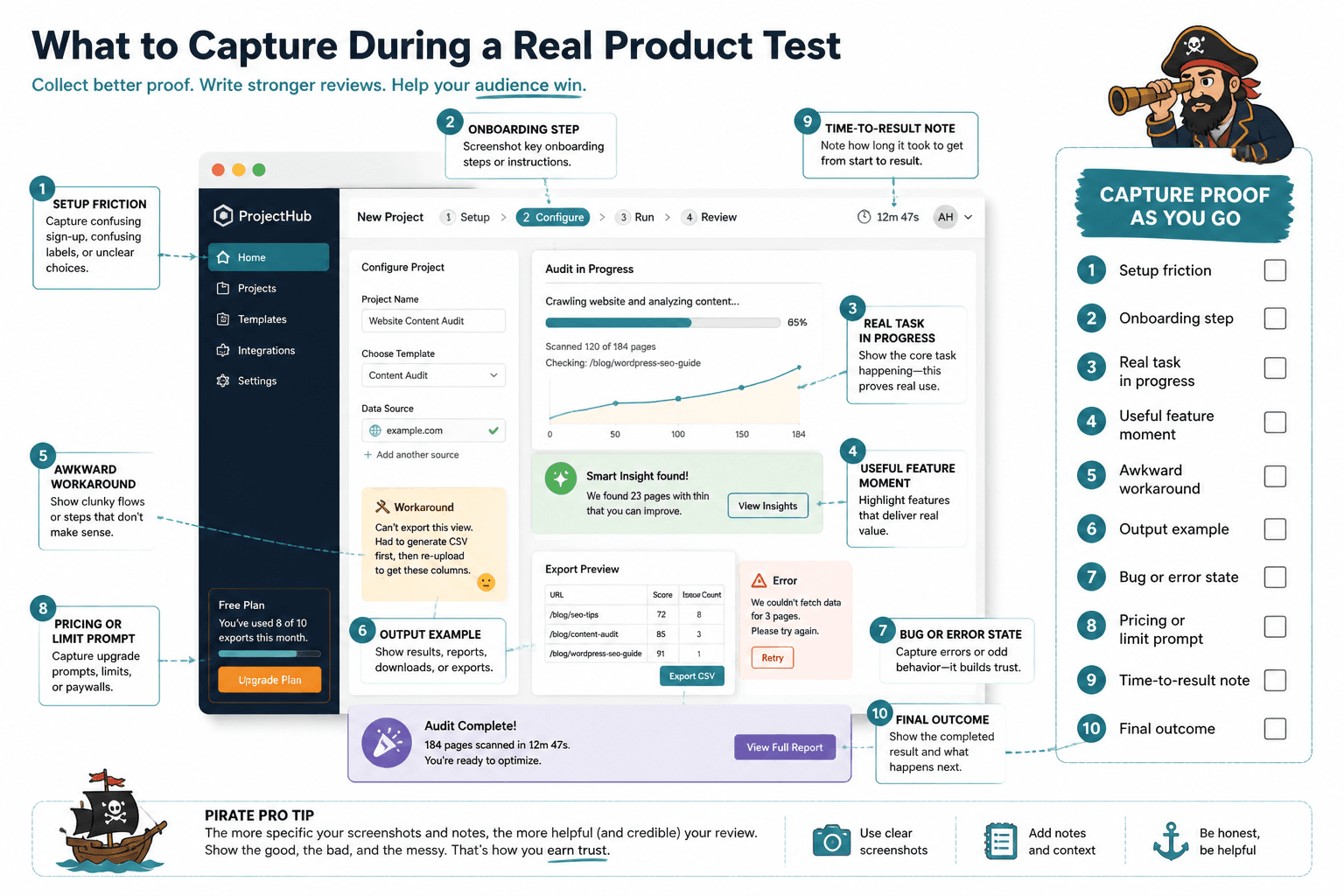
Do not trust your memory. Capture screenshots, awkward steps, useful moments, setup friction, output examples, and small annoyances while they happen.
Step 4: Evaluate with a consistent scorecard
You do not need to publish numeric scores, but you should probably use them internally. A scorecard helps you compare tools without getting hypnotized by one flashy feature.
| Review area | What to assess |
|---|---|
| Ease of setup | How fast a new user can get useful results |
| Use-case fit | How well it solves the specific job |
| Output quality | Whether the result is genuinely usable |
| Friction | Confusing steps, bugs, limits, or awkward UX |
| Value | Whether the pricing feels justified |
| Recommendation strength | How confidently you would suggest it to the right buyer |
Step 5: Write around the decision, not just the tour
Organize the review so the reader can decide what to do next. They should not need to excavate your conclusion from beneath 900 words about dashboard tabs.
A clean structure often looks like this:
- What the tool is for
- Who it is best for
- What it does well
- Where it struggles
- What surprised you
- How it compares to alternatives
- Your final verdict
What to include in a tool review if you want people to trust it
There are a few elements that consistently make reviews more useful and more believable.
Show your testing context
Tell readers how you used the tool. Briefly. If you tested it as a solo creator, say that. If you used the cheapest plan, say that. If you only tested one workflow deeply, say that too.
This kind of context does two things. First, it makes your review more honest. Second, it helps the reader judge whether your experience maps to theirs. That is far more useful than pretending your review is universal truth handed down from the software mountain.
Include specific pros and cons
Not fake balanced ones. Real ones.
Bad pros and cons sound like this:
- Pro: easy to use
- Con: pricing may not suit everyone
That tells nobody anything.
Better pros and cons sound like this:
- Pro: onboarding gets a solo creator from signup to first scheduled post in under 20 minutes
- Con: the analytics look polished but do not give much depth unless you are on a higher tier
If you need a better set of prompts, read best tool reviews pros and cons questions to ask before you buy.
Compare it to the obvious alternatives
A review without alternatives is often incomplete. Readers are almost never deciding in a vacuum. They are usually deciding between this tool, the famous one, the cheaper one, and the one they are already half-using badly.
You do not need to compare every tool in the category. But you should compare against the few options a sensible buyer would also consider.
Give a clear recommendation
Please do not spend 2,000 words hedging and then end with “it depends.” Of course it depends. Everything depends. Your job is to make that dependence clearer.
Say who should buy it, who should skip it, and why.
A useful review does not avoid judgment. It earns the right to make one.
How to choose the right creator tools for your own review workflow
You do not need the biggest stack. You need the least annoying stack that supports consistent output.
When choosing your own creator tools for reviews, ask:
- Does this help me capture proof faster?
- Does it reduce repeat admin work?
- Does it make comparisons easier?
- Does it help me publish cleaner reviews?
- Will I still use it after the first week of enthusiasm wears off?
There is a weird tendency among creators to build giant productivity stacks before they have a stable process. That usually ends with more tabs, more subscriptions, and the exact same confusion.
Start small. One note system. One screenshot method. One writing environment. One publishing workflow. Add more only when the bottleneck is real.
For broader navigation, you can also explore the parent content paths here: related monetization and tool review content.
A practical review template you can reuse
If you want a repeatable structure, this one works well for most creator-facing tools:
- What it is: one clear sentence
- Best for: the user type and use case
- I tested it for: your review context
- What worked well: specific strengths
- What did not: real limitations or friction
- Standout feature: only if it actually matters
- Biggest annoyance: the thing buyers should know
- Compared to alternatives: brief, useful contrast
- Worth it if: buying conditions
- Skip it if: disqualifying conditions
- Final verdict: concise recommendation
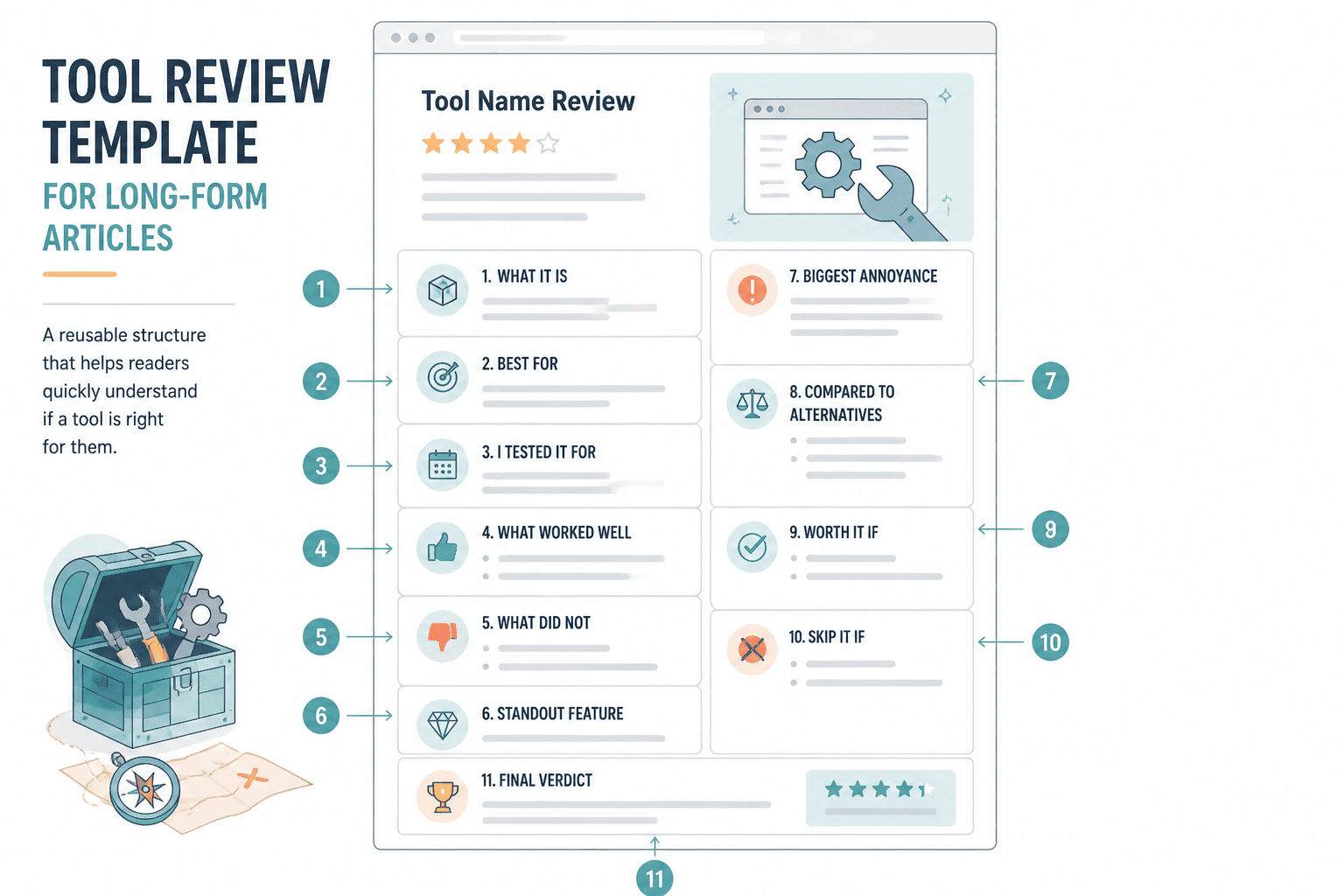
That template is simple on purpose. It keeps your review focused on buyer decisions, not just your experience poking around menus.
Common mistakes that make reviews weaker than they should be
- Reviewing after too little use: first impressions are useful, but they are not the whole story
- Listing features instead of evaluating outcomes: readers care what the feature does in practice
- Using vague praise: “powerful” is not a finding
- Hiding the downsides: this kills trust quickly
- Writing for algorithms instead of buyers: rankings matter, but useless reviews do not build much
- Stuffing in affiliate urgency: if your review starts sounding like a checkout popup, people notice
The bigger theme here is simple: your review should help someone buy smarter, not just click faster.
FAQ
What are the best creator tools for writing tool reviews?
Usually a mix of note capture, screenshot or screen recording, comparison table support, drafting tools, and a publishing system that makes repurposing easy.
The bigger point is simple: clearer structure and clearer writing make the piece more useful. That is usually what makes the ending land better too.