
Most creators do not have a content problem. They have a workflow problem.
A podcast episode becomes one post, even though it could become ten. A long video sits in a folder because clipping it feels tedious. A newsletter has strong ideas, but they never become LinkedIn posts, short-form scripts, sales emails, or show notes. The source material exists. The system for processing it does not.
That is where AI editing and repurposing tools are useful.
The best creator AI stack is not the biggest stack. It is the smallest group of tools that helps you turn one strong source asset into polished, platform-specific content without losing your voice, wasting time, or creating generic output.
If you are still mapping the overall workflow, start with the parent guide to creator AI editing and repurposing. This article focuses specifically on the tools, templates, and systems that make that workflow easier to run.
What AI editing and repurposing tools are actually good for
AI is strongest when it helps you process material you already trust.
For creators, that usually means using AI to:
- Turn transcripts into summaries, outlines, show notes, emails, and posts.
- Extract the strongest ideas, stories, hooks, examples, and quotes from long-form content.
- Rewrite rough drafts into clearer, tighter, more platform-specific versions.
- Convert one source asset into several formats without starting from scratch every time.
- Clean up structure, remove repetition, and improve readability.
- Organize reusable prompts, content angles, brand voice notes, and publishing checklists.
AI is weaker when you ask it to invent your perspective, replace your judgment, or publish without review. It can generate volume quickly, but volume is not the same as useful content.
That distinction matters because Google’s guidance on helpful, reliable, people-first content is clear: content should be made for people, not simply produced to manipulate visibility. For creators, AI should make your real expertise easier to package, not replace the expertise itself.
The best tools start with one thing: a source asset
The best templates and tools for creator AI editing and repurposing start with one thing: a source asset.
That source asset might be:
- A podcast episode.
- A YouTube video.
- A webinar.
- A coaching call.
- A livestream.
- A newsletter draft.
- A long-form essay.
- A voice memo.
- A presentation deck.
Without a source asset, AI tools tend to produce generic filler. With a source asset, they can become editors, extractors, formatters, and workflow assistants.
A good source asset gives the AI something real to work from: your ideas, your phrasing, your examples, your stories, your audience, and your point of view.
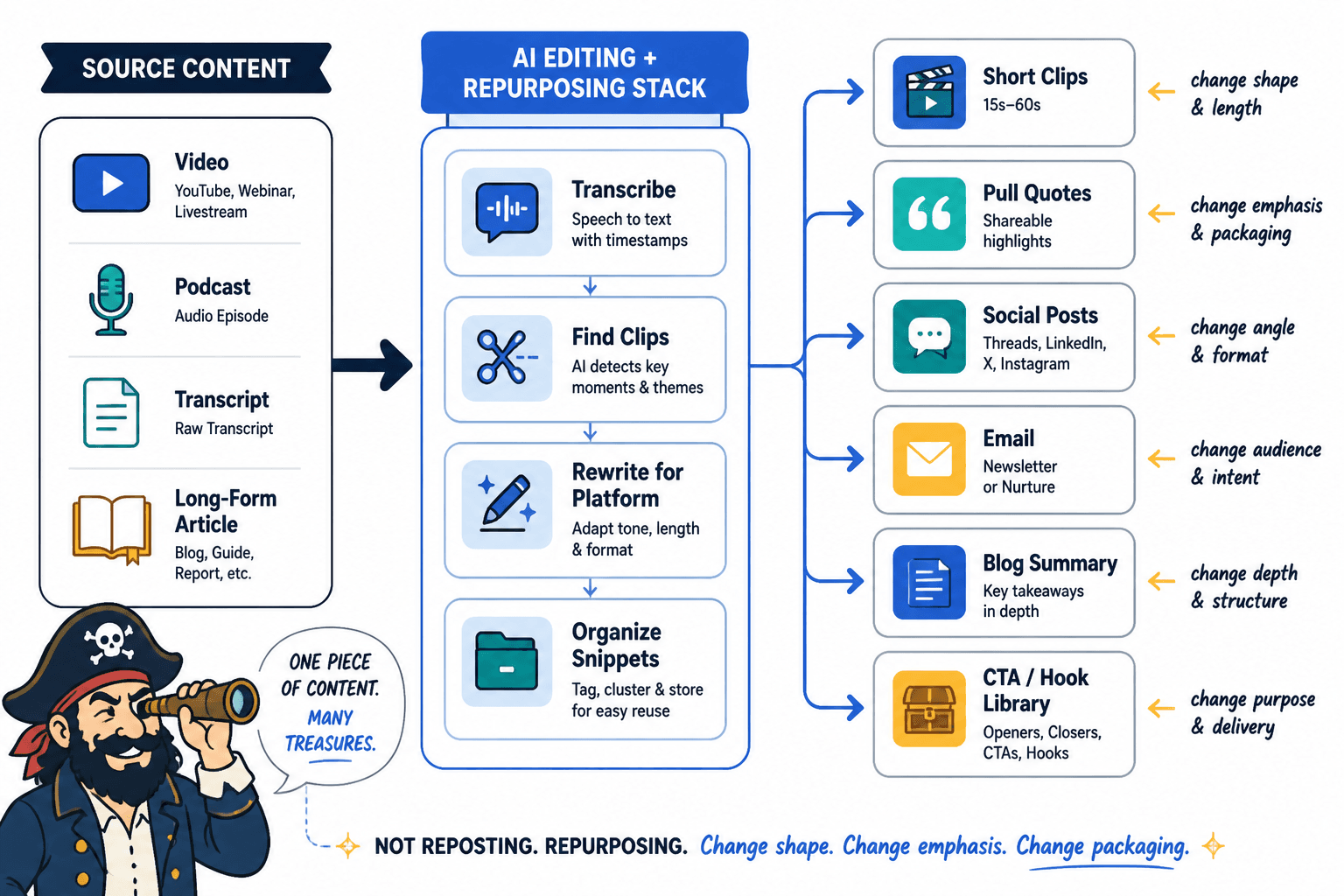
The practical goal is not to make every idea appear on every platform. The goal is to build a repeatable path from source material to useful derivative assets.
For example:
- A podcast episode can become show notes, a newsletter, three LinkedIn posts, five short clips, and a quote graphic.
- A YouTube tutorial can become a blog post, a checklist, a carousel, an email sequence, and short-form video scripts.
- A webinar can become sales enablement content, objections content, a nurture sequence, and social proof posts.
If you want practical content transformations rather than tool recommendations, use the companion examples page for creator AI editing and repurposing examples.
The 5 tool categories that matter most
You do not need a separate subscription for every task. Most creator workflows can be built from five categories.
1. Writing and drafting assistants
Writing assistants help you turn rough material into usable written assets. They are best for drafting, restructuring, summarizing, and creating variations.
Useful tools in this category include:
- ChatGPT for flexible drafting, rewriting, outlining, summarizing, and prompt-based workflows.
- Claude for long-context editing, transcript analysis, tone refinement, and thoughtful restructuring.
- Gemini for creators already working heavily inside Google’s ecosystem.
- Perplexity for research-assisted drafting where citations and source discovery matter.
These tools are useful when you already have material and need help turning it into a different shape.
Good use cases include:
- Turn this transcript into a clean episode summary.
- Extract five contrarian ideas from this essay.
- Rewrite this post in a sharper, more conversational voice.
- Create three newsletter angles from this YouTube script.
- Turn this webinar transcript into a sales follow-up email.
The mistake is treating these tools like automatic content machines. They work better as editorial assistants.
2. Editing and cleanup tools
Editing tools help with clarity, grammar, concision, and readability. They are especially useful when AI output sounds too padded or when a human draft needs polish.
Useful tools include:
- Grammarly for grammar, clarity, tone, and quick cleanup.
- Hemingway Editor for simplifying dense writing and spotting overly complex sentences.
- ProWritingAid for deeper style and structure feedback.
- Google Docs suggestions or Microsoft Editor for lightweight collaborative editing.
Use these tools after the AI draft exists. They should not decide the core idea. They should help the final asset read cleanly.
A good editing pass asks:
- Is the hook specific?
- Does every section add something?
- Did the AI invent claims, examples, or numbers?
- Does this sound like the creator?
- Is the piece formatted for the platform where it will be published?
3. Transcription and media editing tools
For video and audio creators, transcription is the center of the repurposing workflow. Once you have a clean transcript, it becomes much easier to create posts, summaries, clips, emails, and articles.
Useful tools include:
- Descript for transcript-based audio and video editing, removing filler words, creating clips, and editing media like text.
- Riverside for recording, transcription, and short-form clip generation.
- Premiere Pro for creators who need professional editing plus transcript-based workflows.
- CapCut for fast short-form video editing, captions, and social-native formats.
- Otter.ai or Rev for meeting, interview, and podcast transcription.
Captions and transcripts are not only useful for repurposing. They also make media more accessible. The W3C Web Accessibility Initiative explains how captions support people who are deaf or hard of hearing and improve access in many viewing contexts.
If you publish video or audio regularly, a transcription layer is usually one of the highest-leverage tools in the stack.
4. Repurposing and content extraction tools
Repurposing tools help identify clips, moments, quotes, hooks, and derivative assets from long-form content.
Useful tools include:
- OpusClip for turning long videos into short-form clips.
- vidyo.ai for video clipping, captions, and social-ready formats.
- Castmagic for turning podcasts, meetings, and recordings into show notes, summaries, emails, and social posts.
- Repurpose.io for distributing content across platforms.
- Descript for creators who want editing and repurposing in one place.
These tools are most useful when you publish a lot of long-form video, audio, webinars, interviews, or livestreams.
They are less useful if you do not yet have source material worth repurposing. A clipping tool cannot fix a weak video. It can only help extract the strongest moments from a good one.
5. Knowledge management, templates, scheduling, and workflow tools
The hidden part of a good AI repurposing workflow is organization.
You need a place to store:
- Reusable prompts.
- Brand voice notes.
- Content pillars.
- Approved hooks.
- Audience language.
- Published examples.
- Repurposing checklists.
- Content calendars.
Useful tools include:
- Notion for content databases, prompt libraries, editorial calendars, and creator operating systems.
- Airtable for more structured content pipelines, production tracking, and team workflows.
- Google Drive for simple file storage, transcripts, drafts, and shared assets.
- Trello, Asana, or ClickUp for task management.
- Buffer, Later, Hootsuite, or Metricool for scheduling and distribution.
- Zapier or Make for connecting repetitive steps between tools.
This category is easy to ignore because it feels less exciting than the AI tools themselves. But for many creators, the system is the difference between occasional repurposing and consistent publishing.
The lean tool stack that makes sense for most creators
Most creators should not begin with ten tools. Start with a lean stack.
A practical starter stack looks like this:
- One source capture tool: Riverside, Zoom, Descript, Google Docs, or your podcast/video recording setup.
- One transcription layer: Descript, Riverside, Otter, Rev, or built-in platform transcription.
- One general AI assistant: ChatGPT, Claude, Gemini, or another model you use consistently.
- One editing tool: Grammarly, Hemingway, ProWritingAid, or a manual editorial checklist.
- One storage/template system: Notion, Airtable, Google Drive, or another simple workspace.
- One scheduling tool: Buffer, Later, Hootsuite, Metricool, or native platform scheduling.
That is enough for most solo creators.
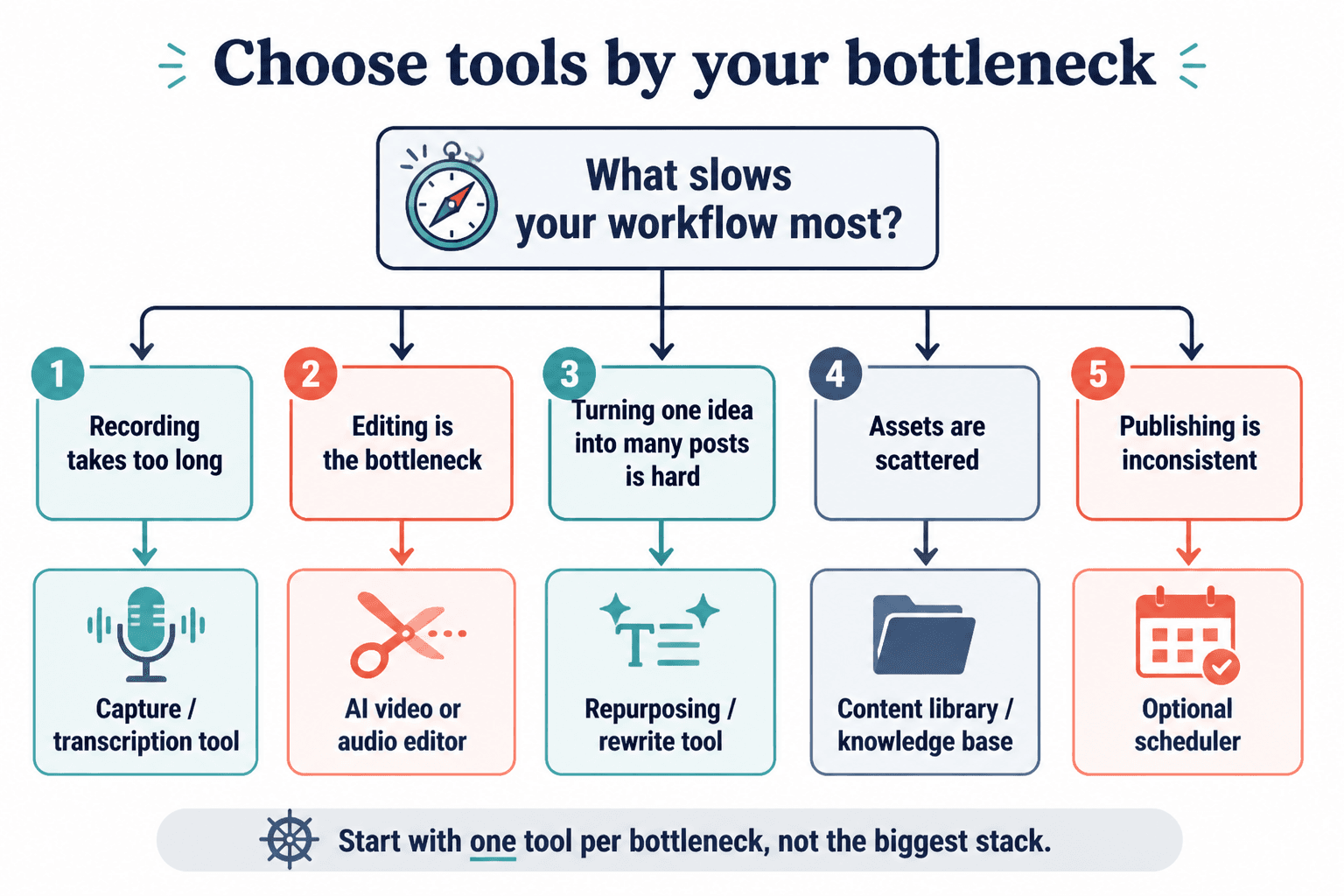
Only add specialized tools when a clear bottleneck appears. If clipping videos takes too long, add a video repurposing tool. If you keep losing prompts and drafts, improve your template system. If your publishing calendar is chaotic, add scheduling and project management.
Do not build a complicated system before you have a repeatable content habit.
Best AI tools by workflow bottleneck
The easiest way to choose the right tools is to start with the bottleneck, not the feature list.
If your bottleneck is turning ideas into drafts
Use a strong writing assistant.
Best fit:
- ChatGPT
- Claude
- Gemini
Use these tools to turn notes, transcripts, and outlines into first drafts. The most useful prompts are specific:
- “Turn this transcript into a 900-word article while preserving the creator’s point of view.”
- “Extract the five strongest arguments from this episode and turn each into a LinkedIn post.”
- “Rewrite this newsletter draft to make it tighter, more direct, and less formal.”
If your bottleneck is cleaning up messy writing
Use editing tools.
Best fit:
- Grammarly
- Hemingway Editor
- ProWritingAid
These tools help reduce friction between rough drafts and publishable assets. They are especially useful if you work with transcripts, voice notes, or AI-generated drafts that need tightening.
If your bottleneck is video clipping
Use media repurposing tools.
Best fit:
- OpusClip
- vidyo.ai
- Descript
- CapCut
- Riverside
These tools can identify candidate clips, add captions, reframe video, and format assets for short-form platforms. You still need human judgment. The AI may find energetic moments, but it may not understand which clip best supports your positioning, offer, or audience promise.
If your bottleneck is turning recordings into written assets
Use transcription plus a writing assistant.
Best fit:
- Descript or Riverside for transcription.
- Claude or ChatGPT for summarizing, extracting, and rewriting.
- Notion or Google Docs for storing final templates and outputs.
This combination works well for podcasters, YouTubers, coaches, course creators, consultants, and founders who record a lot of spoken content.
If your bottleneck is inconsistent voice
Use a brand voice and examples library.
Best fit:
- Notion or Airtable for storing voice notes and approved examples.
- ChatGPT or Claude with custom instructions, project context, or reusable prompts.
- A human editing checklist before publishing.
The tool is less important than the reference material. AI needs examples of your best writing, your audience language, your recurring phrases, and your rules for what not to sound like.
If your bottleneck is publishing consistency
Use workflow and scheduling tools.
Best fit:
- Notion, Airtable, Trello, Asana, or ClickUp for the editorial pipeline.
- Buffer, Later, Hootsuite, or Metricool for scheduling.
- Zapier or Make for automating repetitive handoffs.
A creator with a simple calendar and a reliable checklist will often outperform a creator with a large tool stack and no operating rhythm.
The templates that save the most time
Tools matter, but templates are what make the system repeatable.
A good template tells the AI:
- What the source asset is.
- What role the AI should play.
- What output format you need.
- What voice or style to preserve.
- What to avoid.
- What quality bar the output must meet.
The most useful creator templates are not complicated. They are specific.
Transcript cleanup template
Use this when you have a messy transcript from a podcast, interview, livestream, or webinar.
Prompt structure:
- Clean up this transcript for readability.
- Remove filler words, false starts, and repeated phrases.
- Do not change the meaning.
- Preserve the speaker’s tone and important wording.
- Flag any unclear sections instead of guessing.
This template is useful before creating summaries, clips, show notes, or blog posts.
Core idea extraction template
Use this when you need to find the strongest material inside a long asset.
Prompt structure:
- Analyze this source asset.
- Extract the strongest ideas, claims, stories, examples, objections, and quotable lines.
- Group them by theme.
- Identify which ideas are best for short social posts, long-form articles, email, and video clips.
- Do not invent anything that is not present in the source.
This is one of the highest-leverage templates because it helps you see what you already have.
Long-form to short-form post template
Use this when turning an article, podcast, or video into social content.
Prompt structure:
- Turn this source asset into five short-form posts.
- Each post should focus on one idea only.
- Use a strong hook, clear body, and concise ending.
- Keep the voice direct, specific, and non-corporate.
- Do not use generic motivational language.
This template works well for LinkedIn, X, Threads, and short newsletter snippets.
Podcast or video to newsletter template
Use this when your audience prefers written takeaways.
Prompt structure:
- Turn this episode transcript into a newsletter.
- Open with the central tension or problem.
- Summarize the strongest lesson in a clear narrative flow.
- Include practical takeaways.
- Preserve the creator’s point of view.
- End with a soft call to action.
This is especially useful for creators who record more easily than they write.
Show notes template
Use this for podcast and YouTube publishing.
Prompt structure:
- Create show notes from this transcript.
- Include a concise episode summary.
- List key topics in order.
- Pull out memorable quotes.
- Suggest timestamp sections if timestamps are available.
- Include links or resources only if they appear in the source material.
Clip selection template
Use this before cutting a long video into short clips.
Prompt structure:
- Analyze this transcript for short-form video moments.
- Find clips that contain a clear hook, useful idea, and natural ending.
- Prioritize moments that create curiosity or solve a specific problem.
- For each clip, provide the topic, suggested hook, start point, end point, and caption idea.
- Avoid clips that require too much missing context.
Blog post expansion template
Use this when turning a video, podcast, or newsletter into search-friendly long-form content.
Prompt structure:
- Turn this source material into a structured blog post.
- Use the source as the factual foundation.
- Add clear headings, examples, and transitions.
- Do not add unsupported statistics or claims.
- Preserve the creator’s perspective and practical advice.
If you are using AI repurposing to support offers, funnels, or conversion content, pair these templates with the workflow in the companion guide to using creator AI editing and repurposing for leads and sales.
How to use AI without flattening your voice
The biggest risk with AI editing tools is not that they make mistakes. It is that they make everything sound average.
AI often smooths out the exact things that make creator content work:
- Strong opinions.
- Personal phrasing.
- Specific examples.
- Unusual analogies.
- Hard-earned nuance.
- Useful friction.
To avoid that, give your tools a voice system.
That system can include:
- Three to five examples of your best published work.
- A list of phrases you use often.
- A list of phrases you never want to use.
- Audience descriptions.
- Content pillars.
- Examples of strong hooks.
- Examples of bad AI output you want to avoid.
Then make the AI compare its draft against the system.
Useful prompt:
“Revise this draft to better match the voice examples below. Keep the structure if it works, but remove generic phrasing, soften any exaggerated claims, and make the writing more specific. Preserve the creator’s point of view.”
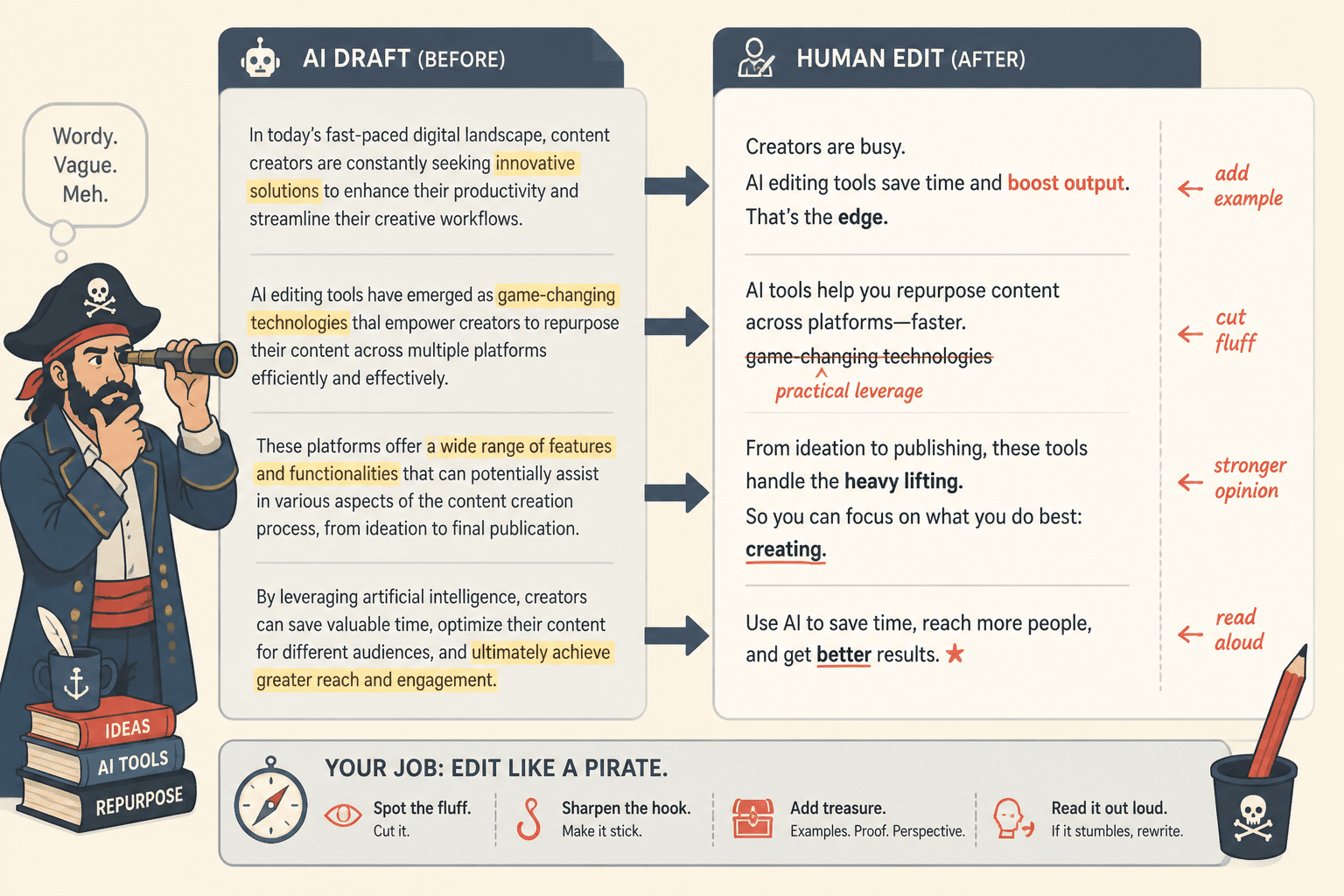
The final pass should still be human. AI can suggest. You decide.
Example tool stacks for common creator workflows
There is no single best stack for every creator. The right setup depends on what you publish most often.
For a solo newsletter creator
A lean stack might be:
- Google Docs or Notion for drafting.
- ChatGPT or Claude for idea expansion and repurposing.
- Grammarly or Hemingway for editing.
- ConvertKit, Beehiiv, or Mailchimp for email publishing.
- Buffer or native scheduling for social posts.
Best workflow:
- Write one newsletter.
- Extract three social posts.
- Create one short thread or carousel outline.
- Save the strongest lines for future hooks.
For a podcaster
A practical stack might be:
- Riverside, SquadCast, or Zoom for recording.
- Descript, Otter, or Rev for transcription.
- Castmagic, ChatGPT, or Claude for show notes and written repurposing.
- Descript or OpusClip for short clips.
- Notion or Airtable for the episode content database.
Best workflow:
- Record the episode.
- Generate a transcript.
- Extract key ideas, quotes, and clips.
- Create show notes, a newsletter, and social posts.
- Schedule assets across the next one to two weeks.
For a YouTube creator
A practical stack might be:
- Premiere Pro, Final Cut, Descript, or CapCut for editing.
- Descript or YouTube transcript export for source text.
- OpusClip or vidyo.ai for short-form clip candidates.
- ChatGPT or Claude for titles, descriptions, blog drafts, and social posts.
- Notion or Airtable for video ideas and repurposing status.
Best workflow:
- Publish the long-form video.
- Generate transcript and chapters.
- Identify short clips.
- Create a blog-style summary or article.
- Turn key ideas into platform-specific posts.
For a coach, consultant, or course creator
A practical stack might be:
- Zoom, Riverside, or Loom for calls, lessons, and trainings.
- Descript, Otter, or Rev for transcription.
- Claude or ChatGPT for extracting lessons, objections, stories, and content angles.
- Notion or Airtable for content libraries and offer messaging.
- Email software for nurture sequences and sales follow-up.
Best workflow:
- Record calls, trainings, or workshops when appropriate and permitted.
- Extract recurring questions and objections.
- Create educational posts, emails, and sales enablement assets.
- Build a reusable library of audience language.
If repurposed content includes endorsements, affiliate recommendations, sponsored mentions, or client results, review the FTC’s guidance on clear disclosures for social media influencers. Repurposing does not remove disclosure obligations.
Quality control checklist before publishing
Before publishing AI-assisted repurposed content, run a quick quality check.
Ask:
- Accuracy: Did the AI invent facts, numbers, quotes, links, or examples?
- Source fidelity: Does the output reflect the actual source material?
- Voice: Does it sound like the creator, or like a generic content assistant?
- Specificity: Are there concrete examples, clear claims, and useful details?
- Platform fit: Is the asset formatted for where it will be published?
- Repetition: Did the AI repeat the same idea across multiple assets?
- Compliance: Are disclosures, permissions, and claims handled properly?
- Purpose: Does this asset help the audience, or is it just more content?
This checklist is simple, but it prevents most AI repurposing problems.
When not to add another tool
A new tool is not always the answer.
Do not add another AI tool if:
- You have not defined your source asset workflow.
- You do not know which bottleneck you are solving.
- You already have similar functionality in a tool you use.
- Your content quality problem is strategic, not operational.
- You are using tools to avoid making editorial decisions.
- Your publishing system is too complex to maintain.
Many creators need fewer tools and better defaults.
Better defaults include:
- A repeatable prompt library.
- A naming system for source files.
- A weekly repurposing block.
- A clear review checklist.
- A simple content calendar.
- A defined path from long-form content to short-form assets.
The best stack is the one you will actually use.
Final recommendation
The best AI tools for creator editing and repurposing are not the tools with the longest feature lists. They are the tools that help you move from source asset to finished asset with less friction and more consistency.
For most creators, the right stack is:
- One place to capture or create source content.
- One transcription or extraction layer.
- One strong AI writing assistant.
- One editing and quality control process.
- One template library.
- One scheduling or workflow system.
Start there. Add specialized tools only when the bottleneck is obvious.
AI should not replace your taste, judgment, or point of view. It should help your strongest ideas travel farther.
For the full strategy, return to the main creator AI editing and repurposing guide. For practical transformations, use the examples companion. For turning repurposed content into business outcomes, use the leads and sales workflow.
—