
Most internal linking advice sounds like it was written by a plugin with a clipboard.
Add related links. Update old posts. Improve site structure. Increase engagement. Fine. All true. Also painfully easy to do in a way that makes your article sound stiff, needy, or weirdly self-promotional.
If you have ever jammed in a sentence like “You may also enjoy this helpful resource” and immediately hated yourself a little, you are not the problem. The problem is the way people are taught to handle internal linking and updating like a mechanical SEO chore instead of part of the reading experience.
How to Handle Internal Linking and Updating Without Sounding Salesy or Robotic comes down to one thing: links and updates should help the reader move naturally, not remind them they are trapped inside your content machine.
Here’s how to make your internal links feel useful, your updates feel intentional, and your articles feel like they were written by a competent human instead of a content intern supervised by a dashboard.
To see how this fits into the wider strategy, open the parent guide.
Why internal linking gets awkward so fast
Internal links become clunky when the writer is thinking about site architecture more than reader momentum.
That is usually the real issue. Not the presence of links. Not even the number of links. The issue is that the link gets inserted for the benefit of SEO logic alone, with no care for timing, phrasing, or relevance.
Readers can feel that. They may not say, “Ah yes, this anchor text appears operational rather than editorial,” but they feel the friction. The sentence suddenly stops sounding like an article and starts sounding like a hallway sign.
A good internal link does at least one of these things:
- Answers the next obvious question
- Gives a deeper explanation without derailing the current article
- Offers a practical example, template, or related process
- Helps the reader choose what to do next
- Supports a claim you just made with a more complete breakdown
A bad internal link usually does this instead:
- Appears too early, before the reader cares
- Uses generic anchor text like “click here” or “read more”
- Interrupts the sentence instead of supporting it
- Pushes the reader sideways into something only loosely related
- Feels like a quiet little self-promotion grenade
Same website. Same article library. Very different result.
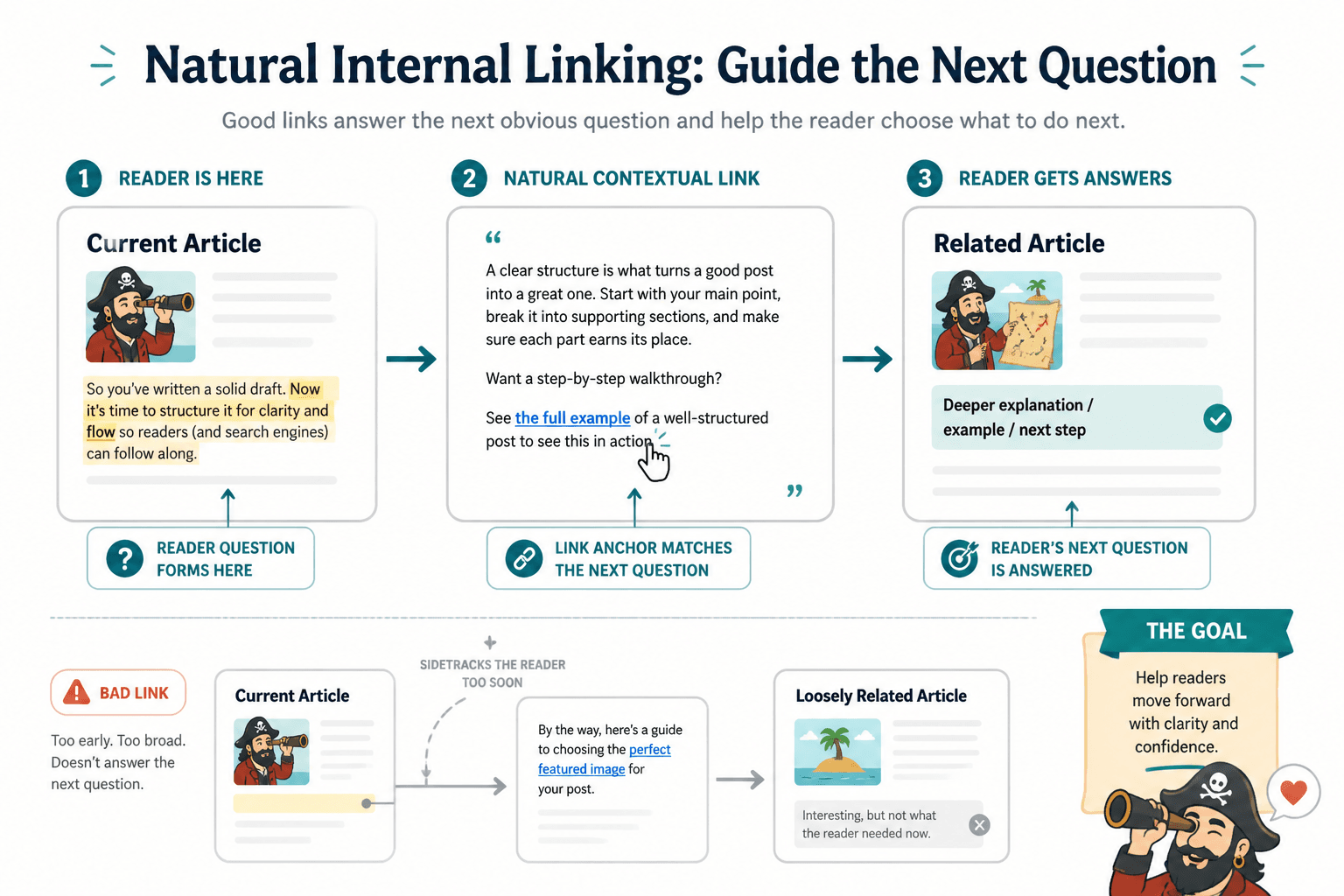
The rule that makes internal links sound human
If you want internal linking and updating to stop sounding robotic, use this rule:
Link where the reader would naturally want more, not where your SEO checklist starts sweating.
That one rule cleans up a lot.
When a reader hits a point of curiosity, confusion, resistance, or next-step intent, that is where a link makes sense. It feels supportive. It feels editorial. It feels like the article is helping instead of nudging.
Updating works the same way. The best updates are not random little additions sprinkled across old posts to make them look fresh. They respond to a real need:
- The article is missing a next step
- The examples are weak or outdated
- A better supporting article now exists
- The intro is not aligned with what the reader actually wants
- The article gets traffic but does not move readers deeper into the site
In other words, update around usefulness, not because “content freshness” sounds impressive in a meeting.
What salesy internal linking actually sounds like
Sometimes the problem is subtle. Sometimes it is very much not.
Here are a few common lines that make internal linking feel forced:
- “Be sure to check out our other amazing guide…”
- “For more value-packed insights, read…”
- “You’ll definitely want to explore…”
- “This comprehensive resource will help you…”
- “Click here to learn more”
None of these are criminal. They are just generic, inflated, and detached from the actual reading moment. They sound like they were copied from a content template and sprayed lightly with fake enthusiasm.
A better approach is to write the link into the thought itself.
Weak vs stronger link phrasing
| Weak | Stronger |
|---|---|
| Read more about internal linking here. | If you want a cleaner system for this, this guide on writing better internal linking and updating breaks it down. |
| Check out our related article. | If your real problem starts earlier in the article, fixing the opening first usually makes the links easier to place naturally. |
| For more tips, click here. | If your updates always end up sounding vague, these update triggers will help you tighten the decision. |
| You may also enjoy this helpful resource. | If your older articles feel flat, rewriting boring internal linking and updating is usually faster than publishing another mediocre post. |
Notice what changed.
- The stronger versions name a specific problem
- They explain why the link matters
- They feel like a continuation of the article, not a detour
- They use anchor text that gives the reader actual information
That is the whole game. Context first. Link second.
How to place internal links without breaking the paragraph
The cleanest internal links usually sit in one of four places.
1. Right after a useful claim
If you say something that naturally opens a side door, that is a good time to link.
Example:
Most internal linking problems start before the link itself. If the opening is weak, every related article feels bolted on later, which is why starting without a weak opening matters more than people think.
The link belongs there because the sentence creates the need for it.
2. At the point of likely reader friction
When the reader is likely thinking “okay, but how?” or “how do I know when to do that?” a link can reduce friction.
Example:
Updating old articles sounds simple until you need a reason to update them. If that decision always gets fuzzy, use these update triggers instead of guessing.
3. Near the end of a section, once the point is established
This works well when the link offers a next step rather than an explanation.
Example:
If your links keep sounding like filler, the fix is usually editorial, not technical. This article will help you make them read like part of the piece instead of site furniture.
4. In a short “next if you need it” line
This is one of the least annoying ways to add internal links because it is honest. It does not pretend every reader must leave the article right now. It simply offers the next move.
Example:
If you are fixing older posts, the fastest follow-up is usually rewriting the dull sections first.
Small line. Clear reason. No weird sales breath.
How to update old articles without making them feel stitched together
A lot of blog updates fail because they are done in tiny isolated moves.
The writer adds a new sentence here, a link there, maybe swaps a year in the title, then calls it updated. The result is technically fresher but structurally messier. The post feels patched, not improved.
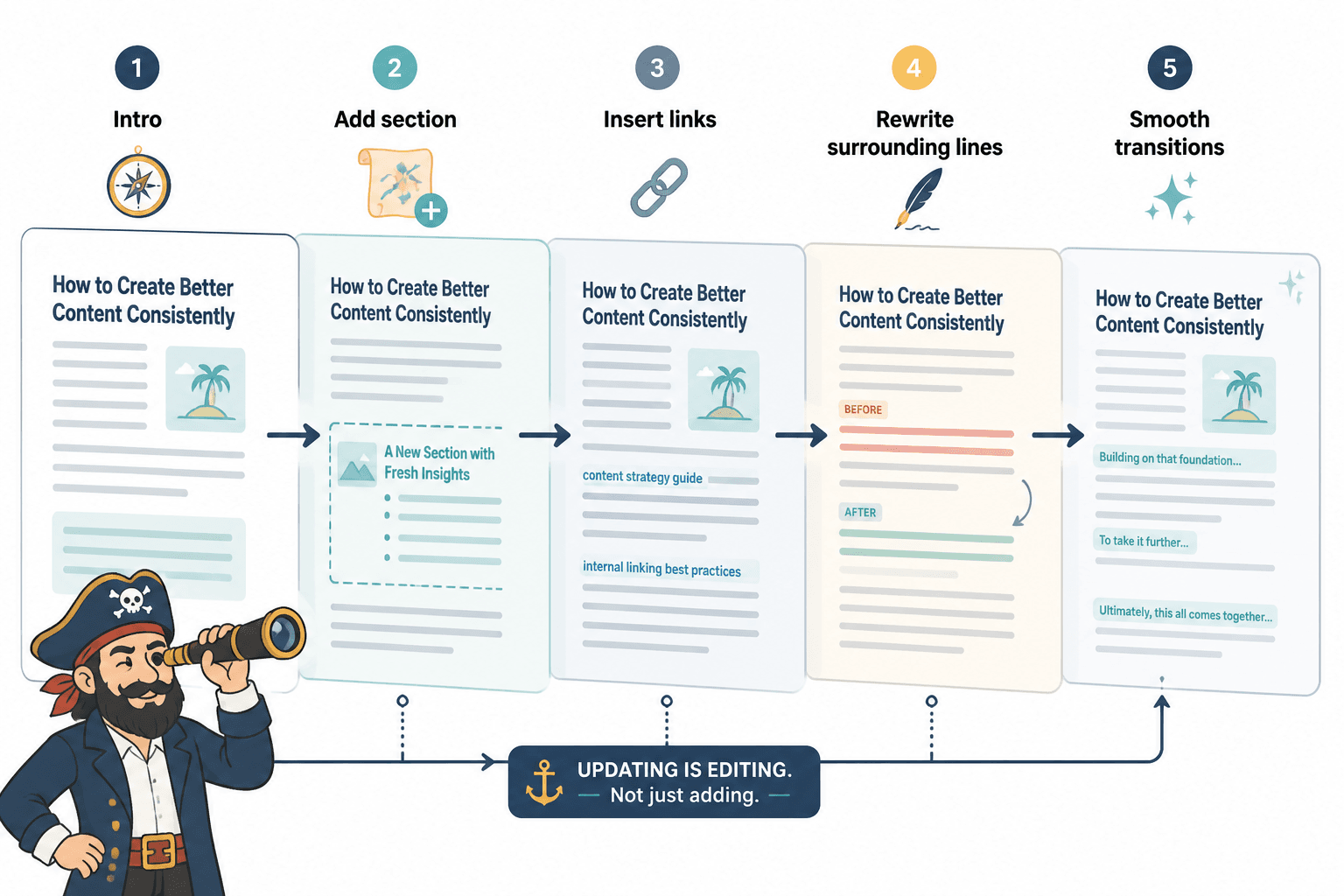
When you update an article, think in layers instead.
A better update sequence
- Recheck the intent. Why would someone land on this article now, and what do they actually need?
- Fix the opening. If the intro is weak, every later improvement has less impact.
- Find content gaps. What is missing, outdated, too vague, or too broad?
- Add or improve internal links. Link where they help the reader continue, not where you can technically fit one.
- Rewrite rough transitions. This is the part most people skip, and it is why updated posts can sound stitched together.
- Tighten the next step. What should the reader do after this article?
That fifth step matters a lot more than people think.
If you insert two new internal links and one new section into an old post, you usually also need to rewrite the sentence before and after them. Not because the link is wrong. Because the rhythm changed. Good updates are rarely just additions. They are edits.
That is why articles on internal linking and updating should be treated as editorial systems, not little SEO chores floating around separately.
Anchor text that helps instead of hovering awkwardly
Bad anchor text is usually too vague or too stuffed.
Too vague looks like this:
- click here
- read more
- this article
- learn more
- related post
Too stuffed looks like this:
- best internal linking and updating strategy for SEO blog content optimization
- how to improve your website internal linking and article refresh process for ranking
One sounds lazy. The other sounds like it is trying to mug Google in an alley.
Good anchor text is specific enough to set expectations and natural enough to fit the sentence. Usually that means using the real topic or benefit of the linked article in plain English.
Examples:
- write better internal linking and updating
- improve internal linking and updating with better triggers
- start internal linking and updating without a weak opening
- rewrite boring internal linking and updating
You do not need every anchor to be a perfect keyword phrase. You do need them to make sense on the page.
How to make internal linking feel editorial, not promotional
This is where tone does a lot of heavy lifting.
If your sentence sounds like it is trying to sell the linked article, the link feels promotional. If the sentence sounds like it is helping the reader continue, the link feels editorial.
Use these tone shifts
| Instead of | Try |
|---|---|
| You should definitely read this next | If this is the part you are stuck on, this next guide will help |
| Our comprehensive resource explains | This breaks down the part most people miss |
| For even more value | If you want the deeper version |
| Check out this amazing article | This is useful if you are fixing that specific issue |
| Click here | Use descriptive anchor text inside the sentence |
See the pattern? Less hype. More relevance. Less “look at our content library.” More “here is the next useful thing.”
That shift matters because readers are not allergic to links. They are allergic to being handled.
A simple framework for adding links during updates
If you are updating older articles and want a repeatable way to add internal links without turning the post into a maze, use this quick framework:
The 3R check: relevant, reasonable, ready
- Relevant: Does the linked article directly support the point, question, or next step?
- Reasonable: Would a reader genuinely expect a link here, or are you forcing it?
- Ready: Has the current section done enough work before asking the reader to leave it?
If the answer is no to any of those, the link probably needs to move, change, or disappear.
This also helps you avoid the classic overlinking mess where every paragraph contains two links and none of them feel earned. More links do not automatically mean better internal linking. Sometimes they just mean your article now reads like a Wikipedia page written by a nervous marketer.
How many internal links should you add when updating?
There is no magic number, which is annoying but true.
The right number depends on:
- The length of the article
- How many real next-step opportunities exist
- How tightly related your article cluster is
- Whether the links actually reduce friction
- How much the article already asks of the reader
As a practical guideline, most articles do well with a handful of genuinely useful internal links rather than a frantic scatter of them.
If you are updating a 2,000-word article, adding 3 to 8 thoughtful internal links will usually beat adding 14 because a plugin suggested some nouns.
And yes, there are exceptions. Pillar pages and resource hubs can carry more. But for standard articles, restraint tends to read better.
Where updating and internal linking support each other
Internal linking and updating work best when they are part of the same editorial habit.
When you publish a new article, look for older posts that should point to it. When you refresh an older post, look for newer related articles it should connect to. That sounds obvious, yet a lot of sites treat publishing and updating like separate departments that only communicate through passive aggression.
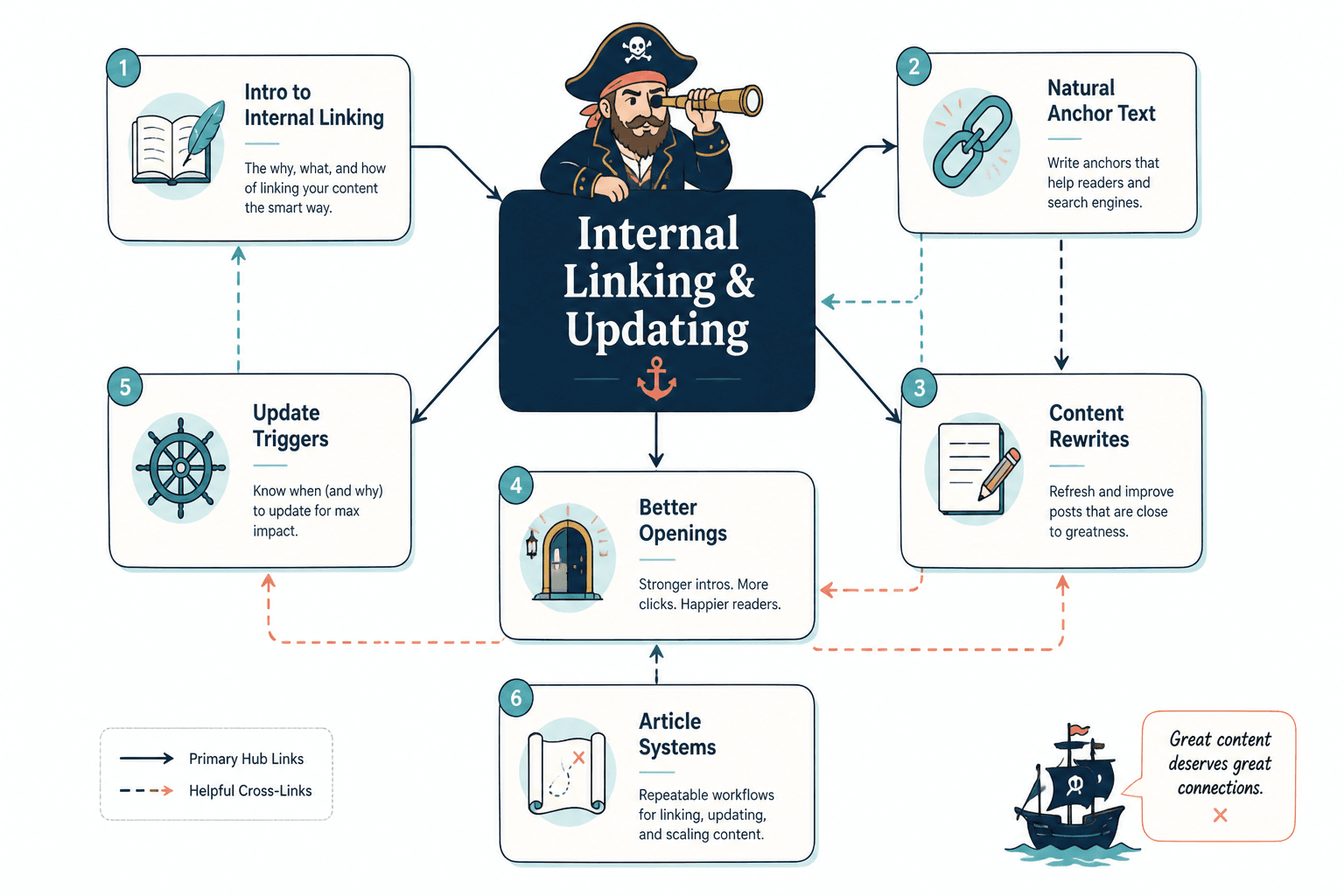
If your site has a clear article system, this becomes much easier. A parent area like internal linking and updating gives related articles a home, which makes link decisions less random. Broader sections like blog SEO writing and article systems help you keep the structure coherent instead of improvising every time.
That structure helps the writing too. When you know the role of each article, the links become easier to place with purpose. One article introduces the idea. Another deepens it. Another handles the rewrite. Another handles the opening. Another handles update triggers. Suddenly your links do not feel random because they are not.
A before-and-after example
Here is what robotic internal linking often looks like in the wild:
Internal linking is very important for SEO and user experience. You should also update old content regularly. For more information, check out our guide on internal linking. Also be sure to read our article on rewriting content and our guide to writing better openings.
Technically functional. Readable? Barely. It sounds like a receptionist handing out brochures.
Now a better version:
Internal links work best when they help the reader continue the thought in front of them. If your links always feel bolted on, writing them more naturally matters more than adding more of them. And if the article still feels flat after that, the next fix is usually rewriting the dull sections or fixing the opening so the whole piece flows better.
Same core idea. Better rhythm. Better context. Better reasons to click.
Mistakes that make updates feel robotic
Internal linking improves when each update makes the next useful step clearer. Cleaner structure usually does more work than a bigger pile of links ever will.
Internal linking improves when each update makes the next useful step clearer. Cleaner structure usually does more work than a bigger pile of links ever will.