
Most lead magnets do not fail because the PDF was ugly or the headline font looked a little too 2019. They fail because the thing itself was weak, vague, bloated, or disconnected from what the business actually sells.
That is why talking about the best templates and tools for lead magnets can get dumb fast. People start obsessing over design apps, fancy quiz builders, and “high-converting” layouts while offering a checklist nobody asked for. The tool was not the problem. The lead magnet was.
Still, good templates and tools do matter. They help you build faster, package better, and stop reinventing the wheel every time you need a free resource. Used properly, they make your lead magnet easier to create, easier to consume, and more likely to move someone toward the next step.
This guide will help you pick the right lead magnet format, use templates without creating generic sludge, and choose tools that support the job instead of pretending to do your thinking for you. If you want a broader foundation first, start with lead magnets and then come back with sharper questions.
For the full path around this topic, head to the parent guide.
What a good lead magnet template actually does
A useful template gives structure. It does not give strategy.
That distinction matters because a lot of people download a “lead magnet template,” swap in their logo, add five polite tips, and wonder why nobody cares. A template can help you organize ideas, create sections, shape the reader experience, and package expertise cleanly. It cannot magically make a boring offer relevant.
The best templates for lead magnets usually help with one or more of these jobs:
- Turning one core idea into a usable resource
- Making the content feel easier to skim and act on
- Creating consistency across multiple lead magnets
- Speeding up production without turning everything into mush
- Making the next step obvious
If your template does not help with those things, it is probably just decoration in a business-casual disguise.
The best lead magnet templates by format
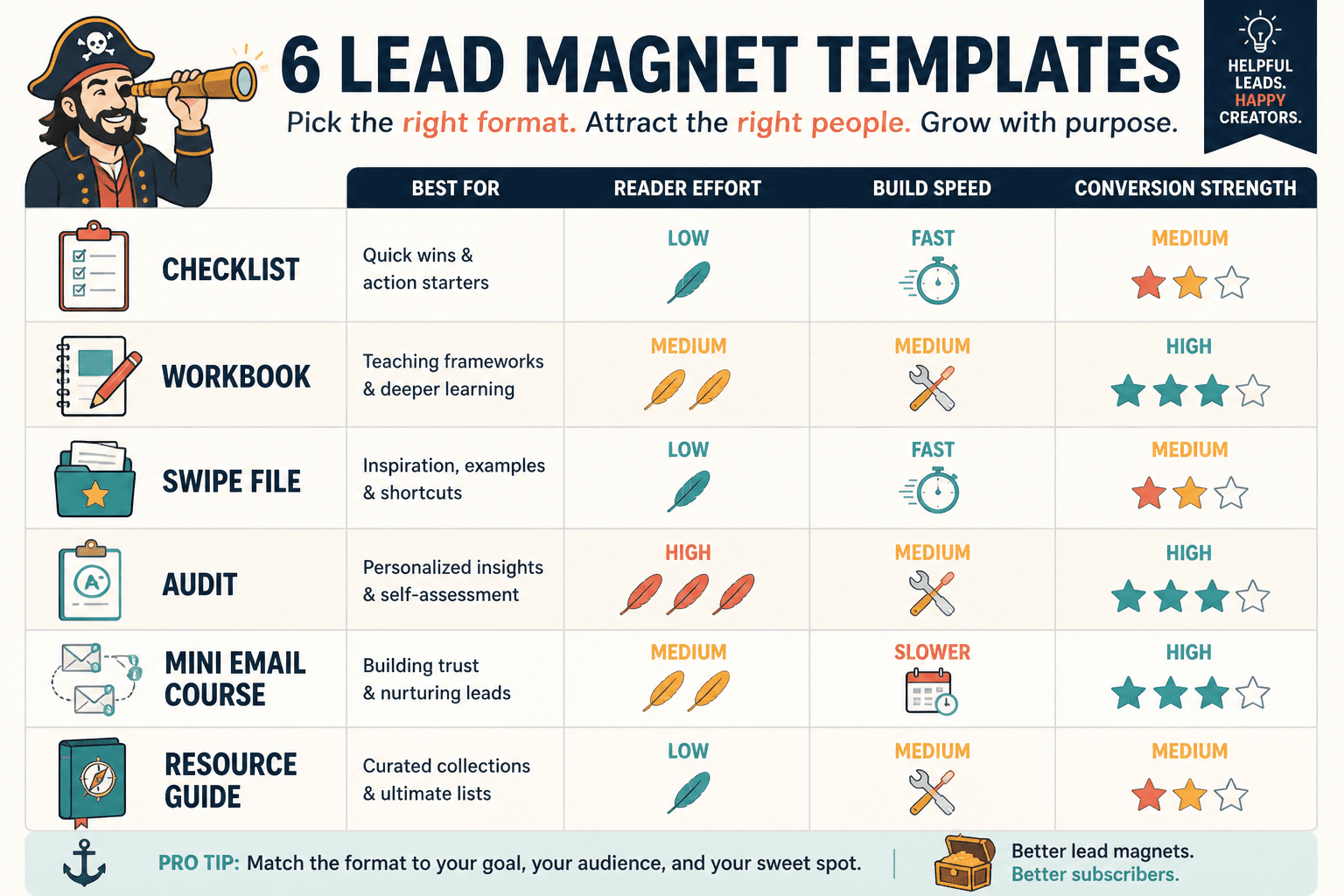
The best lead magnet template depends on the kind of resource you are creating. Different formats solve different problems. A checklist works when the reader wants quick implementation. A mini guide works when they need context. A worksheet works when they need help thinking. A swipe file works when they want speed.
So instead of asking for the one best template, ask: what kind of result should this lead magnet help someone get?
1. Checklist template
Best for: fast wins, audits, process reminders, simple implementation
A strong checklist is not just a random stack of reminders. It should help the reader verify something, complete something, or avoid obvious mistakes.
Simple checklist structure:
- Clear title with one outcome
- Short intro: when to use this
- Grouped checklist sections
- Optional notes or examples under key items
- CTA for the next step
Example: “Pre-Launch Email Checklist for Coaches” is useful. “10 Email Tips” is wallpaper.
2. Cheat sheet template
Best for: shortcuts, summaries, formulas, decision support, reference material
Cheat sheets work well when your audience wants to save time or stop second-guessing. Think formulas, quick frameworks, headline structures, pricing reminders, call prep notes, funnel components, and platform-specific prompts.
Simple cheat sheet structure:
- One sharp promise in the title
- Quick orientation paragraph
- Main formulas, prompts, or rules
- Brief examples
- CTA tied to implementation help
3. Workbook or worksheet template
Best for: clarity, planning, positioning, messaging, offer design
This is one of the better formats for coaches, consultants, and service businesses because it gets the reader involved. Instead of just reading more advice, they fill something in. That usually creates more buy-in and stronger lead quality.
Worksheet structure:
- Title tied to a specific decision or outcome
- Short context for why this matters
- Prompt sections with space to answer
- Examples to reduce confusion
- CTA that naturally follows from the exercise
If your paid offer helps people clarify, choose, define, or plan something, this format makes a lot of sense.
4. Mini guide or playbook template
Best for: more complex ideas, authority-building, deeper trust
This is where many people get carried away and write a free ebook nobody finishes. Keep it tight. A good mini guide should solve one focused problem, not become your memoir on “content strategy principles for modern entrepreneurs.” Respectfully, nobody asked.
Mini guide structure:
- Strong title with one practical outcome
- Brief intro that frames the problem
- 3 to 7 main sections
- Examples, screenshots, or templates
- Clear next step
5. Swipe file template
Best for: copywriting, content creation, outreach, hooks, CTAs, bios, email ideas
Swipe files are strong lead magnets because they save effort immediately. People love examples they can adapt. The key is making them specific enough to be useful and flexible enough to customize.
Swipe file structure:
- Short intro on how to use the file
- Examples grouped by context
- Notes on what makes each one work
- Warnings about common mistakes
- CTA into deeper support or strategy
6. Audit or self-assessment template
Best for: diagnosing gaps, qualifying leads, making pain visible
This format works beautifully because it helps people see what is broken without you screaming “you need me” from the roof. A good audit creates clarity. It also sets up your paid offer naturally if your service fixes the exact issues the audit reveals.
Audit template structure:
- Short promise
- Sections based on criteria or scoring
- Simple rating system
- Interpretation guidance
- Recommended next step
If you want examples of what these can look like in practice, these lead magnet examples for coaches, consultants, and personal brands will help.
Best templates and tools for lead magnets by workflow stage
Most people shop for tools too early. They think the first question is “What should I build this in?” It usually is not. The first question is “What am I helping the reader do?” After that, you can pick tools based on the stage of the workflow.
Here is the more useful way to think about it.
| Workflow stage | What you need | Best tool category |
|---|---|---|
| Idea shaping | Clarify topic, angle, outcome | Notes app, outline tool, AI drafting tool |
| Content creation | Write, structure, refine | Docs tool, writing tool, AI assistant |
| Design and formatting | Package cleanly | Design tool, doc design template |
| Delivery | Send after signup | Email tool, automation tool, file host |
| Landing and opt-in | Collect emails | Form builder, landing page tool |
| Follow-up | Nurture and convert | Email sequence tool, CRM, funnel tool |
The point is simple: one tool rarely does all of this well. You do not need a giant stack, but you do need to stop expecting one shiny platform to write, design, position, and sell for you. That is not software. That is a fantasy with a monthly fee.
Best tool categories for creating lead magnets
Writing and outlining tools
These are for getting the substance right before you start polishing the cover.
Use them for:
- Outlining sections
- Turning a post or thread into a fuller resource
- Creating examples and variants
- Refining language and clarity
- Building reusable template frameworks
Good writing tools help you think faster and package ideas better. They do not replace judgment. If your positioning is fuzzy, your examples are generic, and your actual offer is weak, the draft will still come out smelling faintly of beige.
If AI is part of your workflow, use it to expand, organize, simplify, and vary. Do not use it as a substitute for knowing what your audience actually wants. For that side of the stack, read best AI tools for lead magnets.
Design tools
Design matters, but mostly because it affects usability. The cleanest lead magnet design is usually the one that helps people absorb the thing quickly.
Use design tools for:
- Branded PDF templates
- Checklist and worksheet layouts
- Simple visual hierarchy
- Cover pages and section dividers
- Mockups for landing pages and posts
What matters most here:
- Readable text
- Consistent spacing
- Simple typography
- Clear section labels
- Enough white space to make the content feel manageable
What does not matter nearly as much as people think:
- Fancy gradients
- Overdesigned cover pages
- Trying to make a worksheet look like a luxury magazine
- Adding decorative icons to hide weak content
Landing page and form tools
You need something that makes signup friction low and the promise clear.
Strong opt-in pages usually have:
- One specific promise
- Short bullets on what is inside
- A visual preview if helpful
- A clear form
- No weird clutter trying to prove you are a “brand”
The form and page tool do not need to be fancy. They need to be reliable, fast, and easy to connect to your email system.
Email and delivery tools
This is the part people ignore, then they wonder why their lead magnet “did not convert.” If the follow-up is sloppy, the whole thing underperforms.
You need delivery tools that can:
- Send the resource immediately
- Tag or segment subscribers
- Trigger a simple nurture sequence
- Track basic opens and clicks
- Connect to your booking page, product, or next offer
For the next layer after the download, go to best email tools and funnel tools for lead magnets. That is where the freebie either becomes a relationship or just another forgotten file in someone’s downloads folder.
How to choose the right template for your lead magnet
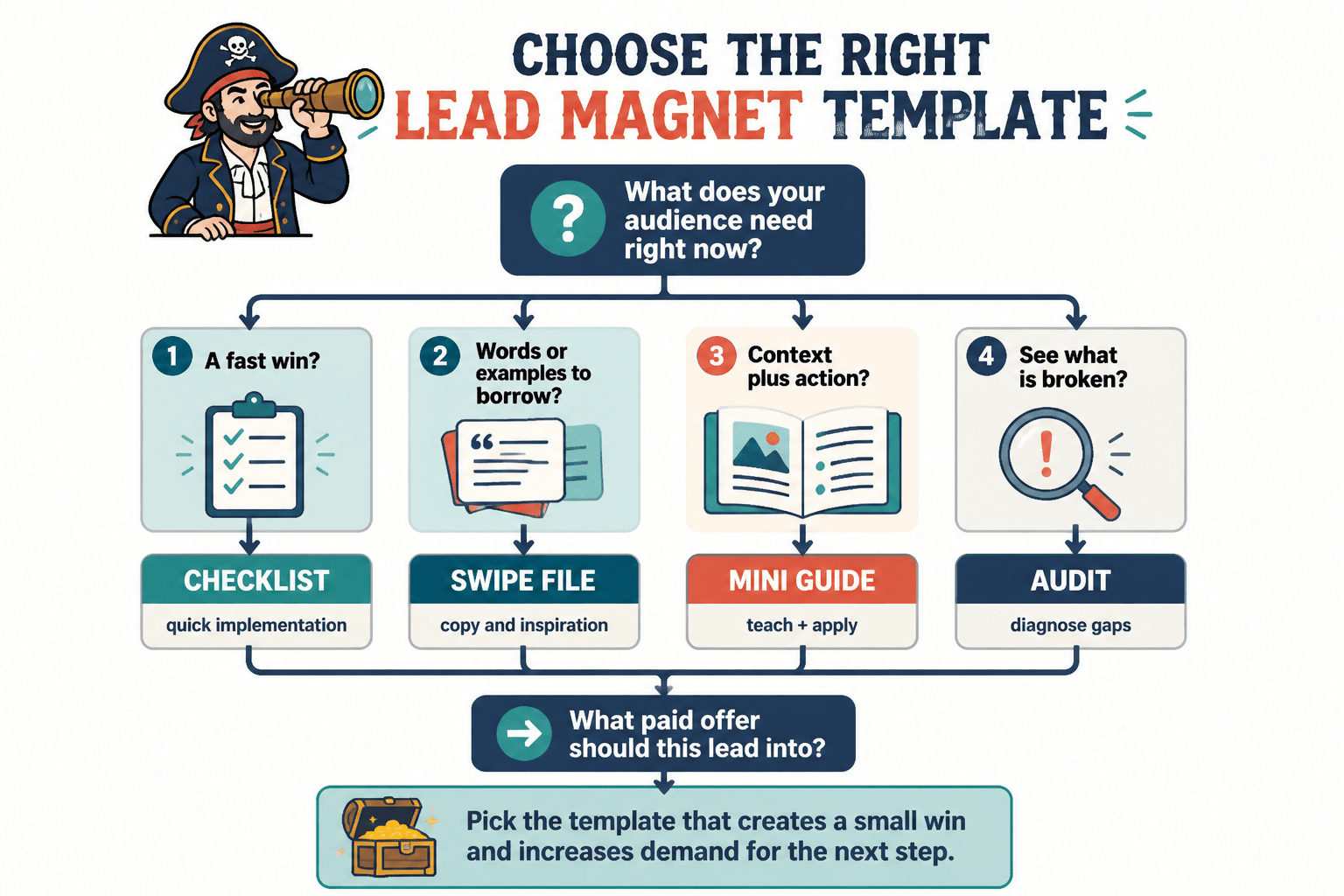
Do not start with the format. Start with the gap between where your reader is and where they want to be.
Here is the easiest decision filter.
- If they need speed, use a checklist or cheat sheet.
- If they need clarity, use a worksheet or self-assessment.
- If they need examples, use a swipe file.
- If they need context plus action, use a mini guide.
- If they need to see what is broken, use an audit.
Then ask one more question: what paid offer should this naturally lead into?
This is where a lot of lead magnets quietly die. They get created as random audience bait with no thought about what happens next. You end up collecting email addresses from people who wanted a free template, not from people who are likely to buy anything.
A better lead magnet creates a small win that increases demand for the next step. It does not try to do the whole job for free, and it does not bait people with one topic then pivot hard into something else after opt-in. That move feels cheap because it is.
A practical template you can reuse for almost any lead magnet
If you want one structure that works across checklists, mini guides, worksheets, and swipe files, use this:
- Title: clear outcome, not a clever phrase
- Opening: what problem this solves and who it is for
- Quick win: one useful insight or shift early
- Main content: 3 to 7 sections max
- Examples: show what good looks like
- Action step: tell them what to do with the resource
- CTA: point to the next natural step
Here is a filled-in version for a consultant:
Title: 7 Questions to Fix a Vague Consulting Offer
Opening: If people like your content but still do not understand what you sell, your offer probably is not weak. It is unclear.
Quick win: The fastest way to improve conversions is usually to sharpen the promise, not add more service details.
Main content: Seven diagnostic questions with examples
Examples: Before-and-after offer statements
Action step: Rewrite your current offer using the worksheet prompts
CTA: Book a strategy session or join the email sequence for offer refinement
That is a lead magnet. Clear, useful, connected to the offer. No dramatic 47-page manifesto required.
What the best tools for lead magnets cannot do
This deserves its own section because people keep buying software to avoid making decisions.
The best templates and tools for lead magnets cannot:
- Fix weak positioning
- Make a boring topic feel urgent
- Create trust if your content is vague
- Turn a random freebie into a qualified funnel
- Know which examples will resonate with your audience unless you tell them
- Replace having an actual point of view
Tools are multipliers. If the core idea is strong, they help. If the core idea is weak, they just help you produce weak things faster.
Common mistakes when using lead magnet templates
- Using a template before deciding the goal: This creates polished nonsense.
- Adding too much content: Free resources work better when they are focused.
- Making it look better than it reads: Nice design cannot rescue generic advice.
- Choosing broad topics: “Social media tips” is not a lead magnet. It is an admission that nobody narrowed the idea.
- No CTA: If there is no next step, you are collecting attention and then dropping it on the floor.
- Mismatch with the paid offer: The free resource should attract people who are likely to want the next thing.
One more thing: stop treating every lead magnet like it needs to be a PDF. Sometimes the best format is a short email course, a private page, a template doc, or a scorecard. Format should follow function, not habit.
A simple lead magnet tool stack for most creators and service businesses
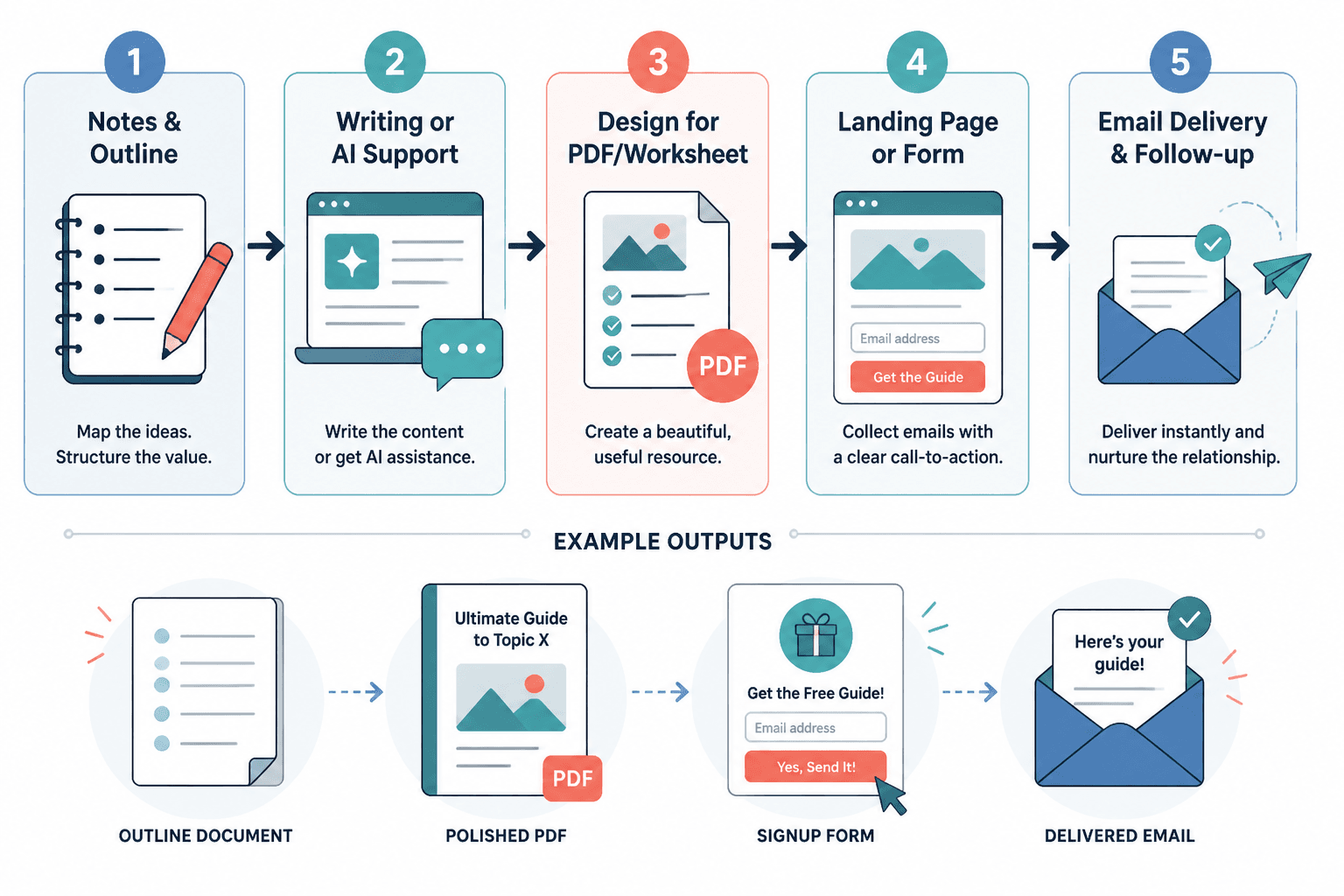
You do not need 14 subscriptions and a dashboard that looks like a small aircraft cockpit. For most creators, coaches, consultants, and solo businesses, this kind of stack is enough:
- One tool for notes and outlining
- One writing or AI support tool
- One design tool for PDFs, worksheets, or visual packaging
- One landing page or form tool
- One email platform for delivery and follow-up
That covers the core system. If you need help connecting the freebie to an actual revenue path, read best funnel ideas to pair with lead magnets.
And if you want the wider category context, you can also explore related monetization and lead magnet resources.
How to know if your lead magnet template and tools are working
Do not judge the lead magnet only by opt-in numbers. That is incomplete.
A better lead magnet system usually shows signs like these:
- The right people sign up, not just random freebie collectors
- Subscribers actually open the follow-up emails
- Readers click through to related offers or resources
- Conversations start from the topic of the lead magnet
- The resource gets referenced or replied to because it was genuinely useful
- It becomes easier to create related content around the same problem
If all you have is downloads and silence, your problem may not be distribution. It may be weak relevance, weak follow-up, or a lead magnet that solves a problem too far away from the buying decision.
FAQ
What is the best format for a lead magnet?
It depends on the job. Checklists are great for quick action, worksheets help with clarity, swipe files save time, and mini guides work when the topic needs more depth.
Do lead magnets need to be designed professionally?
No. They need to be clear, readable, and easy to use. Clean beats fancy almost every time.
Can AI help create lead magnets?
Yes, especially for outlining, drafting, rewriting, and generating examples. It still needs direction, taste, and audience knowledge from you.
Should I use a PDF or another format?
Use whatever format helps the reader get the result fastest. PDF is common, but email courses, worksheets, scorecards, and template docs can work just as well or better.
How long should a lead magnet be?
Long enough to solve one clear problem. Shorter is often better if the resource is sharp and actionable.
Pick tools that support the strategy, not replace it
The best templates and tools for lead magnets are the ones that help you package a useful idea, deliver it smoothly, and move people toward a next step that actually makes sense.
That usually means simpler than people think. A sharp topic. A relevant format. A clean template. A reliable delivery system. A follow-up path that is not clumsy or desperate.
If the lead magnet is focused and the tools support the workflow, you do not need more complexity. You need more relevance. Build something your ideal reader can use in one sitting, connect it to a sensible next step, and stop asking design software to save an offer nobody wants.