
Most people do not need more lead magnet ideas. They need a better way to turn a decent idea into something clear, useful, fast to build, and not painfully generic.
That is where AI tools can help. Not as miracle workers. Not as “create a six-figure funnel in 14 seconds” nonsense. Just as practical assistants that help you research, outline, draft, edit, design, organize, and ship lead magnets without spending three business weeks staring at a blank doc.
The best AI tools for lead magnets are the ones that reduce friction without flattening your voice. They help you build faster, tighten the message, and repurpose what you already know. They do not magically create trust, strong positioning, or a good offer. You still need a brain for that part. Annoying, I know.
Here’s how to pick the right tools, what each category is actually good for, and which ones are worth using if you want your lead magnet to do its job: attract the right people and move them one step closer to working with you.
To see how this fits into the wider strategy, open the parent guide.
What AI tools should actually do for your lead magnets
A good lead magnet is not just a PDF wearing a Canva template. It has a job. It should solve a small but meaningful problem, create trust quickly, and make the next step feel obvious.
AI tools are useful when they help you do one of these things better:
- Find the real question your audience is asking
- Turn messy expertise into a clean outline
- Draft first versions faster
- Rewrite weak sections so they sound sharper and more human
- Create visuals, checklists, worksheets, and summaries
- Repurpose existing posts, emails, calls, and notes into a lead magnet
- Build the delivery workflow around the lead magnet
They are not useful when you expect them to:
- Invent a compelling offer out of thin air
- Know your audience better than you do
- Replace original examples, proof, or lived expertise
- Write a strong lead magnet without direction
- Fix vague positioning
If your lead magnet topic is weak, no tool is saving it. “50 mindset shifts for success” was not a strong idea before AI, and it did not improve after.
Best AI tools for lead magnets by category
There is no one perfect tool here. The best stack depends on what kind of lead magnet you are making: a PDF guide, email mini-course, checklist, worksheet, script pack, resource library, audit template, quiz, or swipe file.
What usually works best is a small stack of specialized tools instead of one bloated app claiming to do strategy, writing, design, funnel setup, chakra balancing, and your taxes.
1. AI writing tools for drafting and shaping the lead magnet
If you already know your topic and just need help getting words on the page, this is the category that saves the most time.
Best uses:
- Outlining the lead magnet
- Turning rough notes into structured sections
- Drafting checklists, worksheets, examples, and summaries
- Rewriting robotic sections into cleaner language
- Creating multiple headline or CTA options
Strong options:
- ChatGPT for fast ideation, outlining, drafting, rewriting, and prompt-based content development
- Claude for cleaner long-form drafting, tone control, and working with bigger chunks of text
- Jasper if you want more marketing workflow structure and templates built in
For most creators, coaches, consultants, and solo operators, ChatGPT or Claude is enough. The key is not “which one writes like a genius.” The key is whether you can guide it well enough to get material worth editing.
Bad prompt in, beige sludge out.
Use these tools to create a first draft or rough components, then rewrite the important parts yourself. Especially the hook, examples, positioning, and CTA. Those are the parts people remember, and also the parts AI tends to flatten first.
If you want help making the actual copy sound more human, this will pair nicely with how to write lead magnets without sounding salesy or robotic.
2. AI research tools for finding better lead magnet angles
A lot of lead magnets fail before the writing starts. They fail at the topic level. The idea is too broad, too obvious, too disconnected from what the audience actually wants, or too shallow to create trust.
AI research tools help you identify better angles by spotting patterns in search behavior, audience questions, and topic gaps.
Best uses:
- Finding recurring audience questions
- Identifying subtopics around a core problem
- Spotting useful phrasing and language patterns
- Finding content clusters you can turn into a lead magnet series
Strong options:
- AlsoAsked style question-mapping tools for discovering related audience questions
- Answer-focused research tools that surface common search queries and subtopics
- AI features inside SEO tools for clustering related ideas and identifying intent patterns
You do not need enterprise-level SEO software to create a lead magnet. Usually, you just need enough input to answer questions like:
- What problem do people actually want solved first?
- What tiny win would make them trust me?
- What format would help them fastest?
- What wording feels closest to how they describe the problem?
That last one matters more than people think. If your audience says, “I’m getting leads but they are low quality,” and your lead magnet says, “Refine your audience acquisition pipeline,” congratulations, you made it worse.
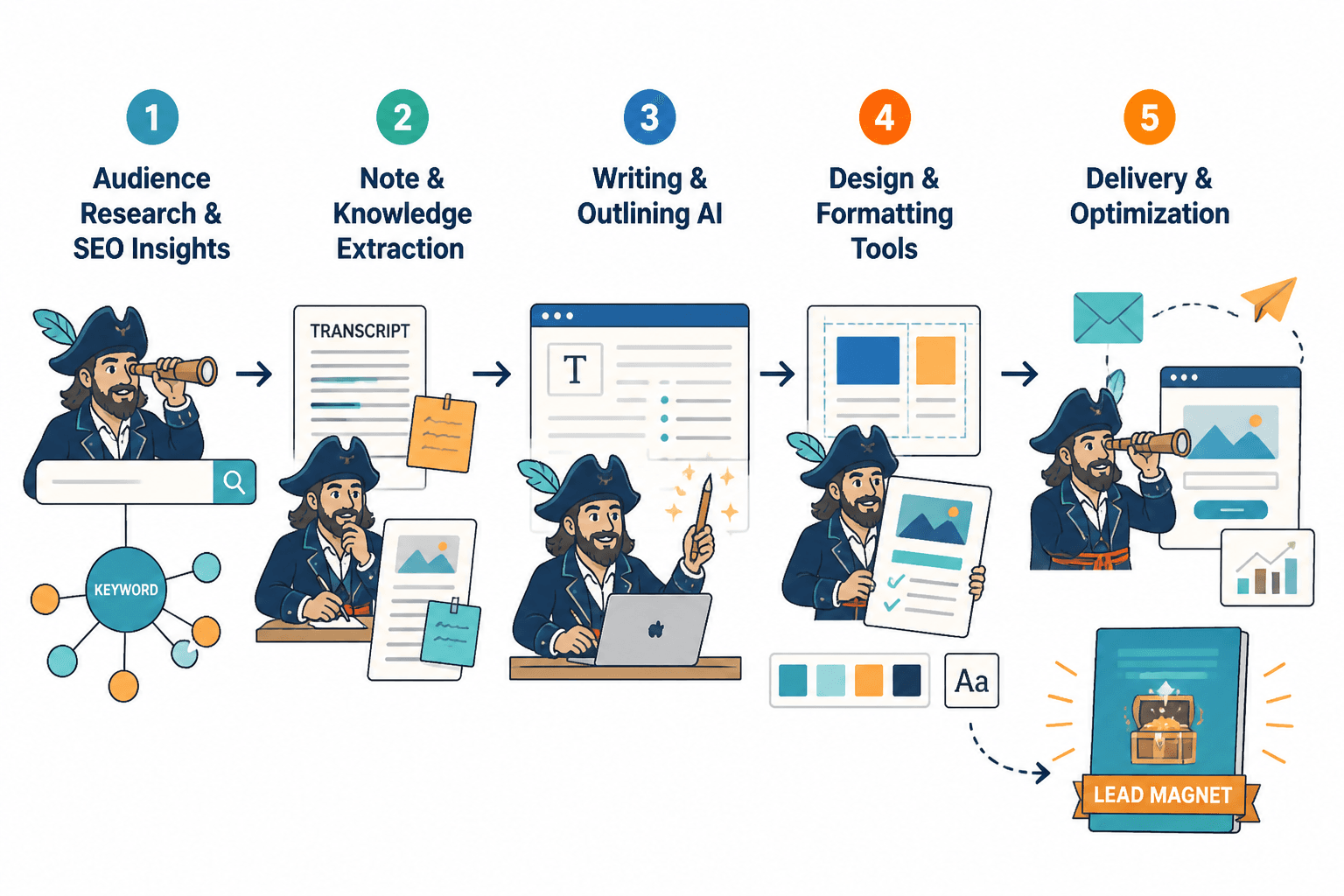
3. AI note and knowledge tools for turning existing material into lead magnets
This category is underrated. Many of the best lead magnets already exist in messy form inside your business. They are buried in client calls, workshop notes, Loom transcripts, emails, voice memos, Slack messages, slide decks, and random documents named something deeply helpful like “final-v2-real-final.”
Best uses:
- Uploading transcripts and extracting recurring themes
- Turning calls or workshops into checklists and guides
- Organizing raw ideas into reusable frameworks
- Pulling examples and phrases from your own material
Strong options:
- Notion AI for organizing, summarizing, and reshaping internal notes
- Mem-style knowledge tools for retrieving patterns across your content and notes
- Transcription tools with AI summaries for turning spoken material into usable source content
If you talk better than you write, this route is especially useful. Record a 10-minute explanation of a client problem, transcribe it, feed it into your writing tool, and ask it to extract:
- The main problem
- The top mistakes
- A simple framework
- Practical action steps
- A worksheet or checklist
That is often a much better starting point than prompting an AI model to create a lead magnet from scratch. Why? Because now it has your ideas, your language, your examples, and your actual expertise to work with.
4. AI design tools for making the lead magnet look finished
Design matters, but not in the “must look like a funded startup pitch deck” way. It matters because ugly, cluttered lead magnets feel harder to use. Clean design helps people trust the material and actually consume it.
Best uses:
- Turning text into polished PDF layouts
- Creating branded workbook pages
- Making simple diagrams, charts, and process visuals
- Generating social promo graphics for the lead magnet
Strong options:
- Canva Magic Design for fast layout and document design
- Canva AI writing and visual tools for supporting headlines, summaries, and graphics
- Presentation tools with AI formatting if your lead magnet is slide-based or visual-first
Canva is the obvious choice for most people because it is fast, flexible, and good enough. “Good enough” is doing a lot of work there, but that is the point. Your lead magnet does not need dribbble-level design. It needs to be readable, scannable, and not embarrassing.
Use AI design help for layout support, not for making bizarre stock-art fever dreams. If the generated visual makes your brand look like a motivational cryptocurrency cult, maybe skip it.
5. AI tools for forms, quizzes, and interactive lead magnets
Not every lead magnet should be a PDF. Sometimes the best format is a quiz, calculator, scorecard, diagnostic, or interactive worksheet. These can work especially well when your audience needs personalization or a quick self-assessment.
Best uses:
- Generating quiz questions and logic paths
- Creating scoring categories
- Building personalized result pages
- Turning audience inputs into tailored next steps
Strong options:
- Quiz and form platforms with AI assistance for generating questions and summaries
- Survey tools with AI analysis for extracting themes from responses
- Simple automation tools with AI steps for routing people based on answers
This format works best when the result naturally points to an offer, service, or next action. Not in a manipulative way. In a useful one. “Here is your result, here is what it means, and here is the smartest next move” is clean. “Your score is 43, buy my course immediately” is not.
6. AI funnel and email tools for delivering the lead magnet
A lead magnet is not just the asset itself. It also needs delivery, follow-up, and some kind of next step. If the file is great but the handoff is clunky, slow, or dead silent after signup, you are wasting momentum.
Best uses:
- Writing delivery emails
- Drafting welcome sequences
- Creating follow-up nurture emails
- Segmenting subscribers by interest or source
- Testing subject lines and email variations
Strong options:
- Email platforms with AI drafting for delivery and nurture support
- Automation tools with AI logic support for segmentation and simple branching
- CRM-light creator tools if you want to connect lead magnets to a broader workflow
If you want the delivery side handled well, read best email tools and funnel tools for lead magnets. And if your real goal is not just downloads but conversions, how to turn lead magnets into more leads or sales is the next logical step.
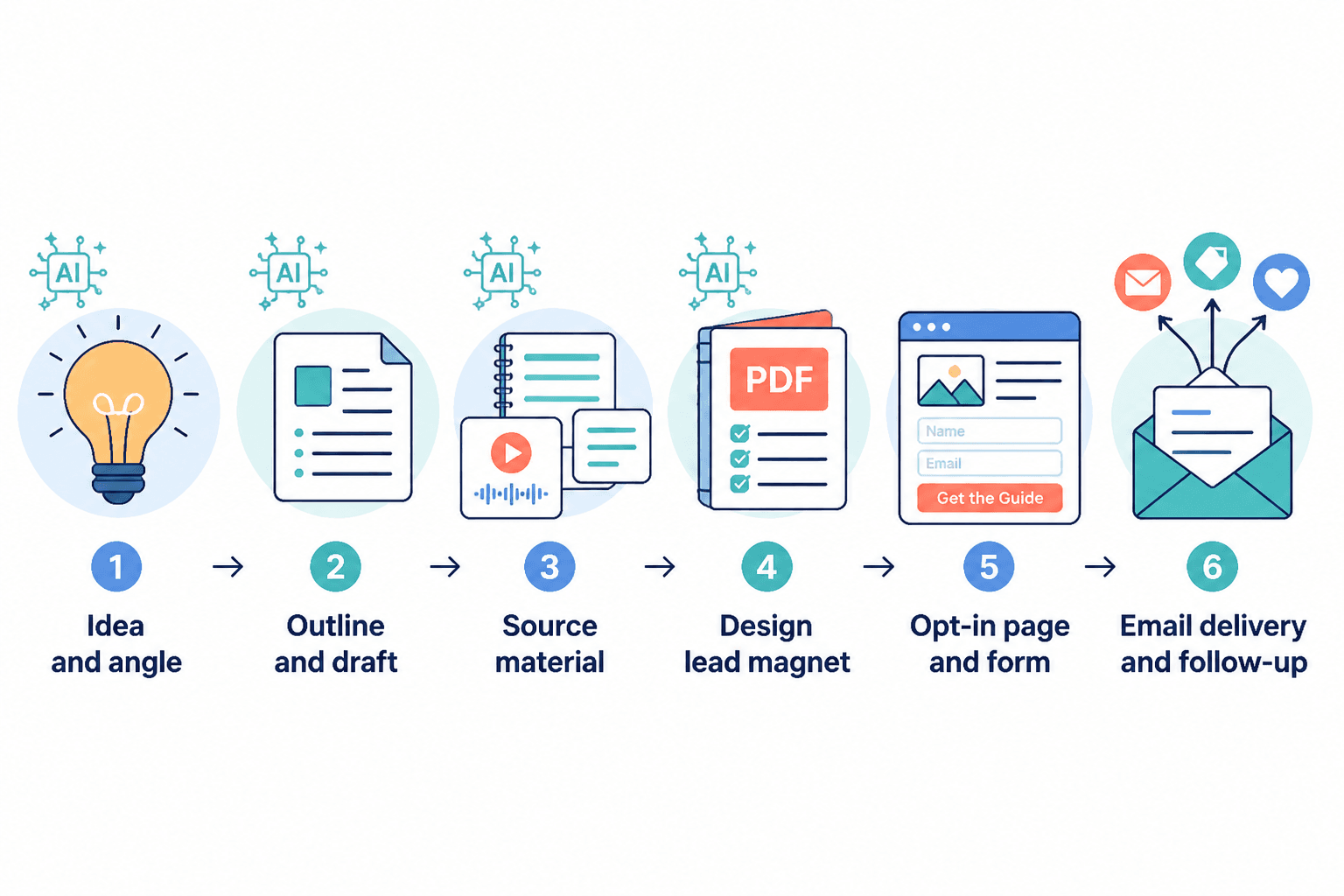
The best AI tool stack for most lead magnet workflows
If you want a simple, realistic stack instead of a giant tool zoo, here is a practical setup for most creators and service businesses.
| Stage | What you need | Good tool type |
|---|---|---|
| Idea and angle | Audience questions, topic clarity | AI research tool or search-intent tool |
| Outline and draft | Structure, copy, examples | ChatGPT or Claude |
| Source material | Notes, transcripts, call insights | Notion AI or transcript summarizer |
| Design | PDF, workbook, checklist layout | Canva with AI support |
| Delivery | Opt-in emails and follow-up | Email platform with AI writing help |
That is enough for most people. You do not need twelve subscriptions and a workflow map that looks like a conspiracy board.
How to use AI to make a lead magnet faster without making it worse
Here is a clean process that keeps AI in the useful lane.
Step 1: Start with the problem, not the format
Do not begin with “I should make a checklist.” Begin with “What specific problem can I solve in 10 minutes for the right person?”
Then ask your AI tool to help you narrow the angle:
- What are 10 smaller problems inside this bigger problem?
- Which of these would make the strongest lead magnet?
- Which one leads naturally to my paid offer?
Step 2: Feed it your real material
Paste in client questions, call transcripts, newsletter replies, workshop notes, sales call objections, or post comments. Give the tool something real to work with.
This is one of the biggest differences between decent AI output and dead-on-arrival output. Generic prompts tend to produce generic content. Real source material gives the draft texture, specifics, and actual relevance.
Step 3: Use AI for structure before polish
Get the sequence right first:
- What is the problem?
- Why does it happen?
- What should they do instead?
- What steps should they take now?
- What is the next logical action after using this?
Most weak lead magnets are not badly written. They are badly structured. They wander. They repeat themselves. They explain instead of helping.
Step 4: Rewrite the key sections yourself
If you only manually edit four parts, edit these:
- The title
- The opening paragraph
- The examples
- The CTA or next-step section
Those are the areas where voice, trust, and specificity matter most. They are also where people can smell AI from across the room.
Step 5: Build the next step before publishing
A lead magnet without a next step is just a free file floating in the void. Before you publish it, make sure the flow continues.
- What email delivers it?
- What follow-up email comes next?
- What offer, article, or resource should they see after reading it?
- What small action tells you they are a warmer lead?
You can find more ideas for structuring that flow in this lead magnets hub and the broader monetization funnels section.
What to avoid when using AI for lead magnets
There are a few mistakes people keep making here, and they are not subtle.
- Using AI to create vague ideas faster. Speed does not improve a boring concept.
- Publishing the first draft nearly untouched. That is how you get polished nonsense.
- Making the lead magnet too long. AI can generate 25 pages of filler before you finish your coffee. Resist.
- Forgetting audience language. If the wording sounds like a consultant swallowed a glossary, rewrite it.
- No proof, no examples, no specificity. Generic advice does not create trust.
- Treating AI output like final strategy. It can suggest. It cannot decide what matters most for your audience and business.
If you want stronger structure and reusable assets around your lead magnet, best templates and tools for lead magnets is a smart companion read.
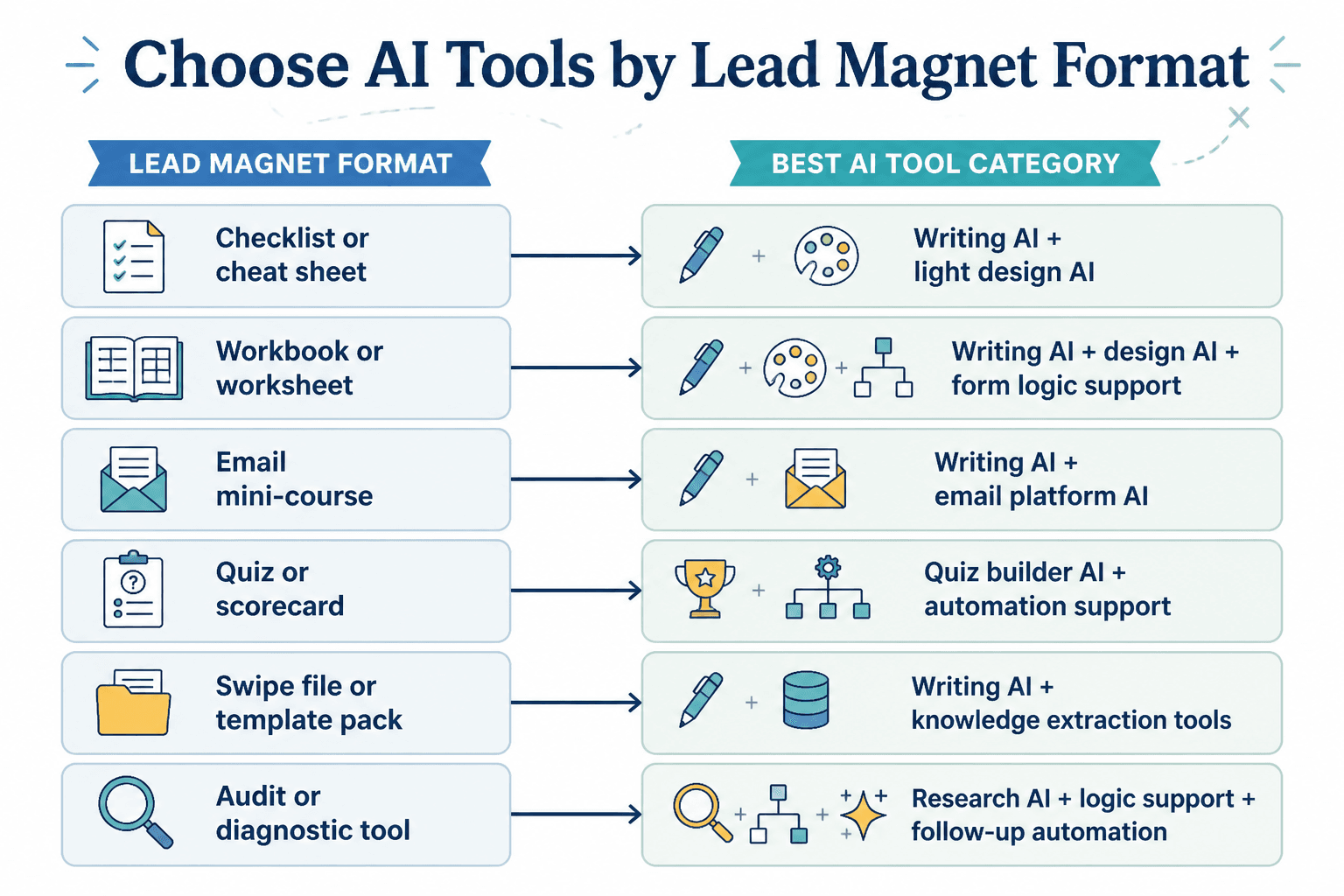
Which AI tool is best for your type of lead magnet?
Here is the practical version.
| Lead magnet type | Most useful AI help |
|---|---|
| PDF guide | Writing AI plus Canva |
| Checklist or cheat sheet | Writing AI plus light design AI |
| Workbook or worksheet | Writing AI, design AI, and form logic support |
| Email mini-course | Writing AI plus email platform AI |
| Quiz or scorecard | Quiz builder AI and automation support |
| Swipe file or template pack | Writing AI and knowledge extraction tools |
| Audit or diagnostic tool | Research AI, logic support, and follow-up automation |
The best AI tools for lead magnets depend less on brand names and more on the bottleneck you are trying to remove. If you struggle with writing, use writing AI. If your ideas are scattered, use knowledge tools. If your asset looks chaotic, use design support. If your follow-up is weak, fix the funnel.
FAQ
Can AI create a full lead magnet for me?
Yes, technically. It usually should not create the final version alone. Use it for drafts, structure, and speed, then add your own examples, judgment, and voice.
What is the best AI writing tool for lead magnets?
For most people, ChatGPT or Claude is enough. The better question is whether you can feed it strong source material and edit the output well.
Are AI-designed lead magnets good enough?
Usually, yes, if the design is clean and readable. You do not need elite design. You need something people can actually use without squinting or getting annoyed.
Should I use AI for the delivery emails too?
Yes, especially for drafting welcome emails and follow-up sequences. Just make sure the emails still sound like you and lead somewhere sensible.
What is the biggest risk of using AI for lead magnets?
Publishing something generic that sounds polished but says very little. That kind of asset looks finished and performs badly, which is a rude combination.
Use AI to remove friction, not responsibility
The best AI tools for lead magnets can absolutely save time. They can help you research faster, draft smarter, repurpose what you already know, and build cleaner delivery systems around the asset. That is all useful. Very useful, in fact.
But the lead magnet still lives or dies on the basics: Is the topic relevant? Is the promise clear? Is the content actually helpful? Does it build trust? Does it lead naturally to the next step?
Use AI to speed up the heavy lifting. Keep the judgment for yourself. That is the part that turns a decent freebie into something that actually brings in good leads instead of just inflating your subscriber count with polite strangers.