
Most tool reviews are not written to help you buy well. They are written to rank, convert, or gently push you toward the affiliate link before your brain has caught up.
That does not mean reviews are useless. It means you need a better way to read them. The problem is rarely a lack of information. It is too much polished information, not enough context, and almost no honesty about tradeoffs.
If you are trying to make sense of Best Tool Review Pros and Cons Questions to Ask Before You Buy, here is the practical version: stop looking for the “best” tool in the abstract and start looking for the best fit for your actual workflow, budget, skill level, and business stage.
This article will help you do that without getting hypnotized by feature lists, five-star ratings, and suspiciously enthusiastic comparison posts. You will get a cleaner way to read pros and cons, better questions to ask before you buy, and a sharper filter for deciding what is worth paying for now versus later.
For the full path around this topic, head to the parent guide.
Why most tool reviews fail buyers
A lot of reviews are technically informative and still terrible buying guides.
They tell you what a tool has, not what using it feels like. They list features, but skip friction. They praise automation, but ignore setup time. They mention pricing, but not the annoying little jump from “affordable starter plan” to “you now need the $79 tier for the one feature you actually wanted.”
And then there is the classic review problem: every tool somehow ends up sounding pretty great. Strange, that.
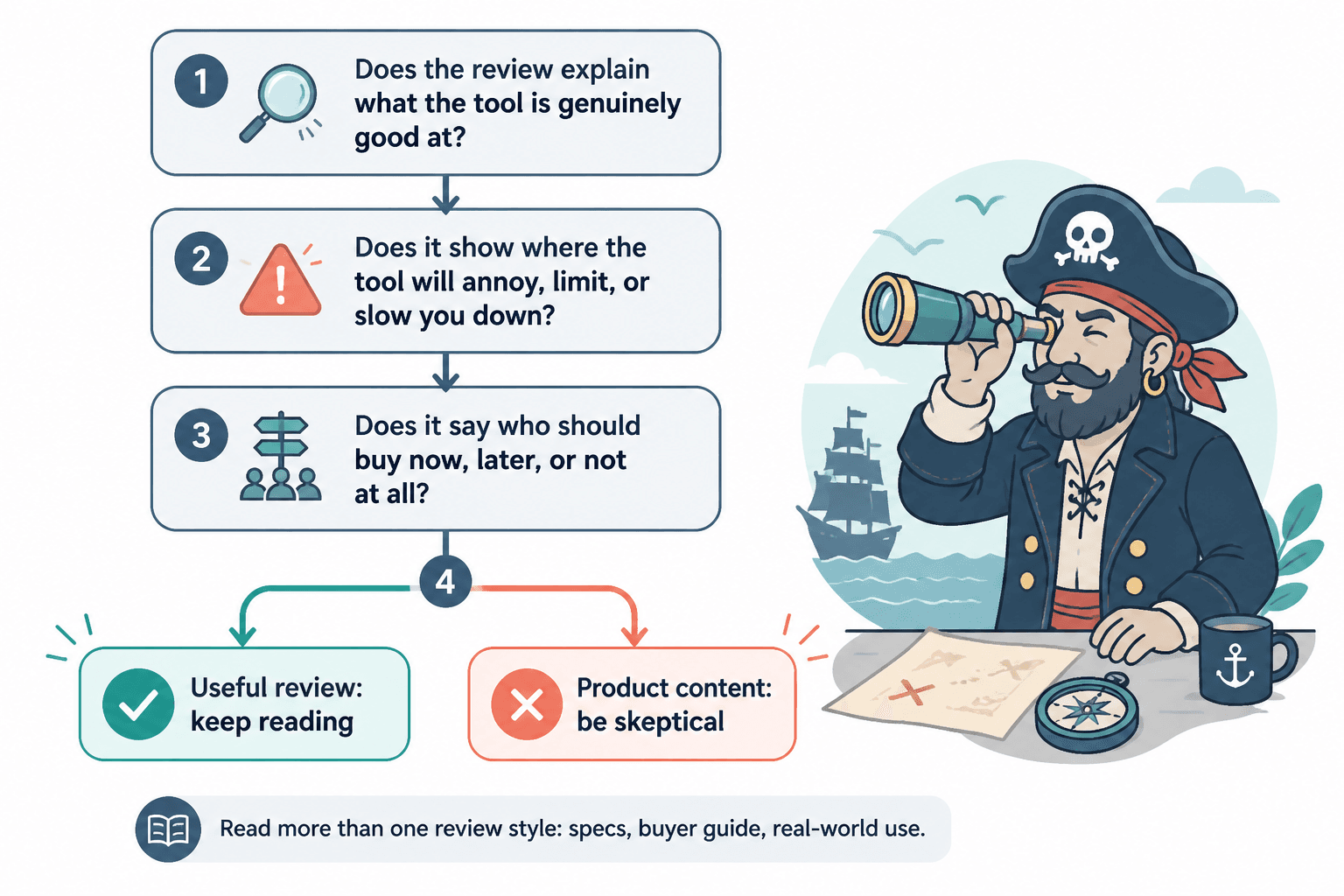
Good tool reviews help you answer three things:
- What this tool is genuinely good at
- Where it will probably annoy, limit, or slow you down
- Who should buy it now, later, or not at all
If a review does not help with those three, it is probably just dressed-up product content.
That is also why it helps to read more than one style of review. A straight product breakdown might be useful for specs. A practical buyer guide might be better for tradeoffs. And examples from real-world use can show what the tool actually looks like when it meets a messy business instead of a clean landing page. If you want more of that angle, this collection of tool reviews is a good place to keep browsing.
How to read pros and cons without getting played
The words “pros and cons” look objective. They often are not.
A review can make a weak tool sound decent just by writing flattering pros and harmless-sounding cons. For example:
- Pro: “Easy to get started”
- Con: “May lack some advanced features”
That sounds fine until you translate it into plain English:
- Real pro: beginner-friendly setup
- Real con: you may outgrow it fast and need to migrate later
That is a very different buying decision.
Look for specific pros, not polite compliments
A useful pro tells you what job the tool handles well.
- Good for repurposing long-form content into short posts
- Fast onboarding for solo creators who hate setup
- Helpful dashboard for tracking outreach without a full CRM
A weak pro sounds like brochure copy:
- User-friendly
- Powerful features
- Robust platform
- Scalable solution
“Robust” has probably never helped anyone make a better purchase.
Look for costly cons, not cosmetic ones
A real con creates friction, waste, or limitation. It affects time, money, usability, adoption, or results.
Useful cons might include:
- Reporting is too shallow for client work
- Templates save time, but outputs need heavy editing
- Integrations are limited unless you use Zapier
- The mobile experience is weak
- Pricing gets expensive once your team grows
- The learning curve is steeper than the homepage suggests
Fluffy cons usually tell you almost nothing:
- Can be overwhelming at first
- Not ideal for everyone
- Some users may prefer other options
That is not a con. That is a shrug wearing a blazer.
The questions to ask before you buy any tool
If you ask better questions, reviews become much more useful. You stop reading like a shopper looking for reassurance and start reading like someone trying to avoid an expensive mistake.
Here are the questions that matter most.
1. What exact job do I need this tool to do?
Not “help with content.” Not “grow the business.” Those are vague enough to justify almost any purchase.
Get specific:
- Draft better first versions faster
- Schedule posts across platforms
- Track warm leads from content
- Create cleaner client proposals
- Turn long videos into short clips
- Organize research and content ideas
The more precise the job, the easier it is to judge the review. A tool can be excellent in general and still wrong for your use case.
2. What am I using now, and what is actually broken?
Sometimes you do not need a new tool. You need to use the current one properly, clean up your workflow, or admit that the issue is not software but strategy.
Harsh, yes. Also often true.
If your content is not converting, a new writing tool may help you draft faster. It will not fix weak positioning, vague offers, or a CTA that sounds like it was stolen from a webinar graveyard.
3. Will this save time, make money, reduce errors, or remove stress?
A tool does not need to do all four. But it should clearly do at least one.
If the value sounds fuzzy, the purchase probably is too. “It seems useful” is how people end up paying monthly for software they open twice.
4. What will setup actually require?
This question gets skipped way too often.
A tool can be powerful and still be a bad buy if implementation is heavy. Reviews should tell you things like:
- How long onboarding takes
- Whether templates are actually usable
- If migration is messy
- Whether integrations are native or patched together
- How much customization is needed before the tool becomes useful
Buying software that needs six extra hours of setup to save you ten minutes a week is not efficiency. It is optimism.
5. What happens when my needs grow?
Some tools are great starter options and bad long-term choices. Others are too bloated for where you are now. A smart review helps you understand both.
Ask:
- Will I outgrow this in six months?
- Will pricing jump hard as I scale?
- Does the tool support team use later?
- Can I export my data easily if I leave?
6. What is the hidden cost?
The hidden cost is rarely just money. It might be learning time, editing time, training your team, buying add-ons, or working around missing features.
This is where honest reviews are worth their weight. The sticker price matters. The maintenance cost matters more.
7. Is this tool improving the work, or just making me feel productive?
There are tools that genuinely improve output. There are also tools that create the lovely illusion of being organized, strategic, and advanced while quietly adding tabs to your browser and nothing to your business.
That distinction matters, especially for creators, consultants, and small businesses. You do not need a cathedral of software to send an email sequence, write better content, or track leads. Sometimes the expensive stack is just procrastination with branding.
A simple way to compare tool reviews before you decide
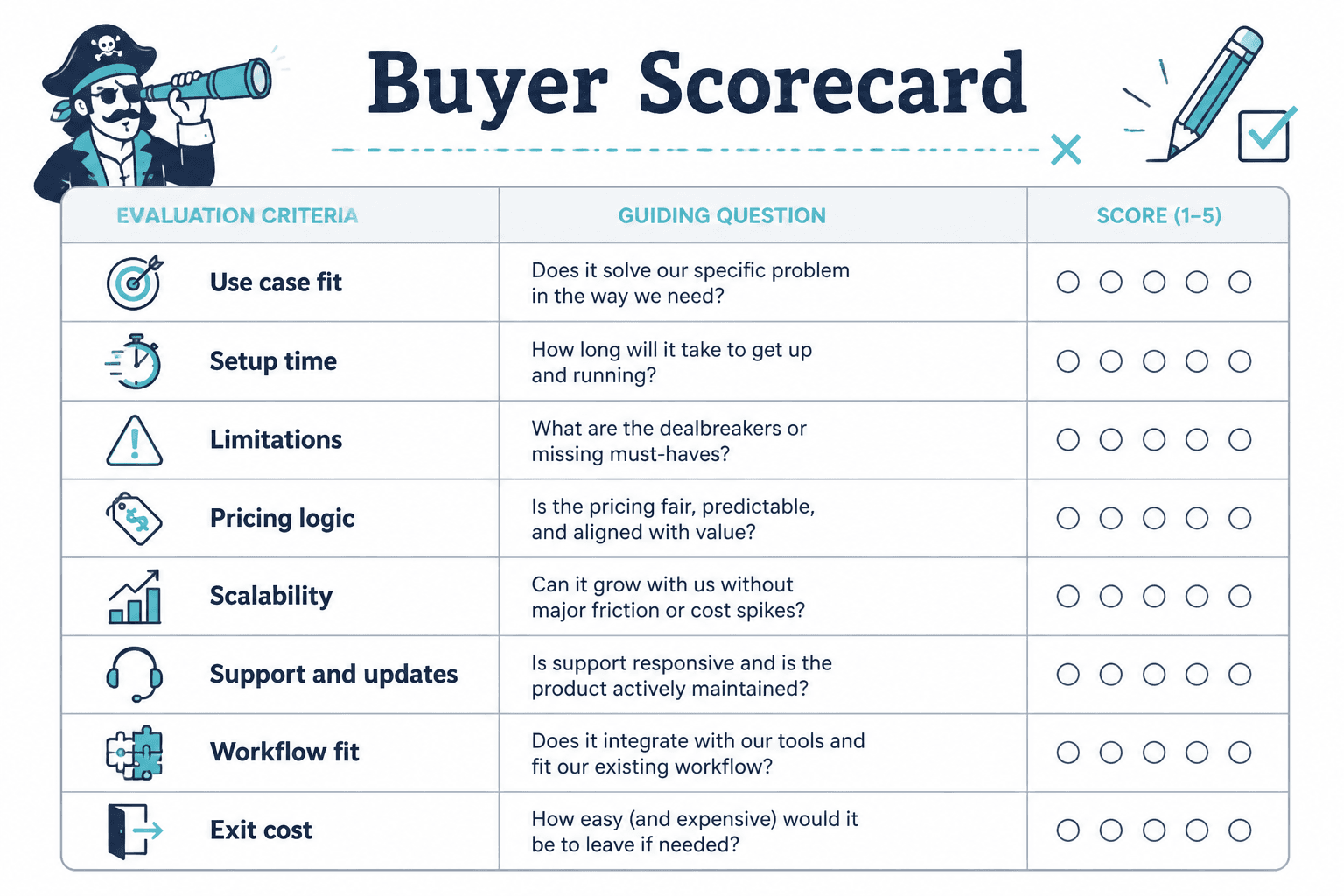
If you are reading multiple reviews, use a simple comparison method instead of trusting your memory. Memory loves shiny claims and forgets annoying details.
Create a quick scorecard with these categories:
| Category | What to check |
|---|---|
| Core job fit | Does it solve the exact problem you have? |
| Ease of use | Can you get value quickly without a long setup spiral? |
| Limitations | What will frustrate you, block you, or require workarounds? |
| Pricing logic | Is the useful version affordable, or only the bait version? |
| Scalability | Will it still work as your needs grow? |
| Support and updates | Does the product seem maintained and supported? |
| Workflow fit | Will it play nicely with what you already use? |
| Exit cost | How painful is it to leave later? |
This is also a good point to cross-check reviews against more buyer-focused comparison content. If you want a sharper framework for that process, read how to compare tool reviews without bias.
How to spot a review that is actually useful
Not every review needs to be negative to be honest. But it should show signs of real evaluation, not just polished approval.
Good signs:
- It names who the tool is best for and who should skip it
- It describes specific use cases
- It includes meaningful limitations
- It mentions tradeoffs between simplicity and power
- It discusses pricing in context
- It compares the tool to realistic alternatives
- It avoids pretending every buyer has the same needs
Bad signs:
- Every product gets glowing praise
- Cons are soft and harmless
- The review sounds copied from the product page
- There is no mention of setup, friction, or learning curve
- The verdict is vague: “great for businesses of all sizes”
- The article rushes readers toward the buy button without enough context
If you want to see what genuinely useful review structure looks like, check out tool review examples that actually help a buyer decide. It is easier to spot quality once you have seen the difference on purpose.
Pros and cons are not enough without buyer context
This is the part many reviews miss: the same feature can be a pro or a con depending on who is buying.
A stripped-down interface might be perfect for a solo creator who wants speed. It might be a problem for an agency that needs permissions, collaboration, and detailed reporting.
Heavy customization might thrill a systems-minded consultant. It might make a coach quietly close the tab and go back to spreadsheets.
That is why “best tool” content gets slippery fast. Best for what? Best for whom? Best at what stage? Best under what budget?
Context changes the answer. Always.
If you are making a shortlist, you will probably also want to pair this article with how to choose tool reviews without wasting money. That piece helps filter the noise before you even start comparing products.
What creators, consultants, and small businesses should care about most
If you run a small business, personal brand, or lean service company, your buying criteria should usually be different from a giant team’s.
You probably care more about:
- Fast time to value
- Clear ROI
- Low setup friction
- Simple workflows
- Enough features, not infinite features
- Reasonable pricing without bloated enterprise nonsense
This matters because many reviews quietly reward complexity. They treat more features as automatically better. They are not. Sometimes more features just means more buttons standing between you and getting your work done.
For small operators, the best tool often is not the most advanced one. It is the one you will actually use consistently without needing a support ticket and a weekend to understand the dashboard.
Before you buy, run this quick decision filter
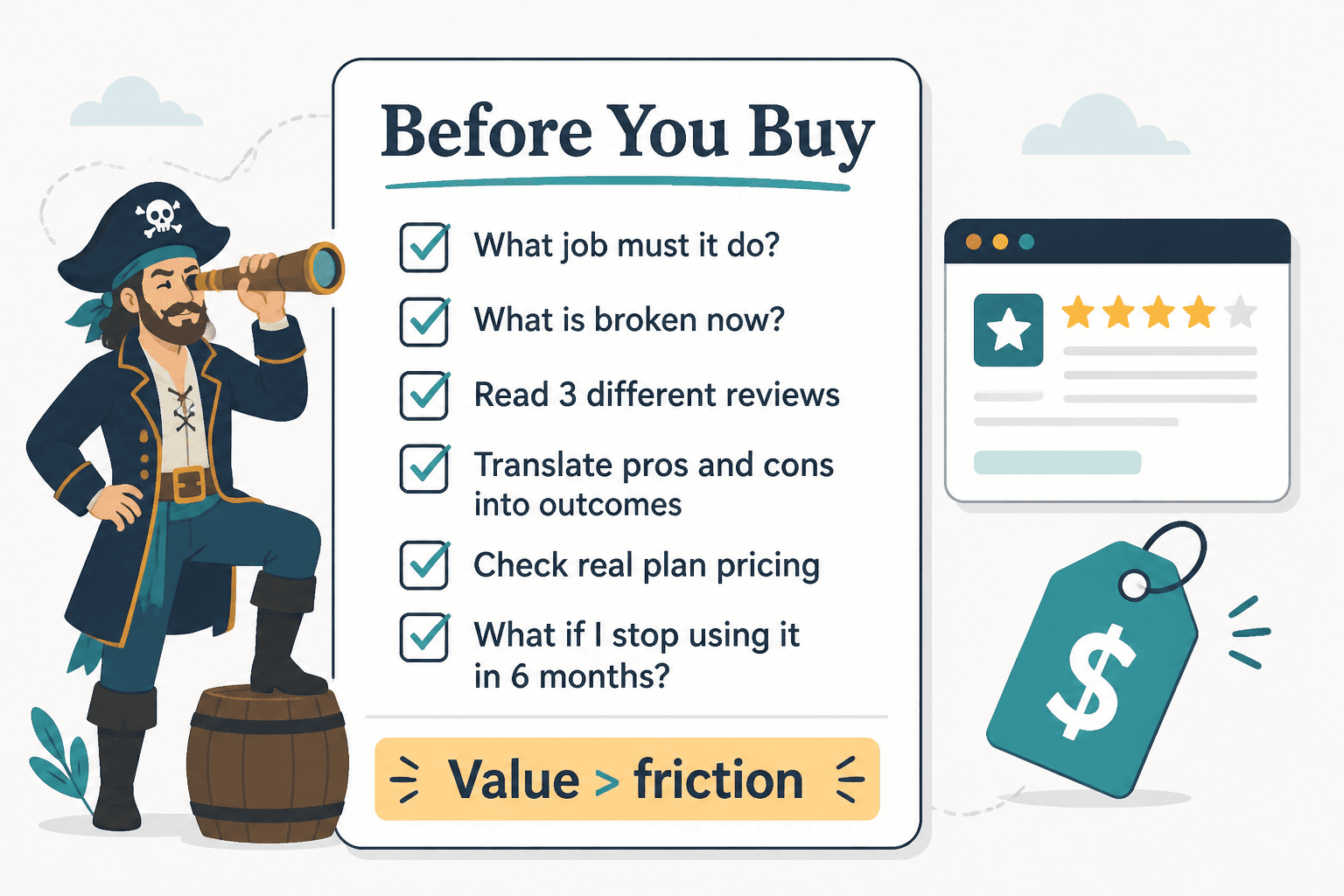
Use this before paying for anything:
- Name the one job you need the tool to do.
- List what is broken in your current setup.
- Read at least three reviews with different angles.
- Translate the pros and cons into real-world outcomes.
- Check pricing at the plan level you would actually need.
- Estimate setup time honestly.
- Ask what happens if you stop using it in six months.
- Buy only if the value is clearer than the friction.
That last point sounds obvious, but people skip it all the time. The prettier the tool, the easier it is to forget to ask whether it will truly earn its place in your workflow.
And if you want a current roundup of options for content-driven businesses, best tool reviews for creators in 2026 can help you narrow the field faster.
Small FAQ
How many tool reviews should I read before buying?
Usually three to five is enough if they are genuinely different in angle. One general review, one comparison-style review, and one practical example-based review is a solid mix.
Should I trust reviews with affiliate links?
Possibly, but do not trust them blindly. Affiliate links do not automatically make a review bad. They do increase the need for specifics, honest downsides, and useful comparisons.
What matters more: features or ease of use?
For most solo operators and small teams, ease of use wins more often than people admit. A tool with fewer features that gets used consistently usually beats a powerful tool gathering dust.
When should I avoid buying a new tool?
If you cannot name the exact problem it solves, if your current issue is really strategy not software, or if the setup burden outweighs the likely gain, pause the purchase.
Buy for fit, not for hype
The best use of Best Tool Review Pros and Cons Questions to Ask Before You Buy is not finding the tool with the nicest homepage or the longest feature list. It is finding the tool that fits your work well enough to save time, reduce friction, or improve results without creating new nonsense to manage.
The bigger point is simple: clearer structure and clearer writing make the piece more useful. That is usually what makes the ending land better too.