
Most tool reviews are either uselessly positive or weirdly theatrical.
You know the type. “This changed everything.” “My full workflow is now 10x faster.” “I can’t believe this app exists.” Then you read three more paragraphs and still have no clue who the tool is actually for, what it does well, what it does badly, or whether it is worth your money.
That is the problem this Tool Reviews Guide for Creators Who Care About Quality is here to fix. If you create content, sell expertise, run a solo business, or recommend tools to an audience, you do not need more affiliate-flavored fog. You need a way to review tools with taste, standards, and enough honesty to be useful.
This guide will help you evaluate tools properly, write better reviews, and spot the difference between software that looks impressive in a demo and software you will still want to use three months later. There is a difference. It matters. Your patience and credit card would probably like you to notice it sooner.
To see how this fits into the wider strategy, open the parent guide.
What quality actually means in a tool review
A quality tool is not just a tool with a sleek homepage, a pile of features, and a founder who posts aggressively on X.
For creators, quality usually comes down to something much less glamorous:
- Does it solve a real workflow problem?
- Does it save time without creating new friction?
- Is it reliable enough to trust with repeat use?
- Is it clear what the tool is best for and not best for?
- Does it help produce better work, not just more activity?
- Is the price reasonable for the value and stage of the user?
That last one matters more than people admit. A tool can be excellent and still be the wrong choice for most creators. If you review a premium enterprise-grade platform as if it is a sensible pick for a solo consultant trying to write three strong posts a week, that is not a good review. That is lazy framing.
Good reviews are not trying to crown one universal winner. They are trying to reduce bad decisions.
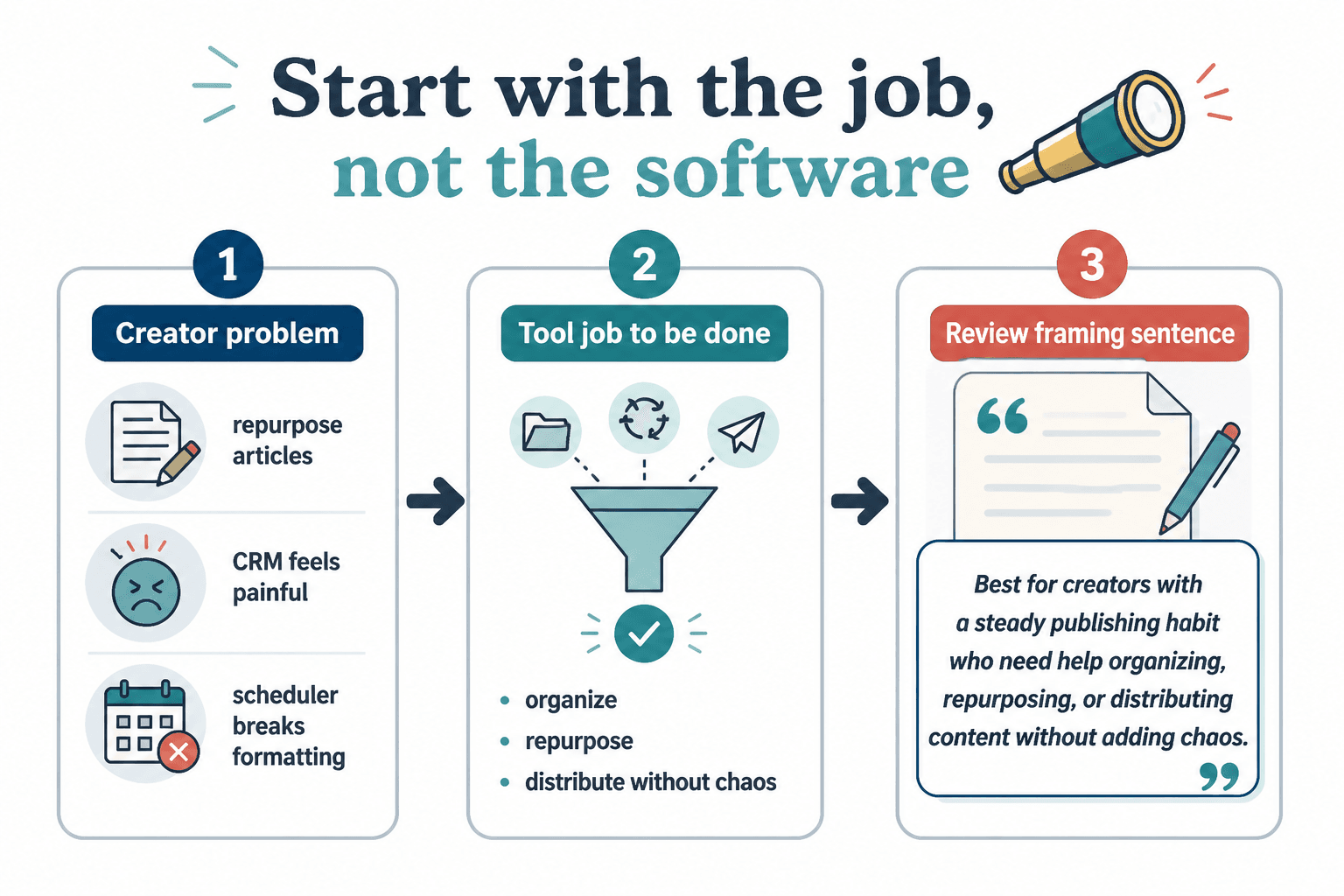
Start with the job, not the feature list
The fastest way to ruin a review is to organize it around features instead of outcomes.
Creators do not buy “multi-format publishing support” or “AI-powered workspace enhancement.” They buy things like:
- A faster way to draft threads
- A better system for storing post ideas
- A cleaner client-content workflow
- An easier way to repurpose articles
- A CRM that does not feel like punishment
- A scheduler that does not make formatting worse
So before you review any tool, define the actual job the reader wants done. If you skip that, you end up reviewing abstract software instead of practical usefulness.
A better review usually starts with a sentence like this:
This tool is best for creators who already have a steady publishing habit and need help organizing, repurposing, or distributing content without adding more chaos.
That one sentence already tells the reader more than a bloated “full overview” section in half the reviews online.
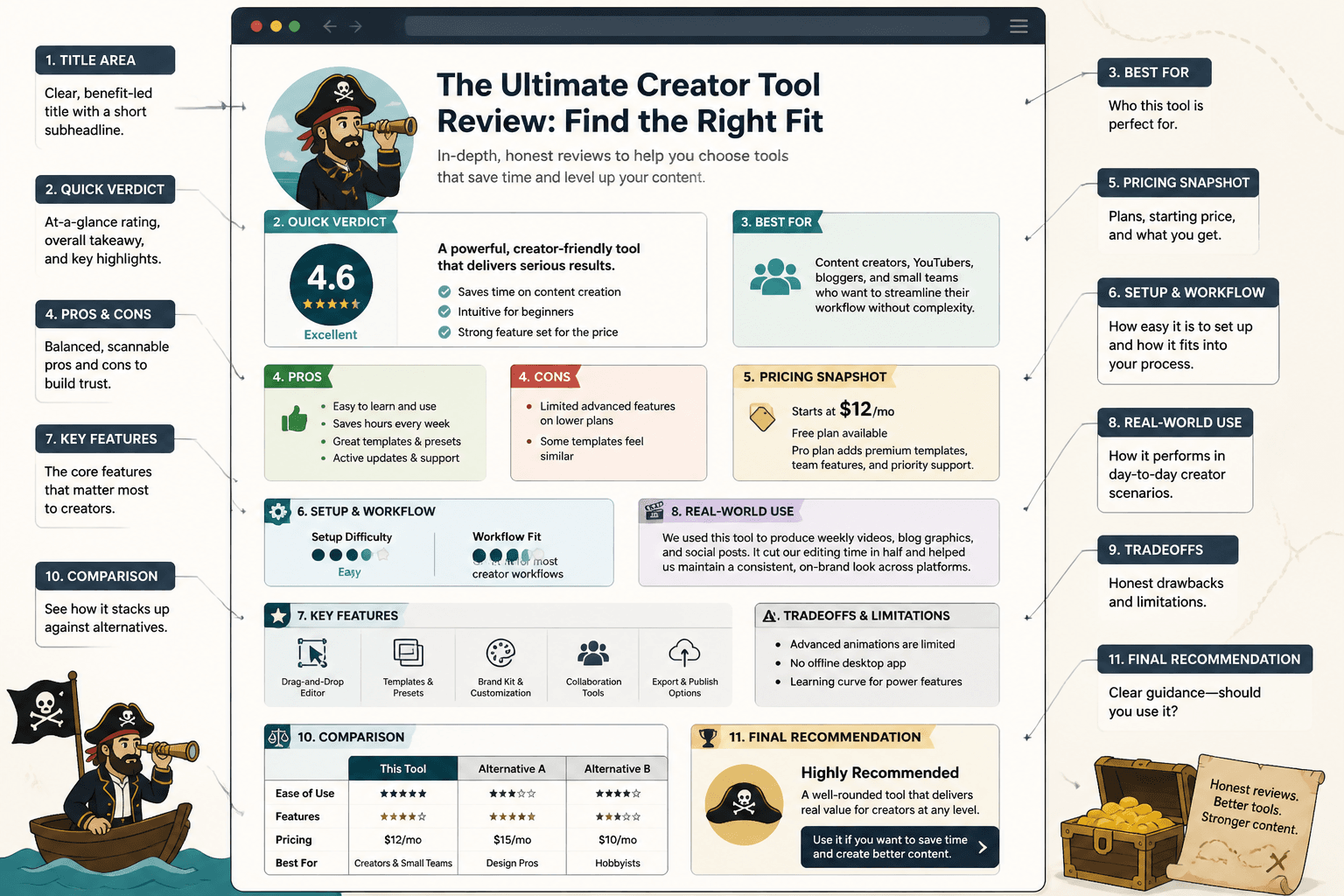
The 7-part review framework that keeps you honest
If you want your review to be useful, use a repeatable structure. Not because formulas are magical, but because they stop you from drifting into hype and filler.
1. Who the tool is for
Be specific. “Creators” is too broad. A YouTuber, ghostwriter, course creator, and newsletter operator can all need very different things.
Try language like:
- Best for solo creators with a simple content pipeline
- Strong fit for agencies managing multi-client publishing
- Useful for consultants turning long-form ideas into short-form posts
- Probably overkill for early-stage freelancers with low output
2. The problem it solves
Name the annoying thing clearly. Reviews get much sharper when they are anchored in friction.
Examples:
- Too many content ideas scattered across notes, docs, and screenshots
- Posting manually across platforms wastes time and attention
- Repurposing takes longer than writing from scratch
- Lead follow-up falls apart after someone engages with content
3. What it does well
This is where you can talk features, but only after tying them to outcomes.
Weak review language:
It offers AI suggestions, folder organization, analytics, and custom views.
Stronger review language:
The custom views make it much easier to separate raw ideas from publish-ready drafts, which matters if your content system currently looks like a digital junk drawer.
4. What it does badly
This is where trust is won.
If your review has no downsides, it sounds sponsored even when it is not. Every tool has tradeoffs. The interface may be clean but rigid. The automation may be powerful but annoying to set up. The AI may be fast but bland. Say that.
Readers do not need perfection. They need a realistic picture.
5. What kind of creator should skip it
This is one of the most underrated parts of a strong review.
A tool can be good and still not be for:
- Beginners who do not yet have a repeatable workflow
- Writers who prefer manual control over automation
- Creators with tiny budgets and simple needs
- People looking for strategy when the tool only helps execution
That kind of clarity makes your review feel much more trustworthy than “works for everyone” nonsense.
6. Pricing in context
Do not just list the monthly price. Explain what kind of value would justify that price.
For example, a $39 tool may be cheap for a creator making weekly sales from content and expensive for someone still guessing what to post.
Context beats sticker shock.
7. Final verdict with clear fit
End with a practical recommendation, not a dramatic flourish.
Something like:
A strong choice for high-output creators who want a more structured system for publishing and repurposing. Less compelling if you are still figuring out your voice, offer, or basic content strategy.
What to test before you trust your own opinion
A surprising number of reviews are based on one afternoon of clicking around.
That is not testing. That is browsing with confidence.
If you want a better review, pressure-test the tool in the kind of conditions a creator would actually face. That means using it as part of a real workflow, not just admiring the dashboard.
Use-case tests worth running
- Create something from scratch using the tool
- Import or organize existing content
- Try a repeat task more than once
- Use it on a rushed day, not just a quiet one
- Check how easy it is to retrieve work later
- Test onboarding without reading every tutorial first
- See what happens when your workflow gets messy
That last one matters because creator workflows are rarely neat. You have half-finished drafts, scattered notes, changing priorities, reused assets, and the occasional tab graveyard. A tool that only looks good in ideal conditions is not especially helpful.
How to review common creator tool categories without sounding clueless
Not all tools should be reviewed the same way. A writing assistant should not be judged by the same standards as a scheduler or CRM. Obvious, yes. Ignored constantly, also yes.
Writing and drafting tools
Review these based on speed, flexibility, idea support, editing usefulness, and output quality.
Ask:
- Does it help generate clearer first drafts?
- Can it adapt to different tones and formats?
- Does it make your writing sharper or just more generic?
- How much cleanup is needed after using it?
If the tool produces polished sludge, say so. Fast bad writing is still bad writing.
Scheduling and publishing tools
Review these based on ease of use, formatting accuracy, workflow clarity, cross-platform support, and reliability.
Ask:
- Does it make publishing smoother or just more centralized?
- Does formatting survive the trip?
- Can you queue content without making it feel robotic?
- Does it help with workflow visibility for a team or solo creator?
Repurposing tools
Review these based on output quality, speed, adaptability, and how much human editing is still required.
Many repurposing tools promise leverage and deliver cleanup work. That is not a tiny flaw. That is the entire review.
CRM and lead-management tools for creators
Review these based on simplicity, pipeline usefulness, note-taking, contact tracking, and how well they support relationship-driven sales.
A creator CRM does not need to feel like enterprise software escaped into your laptop. If it is bloated, clunky, or overbuilt for a solo operator, say that plainly.
Template libraries and content systems
Review these based on usability, adaptability, strategic quality, and whether they actually reduce thinking friction.
Templates are useful when they create structure. They are not useful when they mass-produce sameness.
For more category-specific frameworks, it helps to compare your process with creator tool review frameworks so you are not making up standards halfway through the article.
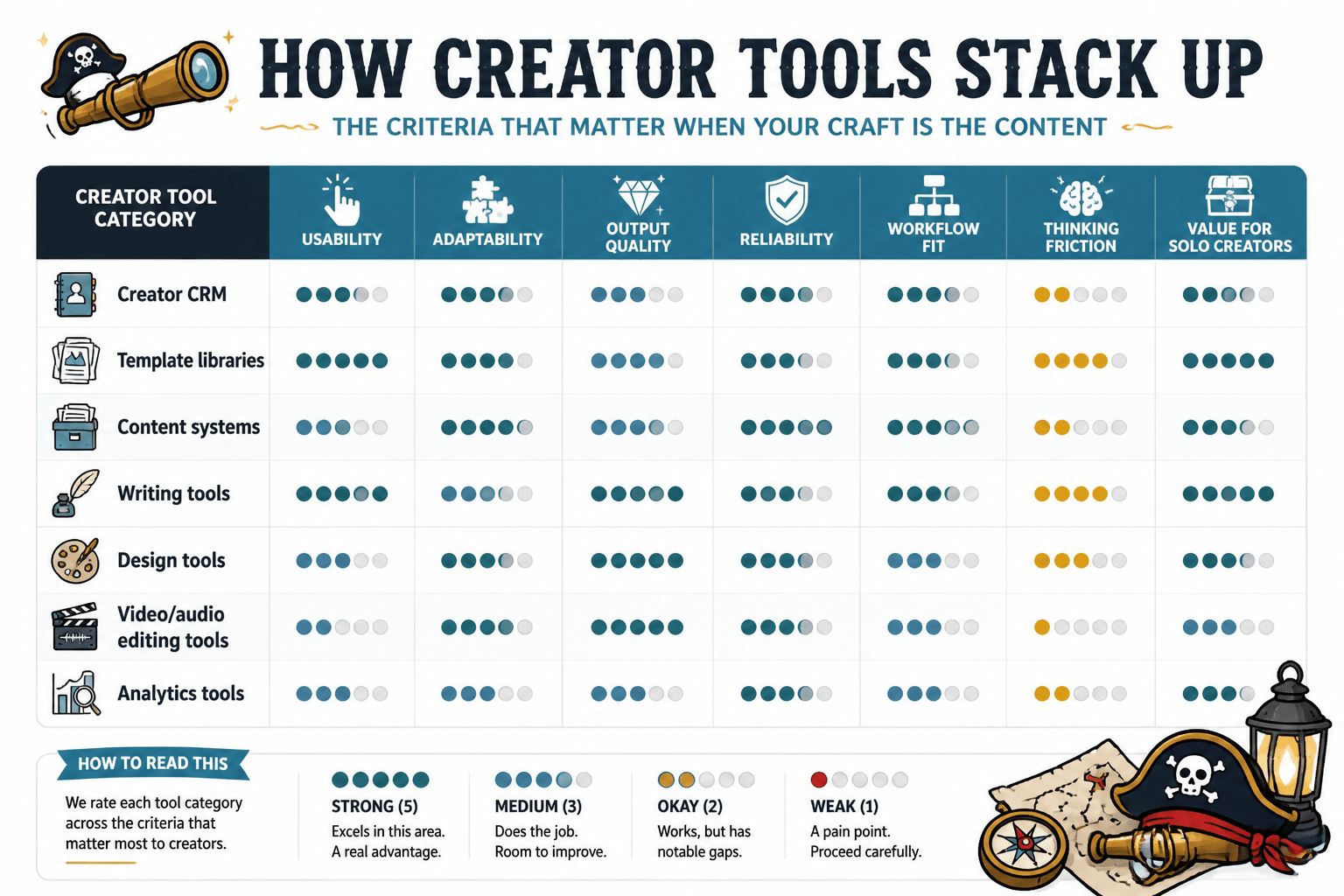
A simple scoring system that does not pretend to be scientific
Scoring can help, but only if you treat it as a shortcut for judgment, not a replacement for judgment.
Use a light scoring model like this:
| Criteria | What to look for |
|---|---|
| Usefulness | Does it solve a real creator problem? |
| Ease of use | Can someone use it without a three-hour setup spiral? |
| Output quality | Does it help produce better work? |
| Reliability | Does it work consistently without weird friction? |
| Flexibility | Can it adapt to different workflows or content styles? |
| Value | Is the cost reasonable for the likely user? |
You can score each one out of 5 if you want, but the written explanation matters more than the number. A 3 out of 5 for flexibility means nothing unless you explain why it matters.
The point is not to cosplay consumer lab testing. The point is to make your reasoning visible.
How to write tool reviews without sounding like affiliate fluff
The fastest way to wreck a review is to sound financially overinvested in the outcome.
Readers can smell this. They may not know exactly what is off, but they know when every sentence feels like it is trying to escort them to a button.
If you want trust, write with a little more restraint.
What fluff sounds like
- Overpraising basic features
- Ignoring obvious downsides
- Using vague claims like “perfect for all creators”
- Writing long intros that avoid any real opinion
- Hiding the actual recommendation behind enthusiasm
What a trustworthy review sounds like
- Clear about fit
- Specific about tradeoffs
- Honest about learning curve
- Measured about results
- Useful even if the reader never buys
If you want a deeper breakdown of the writing side, read how to write tool reviews without sounding like affiliate fluff. It will save you from the usual “top 10 tools” swamp.
The questions every good creator tool review should answer
If your review does not answer these, it probably is not done yet.
- Who is this tool actually for?
- What problem does it solve better than simpler alternatives?
- What does the setup process feel like?
- What gets easier after using it for a week or a month?
- What is still annoying?
- What kind of creator should probably skip it?
- Is the price justified for the likely user?
- Would you still recommend it if there were no affiliate payout attached?
That last question is brutal and very useful. If the answer is no, maybe the issue is not your review angle. Maybe the tool just is not that compelling.
How creators should use reviews before buying anything
This guide is not only for people writing reviews. It is also for creators trying not to waste money on shiny software with an identity crisis.
When reading reviews, watch for three things.
1. Specificity
Does the reviewer actually explain use cases, tradeoffs, and workflow impact? Or are they just reciting product copy with better punctuation?
2. Context
Is the recommendation meant for someone at your stage, with your budget, and your kind of workflow? Advice for a content team of eight is not especially helpful if your “team” is you and one heroic Google Doc.
3. Downsides
If the review has no real drawbacks, be suspicious. Not paranoid. Just appropriately suspicious.
If you are evaluating purchase decisions more carefully, this guide on choosing tool reviews without wasting money is worth your time.
What a useful tool review structure looks like in practice
Here is a simple structure you can reuse for your own creator-focused reviews:
- Open with the real problem the tool claims to solve
- State who the tool is best for
- Explain what it does well in practical terms
- Explain where it falls short
- Describe the workflow experience, not just the features
- Discuss pricing in context
- Give a clear recommendation with boundaries
That structure keeps your review grounded in usefulness instead of turning into a software brochure with adjectives.
If you want live examples, browse the broader tool reviews section and compare how different tools are framed for different types of creators. You can also check the best tool reviews for creators in 2026 to see how stronger review logic holds up across categories.
For a wider path through this topic, the parent sections at monetization and money-content tool reviews can help connect reviews to the bigger business question: does this tool actually support revenue, trust, or workflow quality, or is it just another tab you feel guilty about paying for?
Common mistakes that make tool reviews weak
- Reviewing the homepage instead of the experience
- Praising features without explaining outcomes
- Ignoring setup friction
- Acting like one tool fits everyone
- Writing for SEO first and usefulness second
- Refusing to name obvious tradeoffs
- Confusing novelty with quality
Novelty gets far too much credit in creator-tool land. A fresh interface is nice. A weird AI flourish is mildly entertaining. Neither matters much if the tool makes real work harder, muddier, or more generic.
The best reviews are not trying to be the most excited person in the room. They are trying to be the most useful.
Quick FAQ
How long should a creator tool review be?
Long enough to explain fit, tradeoffs, workflow impact, and pricing clearly. If you can do that in 900 words, great. If it needs 1,800, fine. Padding does not make a review thorough.
Should tool reviews include scores?
They can, if the scoring is simple and explained well. Scores are useful summaries, not substitutes for judgment.
Can affiliate reviews still be trustworthy?
Yes, if they are honest about limitations, clear about fit, and useful even when the reader does not buy.
What matters more: features or workflow?
Workflow. Features only matter if they improve the work.
How many tools should you compare in one review article?
Usually fewer than you think. Depth beats a bloated list of shallow descriptions.
Final thought: quality is not hype with nicer formatting
A strong Tool Reviews Guide for Creators Who Care About Quality is really a guide to judgment.
The point is not to sound clever, cover every feature, or act impressed by software doing basic software things. The point is to help creators make better decisions with their time, money, and workflow.
If a review helps someone avoid a bad-fit tool, that is useful. If it helps them choose one that genuinely supports better work, even better. That is the standard. Not hype. Not volume. Not “best” labels slapped onto whatever has the noisiest landing page this month.
Review tools like someone who respects the reader’s attention. That alone will put you well ahead of most of the internet.
The bigger point is simple: clearer structure and clearer writing make the piece more useful. That is usually what makes the ending land better too.