
Most people do not waste money on tools because they picked the worst product on the market. They waste money because they trusted the wrong review.
That is the part people skip. They compare features, screenshots, pricing tiers, maybe a few glowing testimonials, and then click buy like they are making a sensible adult decision. Two weeks later, the tool is clunky, half the “must-have” features are irrelevant, and the workflow they thought they were buying does not actually fit how they work.
If you want to know how to choose tool reviews without wasting money, the real skill is not finding more reviews. It is learning how to read reviews like a buyer instead of a dazzled browser.
This article will help you do exactly that. You will learn how to spot useful reviews, ignore the padded nonsense, compare opinions without getting manipulated, and make a buying decision that matches your actual needs, budget, and workflow. Which is a much better outcome than collecting 19 tabs and still buying the wrong thing.
If you want the bigger picture, start with the parent guide.
Why most tool reviews are not actually helping you buy better
A lot of tool reviews are built to rank, convert, or fill content calendars. Not to help you make a clean decision.
That does not mean every review is dishonest. It does mean many reviews are written from the wrong angle. They are often too broad, too positive, too feature-heavy, or too detached from real usage to answer the one question you actually care about: Will this tool work for me without becoming an expensive irritation?
Good reviews reduce uncertainty. Bad reviews increase it while pretending to help.
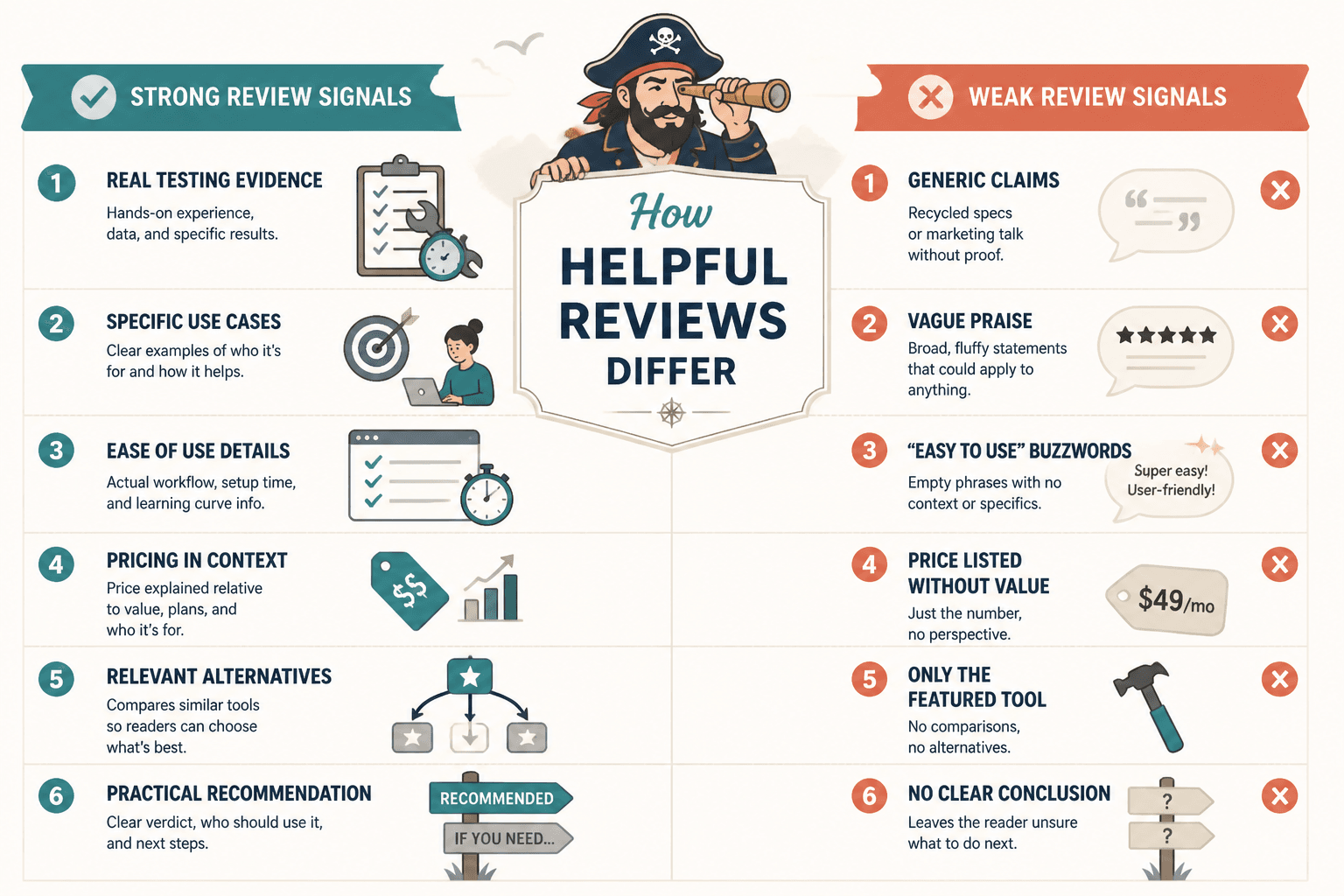
Here is what weak reviews tend to do:
- Repeat the company’s messaging in slightly different words
- List features without explaining who they matter for
- Avoid meaningful downsides
- Compare tools at a surface level only
- Use generic ratings like “9.2/10” with no real context
- Treat every buyer as if they have the same needs
- Push urgency before trust
If a review says a tool is “great for businesses of all sizes” that is usually your cue to trust it less, not more. Software is rarely for everybody. Neither are templates, schedulers, CRMs, writing tools, course platforms, analytics tools, or funnel builders. Broad praise often hides lazy thinking.
Useful reviews are specific. They tell you where a tool shines, where it struggles, what kind of user it suits, and what tradeoffs come with using it. Because every tool has tradeoffs. Even the shiny ones with aggressive affiliate programs.
Start with your use case before you read a single review
Before you evaluate any review, get painfully clear on what you need the tool to do. Not what looks impressive. Not what creators on X are praising this week. What you actually need.
This sounds obvious, yet loads of people skip it. Then they buy software based on popularity, not fit. That is how you end up paying for enterprise complexity when all you needed was one reliable function and a clean interface.
Write down these five things first:
- Your job to be done: What exactly do you need help with?
- Your must-haves: Which features are non-negotiable?
- Your nice-to-haves: What would be helpful but not required?
- Your constraints: Budget, time, technical skill, team size, integrations
- Your dealbreakers: What would make the tool annoying enough to abandon?
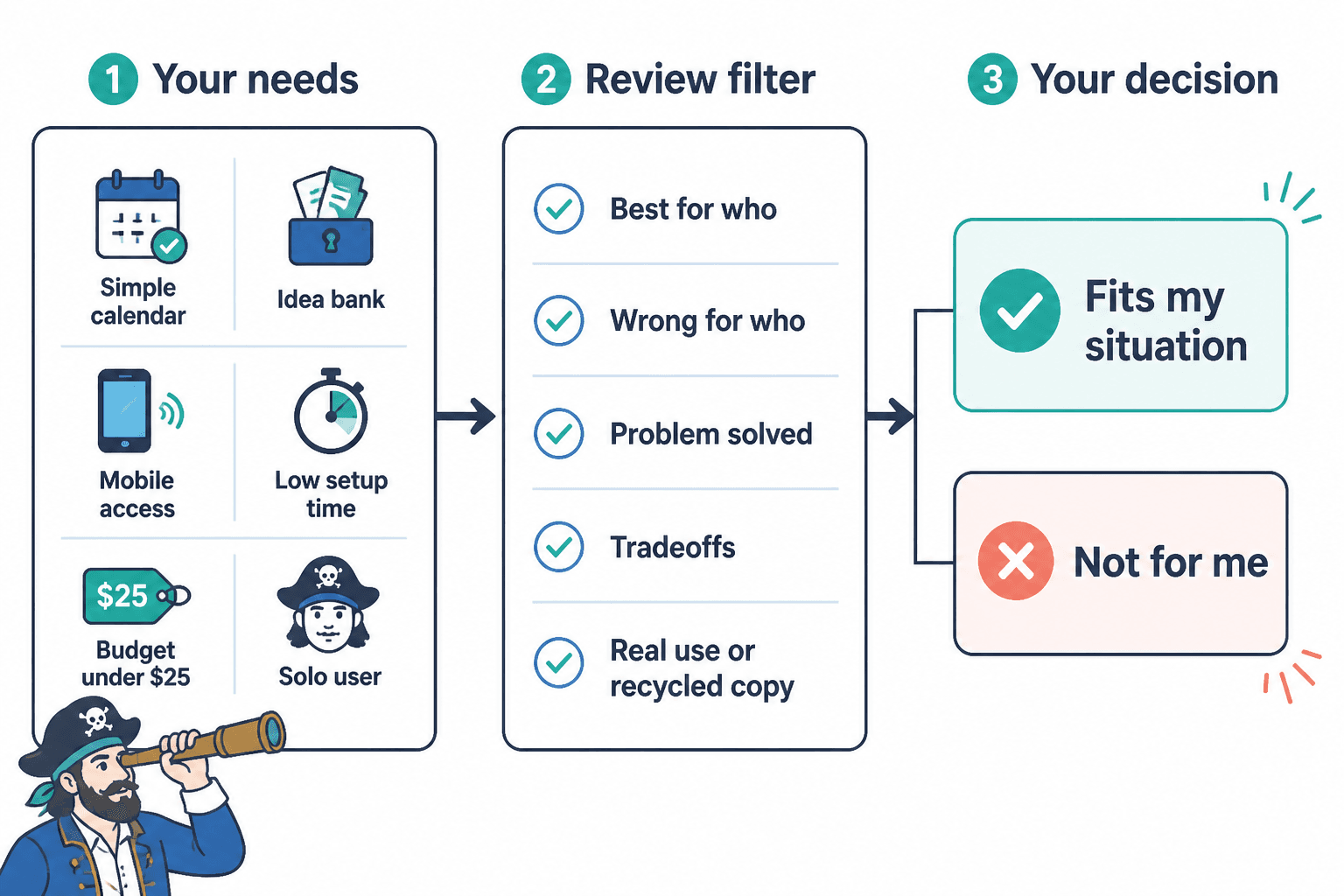
For example, if you are choosing a content planning tool, your real need might not be “best content tool.” It might be:
- I need a simple calendar and idea bank
- I work solo, so I do not need team collaboration
- I need mobile access because I capture ideas while out
- I do not want a tool that takes two hours to set up
- My budget is under $25 a month
Now reviews become easier to judge. Instead of asking, “Is this tool good?” you ask, “Is this review telling me whether this tool fits my situation?” That is a much smarter question.
How to choose tool reviews without wasting money: the actual filter
If you remember one section from this article, make it this one. A solid review should help you answer five things quickly:
- Who is this tool best for?
- Who is it probably wrong for?
- What problem does it solve well?
- What frustrations or tradeoffs come with it?
- Is the reviewer speaking from real use or recycled copy?
That is the filter. Everything else is support material.
1. Check whether the reviewer has a clear point of view
Useful reviewers make judgments. They do not just describe. They tell you what is strong, what is weak, and what kind of buyer should care.
Weak review language sounds like this:
This platform offers a robust suite of features for users looking to improve productivity.
That sentence says almost nothing. “Robust suite of features” is the kind of phrase that should be fined.
Stronger review language sounds more like this:
This tool is best for solo operators who want a simple workflow and can live without advanced reporting. If you need deep customization, it will feel cramped fast.
That is useful because it narrows the fit and names the tradeoff.
2. Look for signs of real usage
A strong review usually includes evidence that the person actually used the tool or understood it beyond the pricing page.
Good signs include:
- Specific comments about setup, learning curve, or workflow friction
- Mentions of features that sounded good but were less useful in practice
- Clear examples of what the tool handled well
- Discussion of support quality, onboarding, reliability, or limitations
- Comparisons grounded in actual differences, not vague “better for teams” filler
Bad signs include:
- Feature lists copied from the product page
- No downsides at all
- Very broad praise with no user context
- Comparison tables without explanation
- Every tool somehow being “excellent”
If a review never mentions friction, limitations, or tradeoffs, it is probably marketing in a trench coat.
3. Pay attention to what the review does not say
Sometimes the biggest red flag is omission.
If a review covers automation software and says nothing about setup time, integration headaches, reporting quality, or what happens once your workflow gets more complex, that is a problem. If a review covers writing tools and says nothing about output quality, editing burden, or how much guidance the tool needs, also a problem.
The silence tells you the review may not be built around buyer reality. It may be built around publishing speed.
4. Separate review quality from tool popularity
A popular tool can still be wrong for you. An unpopular tool can still be the better fit.
People often confuse market visibility with buyer suitability. They are not the same thing. Big tools have bigger affiliate ecosystems, more YouTube coverage, more listicles, and more social proof. That can make them look safer. Sometimes they are. Sometimes they are just louder.
Do not ask, “Which tool shows up everywhere?” Ask, “Which review helps me understand fit, friction, and tradeoffs clearly?”
The 7 questions every tool review should help you answer
When you are deciding whether a review is worth trusting, run it through these questions.
- What kind of buyer is this tool actually for?
Good reviews define the user clearly. - What is the strongest reason to choose it?
If the main benefit is vague, the review is probably vague too. - What are the real drawbacks?
There should be at least a few. - How hard is it to start using well?
Ease of use matters more than feature count for many buyers. - What happens after the honeymoon period?
Does it scale, get cluttered, become expensive, or stay useful? - What would make someone regret buying it?
This is one of the most revealing buyer questions. - Compared to what?
Without a frame of comparison, praise means very little.
If you want to sharpen that comparison process even more, read how to compare tool reviews with buyer questions instead of bias. It pairs well with this article because comparison gets messy fast once five tabs turn into fifteen.
Red flags that usually mean the review is wasting your time
Some reviews are not evil. They are just useless. Which can still cost you money.
Watch for these red flags:
- No clear audience fit: The review never says who should use the tool.
- No downside section: Apparently this software was forged by angels. Sure.
- Feature overload: Endless menus of features with no prioritization.
- Rating inflation: Every category gets a 9 or 10.
- Affiliate urgency: “Buy now” energy appears before trust is earned.
- Thin comparisons: Tools are compared by pricing and surface features only.
- No workflow context: You never learn how the tool behaves in real use.
- Generic conclusion: The review ends with “great choice for many users.” Not helpful.
A review can be well designed, readable, and still be weak. A clean layout is not proof. Fancy comparison tables are not proof. A lot of review content is simply organized ambiguity.
If you want a stronger framework for evaluating strengths and weaknesses, these pros and cons questions to ask before you buy will help you pressure-test the review instead of just absorbing it.
What a genuinely useful tool review looks like
A strong tool review usually has a shape. Not a rigid formula, but a useful structure that mirrors how buyers think.
| Section | What it should do |
|---|---|
| Quick verdict | State who the tool is for and the main tradeoff |
| Best use cases | Explain where it fits naturally |
| Key strengths | Highlight what actually makes it worth considering |
| Key limitations | Name frustrations, missing features, or poor fit scenarios |
| Ease of use | Show setup difficulty, learning curve, and maintenance burden |
| Pricing context | Explain value, not just cost |
| Alternatives | Compare based on user needs, not popularity alone |
| Bottom line | Help the buyer make a practical decision |
This is why good reviews feel clarifying. They reduce noise. They do not just hand you more information and wish you luck.
For examples of what that looks like in practice, these tool review examples that actually help a buyer decide are worth studying. Seeing the difference side by side is often faster than reading another theory-heavy guide.
How to compare multiple reviews without getting lost
Once you read more than three reviews, your brain starts doing a very annoying thing. It replaces clarity with volume. Suddenly everything sounds familiar, every tool looks “powerful,” and your confidence drops instead of improving.
That is why you need a simple comparison method.
Use a buyer scorecard, not vibes
Make a quick table for the top three to five tools you are considering. Score them against your actual needs, not generic review criteria.
| Criteria | Tool A | Tool B | Tool C |
|---|---|---|---|
| Core job to be done | |||
| Ease of setup | |||
| Learning curve | |||
| Must-have features | |||
| Nice-to-have features | |||
| Monthly cost | |||
| Scales with your needs | |||
| Likely frustrations |
This forces you to compare tools based on fit instead of shiny-object drift.
Weight your criteria
Not every factor matters equally. If budget is tight, pricing may matter more than design polish. If your time is stretched, ease of setup may matter more than advanced flexibility.
A cheap tool you never adopt is more expensive than a pricier tool you actually use.
Look for repeated friction, not repeated praise
When multiple reviews mention the same downside, pay attention. Repeated complaints about setup complexity, poor support, buggy integrations, or confusing UI are more informative than repeated praise like “great tool” or “highly recommended.”
Praise is cheap. Friction is revealing.
How budget changes the way you should read reviews
If your budget is small, your review standards should be stricter, not looser.
People with tight budgets often get pushed toward two bad decisions. First, buying the cheapest option because it feels safer. Second, overbuying because they are scared of buying twice. Both can go wrong.
When money is tight, the better question is not just “What is the cheapest decent tool?” It is “What tool gives me enough of what I need, with the lowest regret risk?”
That means reviews should help you judge:
- How quickly you can get value from the tool
- Whether you will outgrow it too fast
- Whether setup is realistic for your skill level
- What hidden costs may show up later
- Whether a free or lower-tier option is actually usable
If that is your situation, this guide on reviewing tool reviews with a tiny budget goes deeper on low-risk decision-making without defaulting to bargain-bin chaos.
Do not trust reviews that ignore implementation reality
A tool is not just a product. It is a process attached to a product.
This is one of the biggest reasons buyers waste money. They evaluate the tool as if buying access equals getting results. It does not. A scheduler still needs a content system. A CRM still needs follow-up habits. A writing tool still needs input worth shaping. A funnel tool still needs an offer people actually want.
So when you read reviews, look for comments that deal with implementation, not just interface.
- How much setup is required?
- What kind of user discipline does the tool assume?
- Does it work well out of the box or need customization?
- Will it simplify your workflow or add another layer to manage?
- Is it solving a real bottleneck or just making you feel organized?
This matters especially in categories tied to content, monetization, and funnels. Tools can support a process. They cannot replace strategy, positioning, or judgment. Reviews that blur that line tend to oversell outcomes.
If you are exploring more buyer-focused review guidance, the broader tool reviews section can help you evaluate these purchases with a bit more caution and a lot less optimism-fueled clicking.
A simple review-reading process you can use before you buy
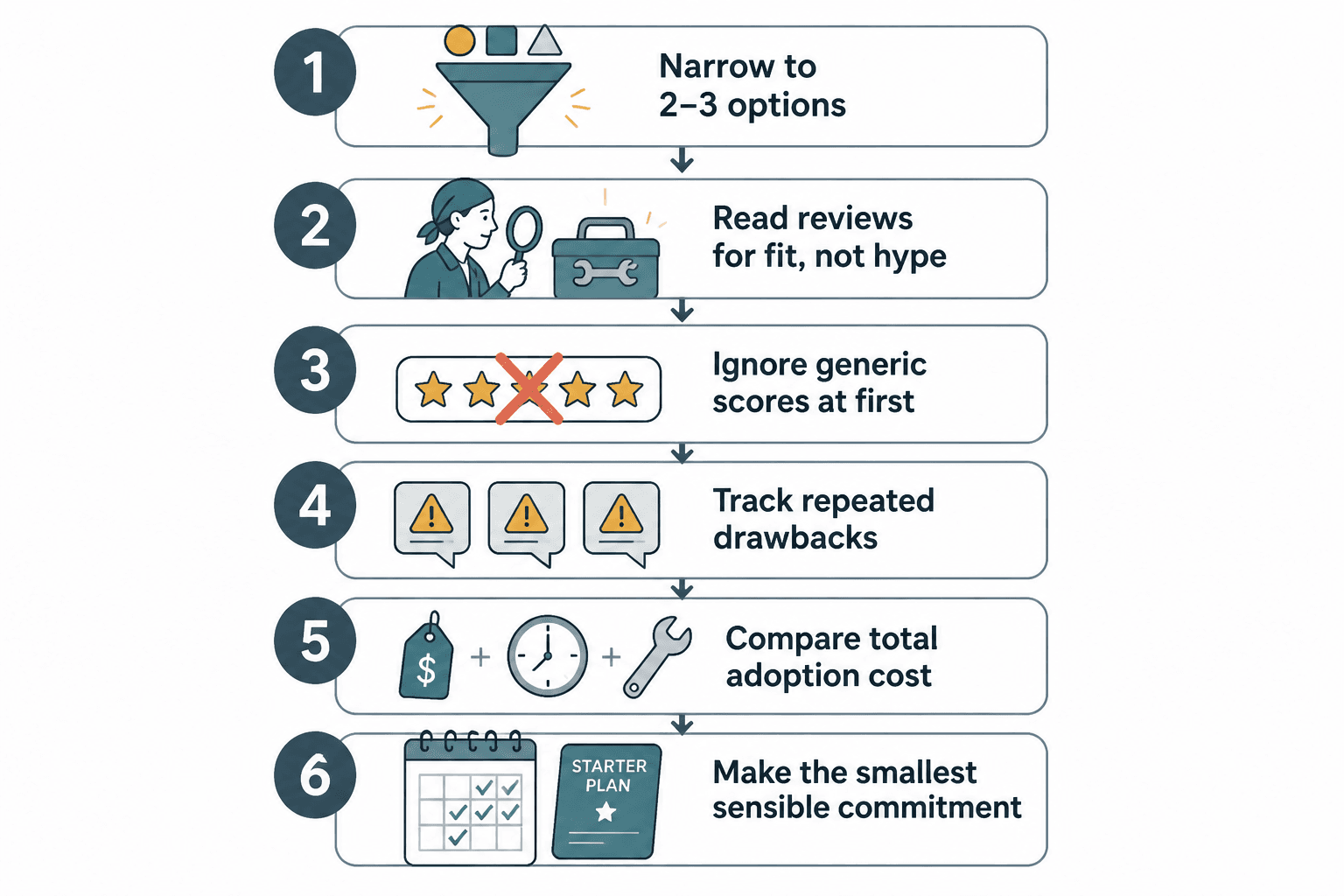
If you want a practical system, use this.
- Define your use case.
Write down what the tool must do, what it must not do, and your budget. - Shortlist 3 to 5 tools.
Do not compare twelve. That way confusion lies. - Read reviews for fit, not hype.
Focus on who the tool is for, who it is not for, and likely frustrations. - Ignore generic scores at first.
They often flatten important differences. - Track repeated drawbacks.
Patterns matter more than isolated opinions. - Compare total adoption cost.
Include setup time, learning curve, and maintenance burden. - Make the smallest sensible commitment.
If possible, start with a trial, monthly plan, or lower-tier option.
That last point matters. You do not need to “go all in” on a tool because a review made it sound inevitable. If the product allows a lower-risk test, take it. Commitment should follow evidence, not excitement.
Where this fits in your bigger buying process
Tool reviews are one part of a wider buying decision. A useful one, but still just one part.
You are not only buying software or a platform or a template bundle. You are buying a way of working. So your decision should account for your business model, content workflow, monetization stage, team size, and tolerance for setup nonsense.
If your work sits inside content, lead generation, and offers, it also helps to think in systems. A tool should support the way your content turns into trust, leads, and sales. It should not become a side hobby you keep paying for because canceling feels like admitting something.
If you want the wider context, you can browse the related sections on monetization funnels and money content. That broader view helps when the tool you are considering touches content production, conversion paths, or buyer trust.
Quick FAQ
How many reviews should I read before buying a tool?
Usually three to five strong reviews is enough if they are specific and buyer-focused. More than that often creates noise unless you are comparing high-cost tools.
Should I trust star ratings?
Use them lightly. Ratings can be useful for spotting broad patterns, but they rarely explain fit, friction, or tradeoffs well enough on their own.
Are affiliate reviews always bad?
No. Some are excellent. The problem is not affiliate links by themselves. The problem is reviews that hide drawbacks, oversell outcomes, or prioritize conversion over clarity.
What matters more: features or ease of use?
For many solo creators, consultants, and small businesses, ease of use wins. Extra features do not help if the tool is annoying enough to avoid.
What is the biggest mistake buyers make?
Buying a tool before defining the actual job they need it to do. If your use case is fuzzy, every review looks convincing.
Choose reviews that make the decision clearer, not louder
If you want to know how to choose tool reviews without wasting money, the answer is not hunting for more opinions. It is choosing better signals.
Read reviews that define the user, name the tradeoffs, show signs of real use, and help you see where the tool fits and where it does not. Ignore reviews that rely on vague praise, padded feature lists, and suspiciously universal approval.
The best review does not push you toward a purchase. It helps you make a cleaner decision.
That is the whole game. Less hype. Less confusion. Less money spent fixing avoidable buying mistakes.
The bigger point is simple: clearer structure and clearer writing make the piece more useful. That is usually what makes the ending land better too.