
Most people looking for the best affiliate plugins and creator ops tools for affiliate articles are really trying to solve two separate problems.
Problem one: “How do I make affiliate links, product boxes, disclosures, and comparisons not look like a chaotic garage sale?”
Problem two: “How do I stop running my affiliate content with vibes, three sticky notes, and a folder called final-final-actual-final?”
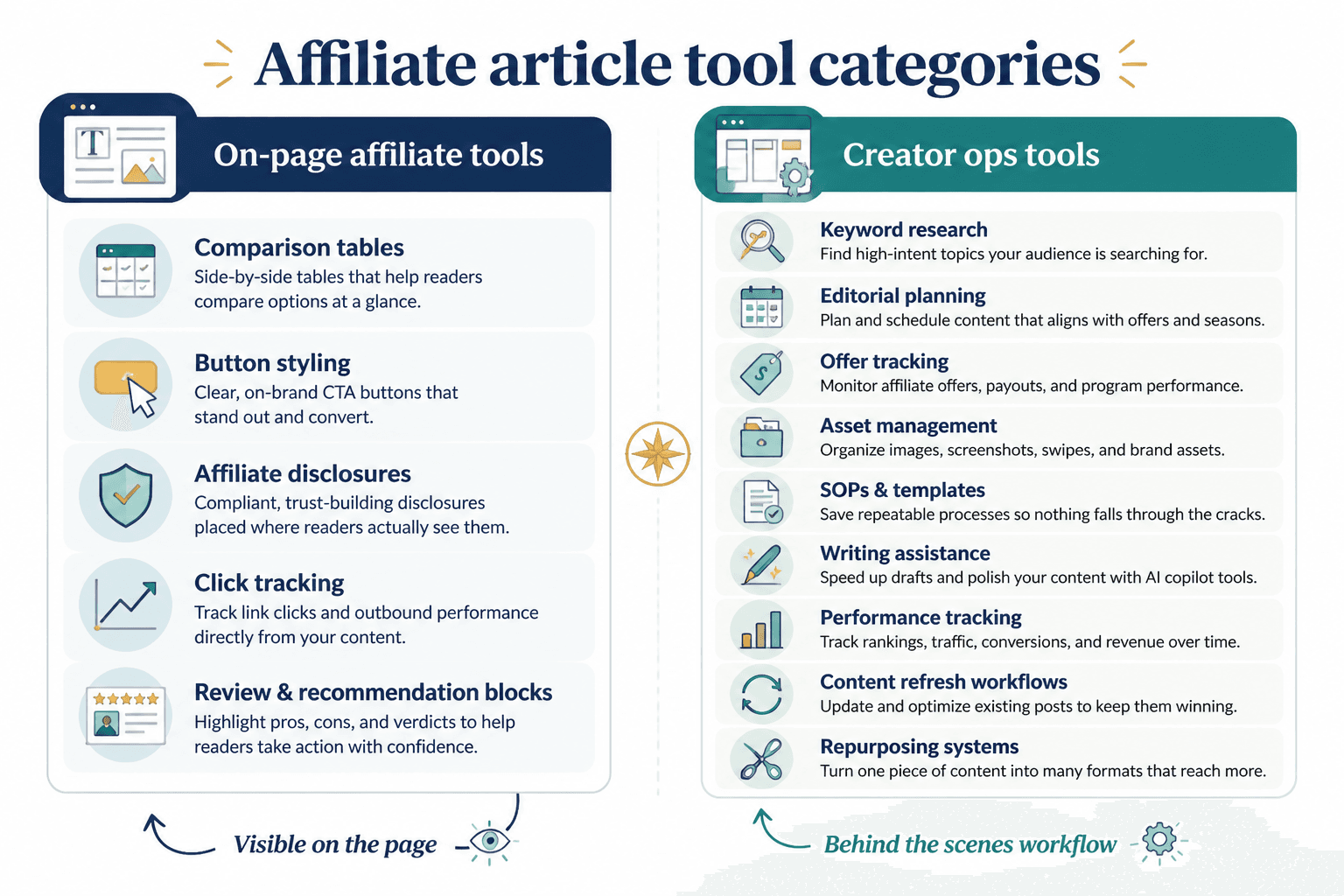
Those are different jobs. One set of tools helps your article function better on the page. The other helps you actually run the machine behind the content: research, planning, updates, tracking, approvals, assets, and repurposing.
That distinction matters, because a lot of creators buy plugin stacks like they are assembling a tiny software Avengers team, then wonder why their affiliate articles still underperform. The issue usually isn’t a lack of tools. It’s using the wrong tools for the wrong layer of the work.
Here’s the practical version: this guide will help you choose the tools that make affiliate articles easier to build, easier to manage, and less annoying to maintain. Not magical. Just better. Which, honestly, is enough.
If you want the broader strategy behind affiliate content first, read Affiliate Articles Guide for Creators Who Want Better Results. You can also browse the wider monetization funnels section, the money content category, and the core affiliate articles hub if you’re building a bigger affiliate content system.
If you want the bigger picture, start with the parent guide.
What counts as an affiliate plugin vs a creator ops tool?
This is the first place people get sloppy.
Affiliate plugins are usually on-page tools. They help you publish, display, organize, or optimize affiliate content inside your site.
- Link cloaking or management
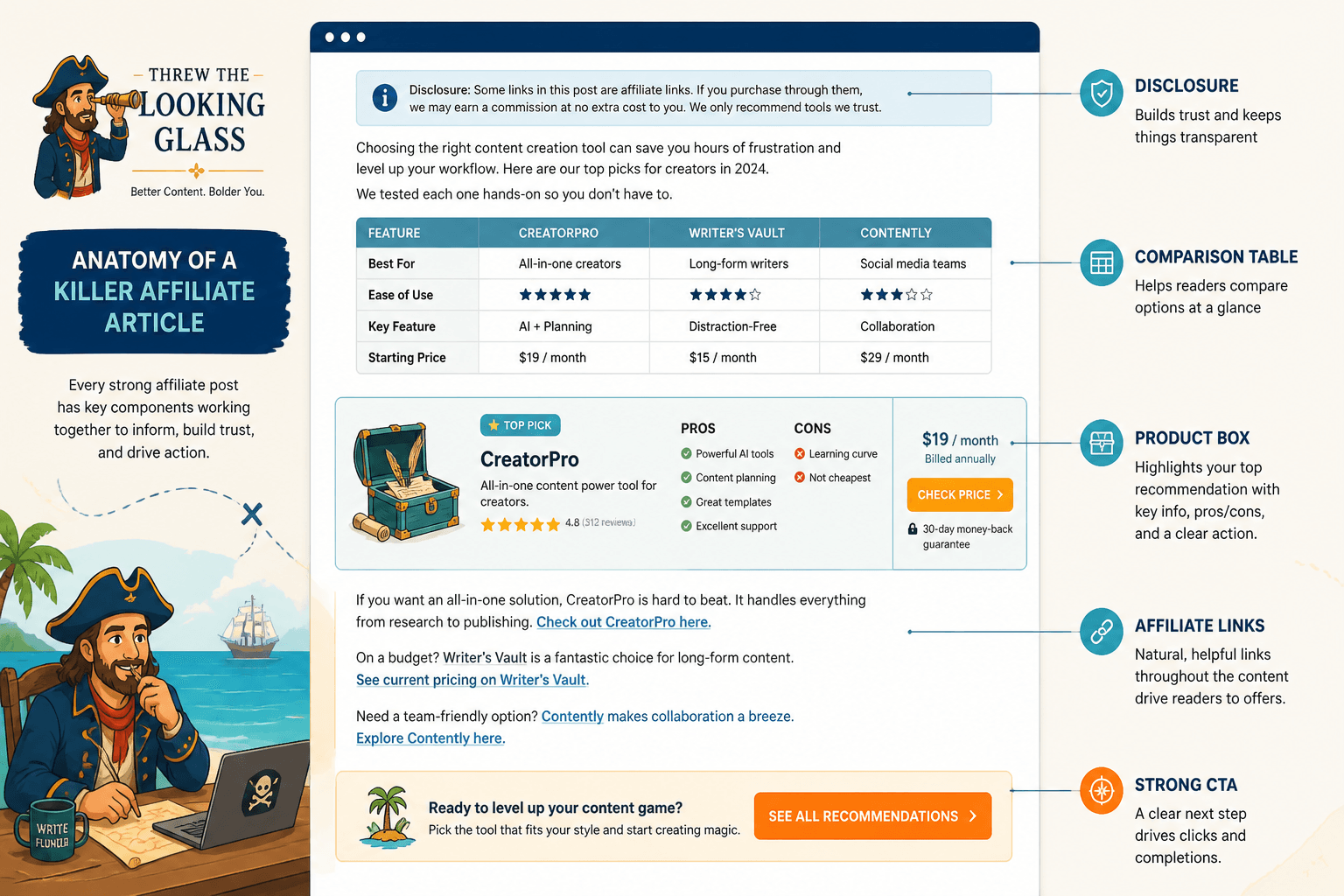
- Product boxes
- Comparison tables
- Button styling
- Affiliate disclosures
- Click tracking
- Content blocks for reviews and recommendations
Creator ops tools handle the workflow around the article.
- Keyword and topic research
- Editorial planning
- Offer tracking
- Asset management
- SOPs and templates
- Writing assistance
- Performance tracking
- Content refresh workflows
- Repurposing systems
If your affiliate content operation has been feeling messy, the mess usually lives in creator ops, not just design. A prettier comparison table won’t save an article built on weak research, old screenshots, expired offers, and links you forgot to test six months ago.
What the best affiliate plugins and creator ops tools for affiliate articles should actually do
Good tools do one or more of these jobs:
- Make links cleaner and easier to manage
- Improve article usability with comparison blocks, product summaries, and buttons
- Reduce update chaos when offers change
- Help you keep disclosures and compliance elements consistent
- Make article production repeatable instead of improvised
- Help you track what content drives clicks or conversions
- Save time without flattening your judgment
What they cannot do is rescue a weak article angle.
If your article is targeting the wrong intent, recommending random tools with no clear use case, or reading like a generic “top 10” list built by autocomplete, no plugin will save it. Tools support a system. They are not a substitute for one.
The core affiliate plugin categories worth considering
You do not need every category below. Most creators need one or two solid on-site tools, then a lean ops stack behind them.
1. Link management plugins
These help you organize affiliate links, shorten ugly URLs, update destinations faster, and sometimes track clicks.
They’re especially useful if:
- You mention the same product across multiple articles
- You want cleaner links inside your content
- You may need to swap programs later
- You want one place to audit what links exist
What to look for:
- Centralized link library
- Easy link replacement
- Category or tag organization
- Basic click data
- Simple insertion into posts
What to avoid:
- Plugins that make your workflow more complicated than raw links
- Overengineered dashboards you will never open again
- Link setups that are hard to migrate later
This category matters most when your affiliate content library is growing. If you have three affiliate links total, calm down. You do not need a command center.
2. Product box and review block plugins
These help you present recommendations clearly inside affiliate articles. Think feature boxes, pros-and-cons layouts, ratings, product snapshots, and CTA sections.
Good product blocks can improve clarity fast because they answer the reader’s practical questions before the reader gets bored and leaves.
- What is this tool?
- Who is it for?
- Why would I pick it?
- What is the catch?
- What should I do next?
What to look for:
- Clean layouts that fit your site style
- Easy editing inside Gutenberg
- Fields for price notes, use cases, pros, cons, and CTA text
- Mobile-friendly formatting
- Reusable block templates
What to avoid:
- Fake “review” widgets that make everything look equally amazing
- Distracting boxes packed with badges, stars, icons, and noise
- Layouts that scream affiliate article from 2016
A clean product box can help conversion. An overcooked one can kill trust. If every tool somehow has five stars, “best value,” “editor’s choice,” and “must-have,” readers are not fooled. They just get mildly annoyed.
3. Comparison table plugins
This is one of the most useful categories for affiliate articles, especially for roundup posts, alternatives posts, and “best X for Y” content.
A good comparison table helps readers scan fast. That matters because a lot of affiliate readers are not there for your prose. They are there because they need to pick a thing and move on with their day.
Look for:
- Easy row and column editing
- Responsive design
- Sorting only if it actually helps
- CTA buttons per row
- Fields for use case, pricing model, strengths, and limitations
Use comparison tables when they reduce friction. Do not use them as decorative proof that you “did research.” Readers can smell filler.
4. Disclosure and compliance helpers
Affiliate disclosures are not glamorous, but neither is losing trust because your monetization setup feels slippery.
You may not need a dedicated plugin for this if your theme or reusable blocks already handle disclosures cleanly. But you do need a reliable system.
What matters:
- Consistent disclosure placement
- Clear language
- Reusable formatting
- Simple updating across affiliate articles
If your disclosure process is “I think I added that somewhere near the top,” that is not a process. That is optimism wearing glasses.
5. Click tracking and lightweight analytics add-ons
Not every creator needs deep analytics software for affiliate content. But some level of click insight helps.
You want to know things like:
- Which articles get affiliate clicks
- Which buttons get ignored
- Which placements perform better
- Which products attract interest but not conversions
This data will not tell you everything. Affiliate platforms often limit what you can see, and attribution can be messy. Still, click patterns can show you where article structure needs work.
The creator ops tools that matter more than people think
This is the less sexy half of the stack, which is exactly why it gets ignored.
If affiliate plugins make the article better on the front end, creator ops tools stop your affiliate content process from turning into an unmaintainable pile of tabs, screenshots, half-tested claims, and old links. And for most serious creators, this layer is where the real gains happen.
1. Research and keyword workflow tools
You need a way to capture article ideas based on actual search intent, content gaps, product categories, and audience problems.
The best tools here help you answer:
- What are people trying to compare?
- What “best” queries are worth targeting?
- Where is intent commercial, informational, or mixed?
- Which topics are too broad to rank or convert well?
- What sub-angles are missing from competitor posts?
You can get more into templates and systems for this in Best Templates and Tools for Affiliate Articles.
2. Content planning and editorial ops tools
You need somewhere to manage article status, target keyword, affiliate program, update date, owner, CTA type, and supporting assets.
A simple database or content board works fine if it tracks the right things. Fancy is optional. Clarity is not.
Useful fields include:
- Article topic
- Primary intent
- Target product category
- Affiliate program used
- Article type: roundup, comparison, alternatives, review, tutorial
- Status: idea, research, draft, published, refresh needed
- Last updated date
- Screenshots needed
- Disclosure added
- CTA style used
- Internal links added
Without this, scaling affiliate content gets sloppy fast. You start forgetting what exists, duplicating topics, and leaving money sitting inside outdated articles.
3. Asset and screenshot management tools
Affiliate articles often rely on product screenshots, logos, comparison visuals, notes from testing, pricing captures, and UI references.
That means you need a sane way to organize assets by:
- Brand or tool name
- Date captured
- Version or plan level
- Usage rights or notes
- Which articles use the asset
If you skip this, updates become painful. And affiliate content that never gets updated tends to age like airport sushi.
4. AI writing and idea support tools
Used well, AI tools can help affiliate article workflows. Used badly, they produce dead-eyed product summaries that all sound like they were approved by a committee of laminated brochures.
AI is useful for:
- Drafting article outlines
- Generating angle variations
- Summarizing research notes
- Creating comparison criteria lists
- Speeding up rewrite passes
- Turning one article into derivative assets
AI is not useful for:
- Replacing firsthand judgment
- Inventing credibility you do not have
- Writing convincing product recommendations from thin air
- Understanding nuanced audience fit without guidance
- Making bland recommendations feel trustworthy
If AI is part of your workflow, keep it on a short leash. It can speed up structure and repetition. It should not be deciding what is actually best for your reader. For more on that balance, see Best AI Tools for Affiliate Articles.
5. Performance tracking and refresh tools
Affiliate articles are not one-and-done content. Or at least they should not be, if you want them to keep working.
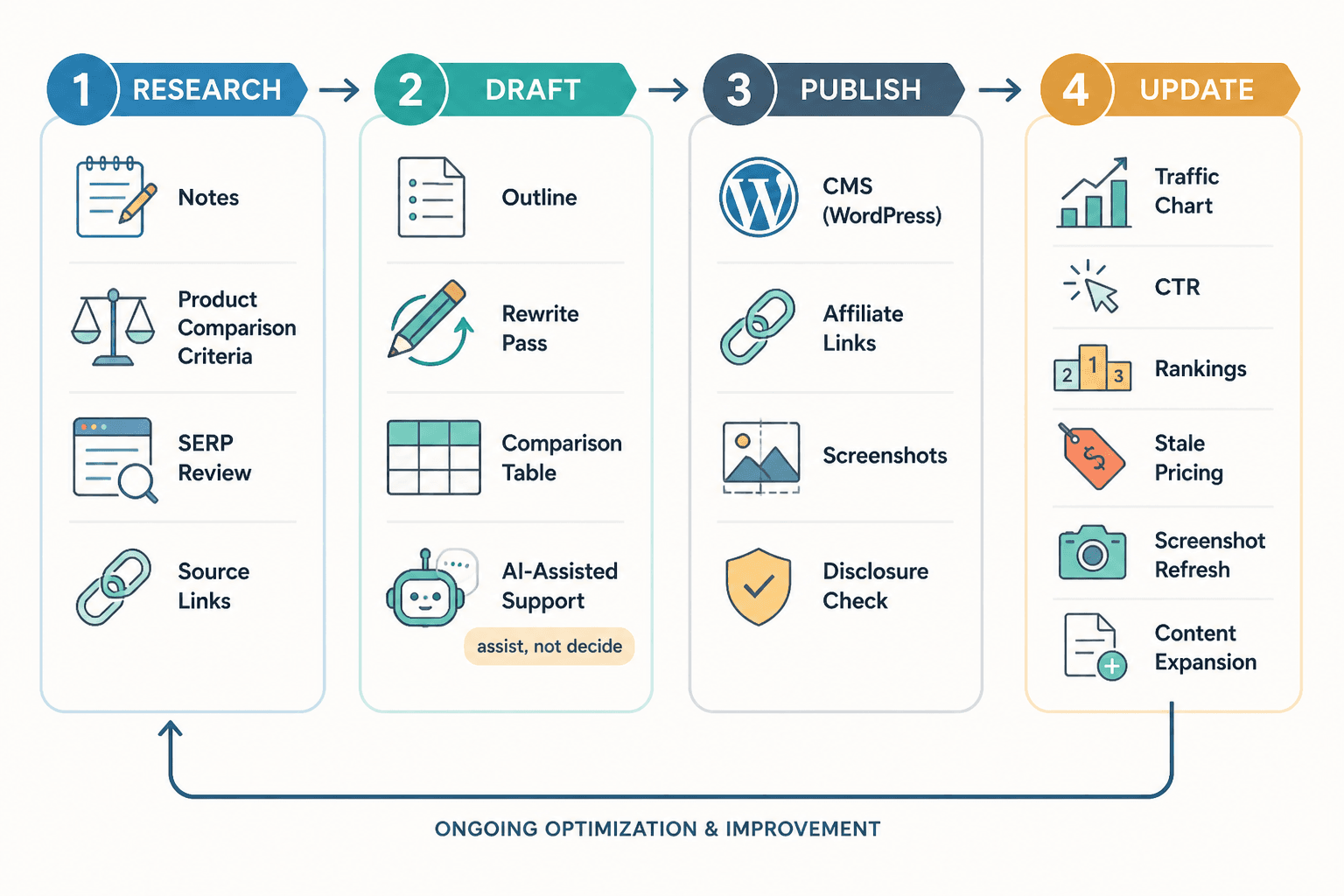
The right ops tools help you review:
- Traffic trends
- Click-through rates
- Article rankings or visibility shifts
- Products with declining relevance
- Aging screenshots or pricing mentions
- Articles ready for expansion or consolidation
A refresh system is one of the least glamorous and highest-leverage parts of affiliate content. New articles get the attention. Updated articles often get the money.
How to choose the right tool stack without building a bloated mess
You do not need “the best stack.” You need the lightest stack that handles your actual workflow.
Start by choosing tools based on stage.
| Stage | What you probably need | What you probably do not need yet |
|---|---|---|
| Just starting affiliate articles | Simple link management, reusable disclosure block, editorial tracker, research notes system | Advanced testing tools, heavy automation, complex dashboards |
| Publishing regularly | Comparison tables, product boxes, click tracking, screenshot organization, refresh tracker | Enterprise-style workflows and oversized tool suites |
| Growing a serious content library | Centralized link systems, repeatable templates, asset library, performance reviews, AI support for ops | Random plugins added just because another creator mentioned them once |
A good stack should pass five tests:
- It saves time. Not in theory. In real use.
- It reduces errors. Especially with links, disclosures, and outdated product info.
- It improves reader clarity. Better structure beats fancier widgets.
- It is maintainable. You or your team can actually keep using it.
- It does not wreck site performance or editorial sanity.
If a tool adds setup friction, editing friction, design friction, and training friction just to make one box look 8% nicer, skip it.
A practical lean stack for most creators
If you want a simple recommendation without pretending there is one perfect brand for everyone, here is the structure I’d suggest.
On-page affiliate layer
- One link management tool
- One product box or review block solution
- One comparison table option, if you publish roundup or alternatives content
- One reusable disclosure system
- Basic click tracking where useful
Behind-the-scenes creator ops layer
- Research and keyword capture tool
- Editorial planning database
- Asset and screenshot storage system
- AI support tool for drafting and repurposing
- Performance and refresh tracker
That is enough for most creators to run affiliate articles well. The rest is mostly refinement.
Common mistakes when choosing affiliate plugins and ops tools
Choosing for aesthetics instead of workflow
Yes, presentation matters. But if the plugin looks great and is miserable to update, you will eventually stop updating it. Then your nice-looking article becomes an elegant museum exhibit of expired information.
Buying tools before defining article types
Different article formats need different support.
- Roundups need comparisons and category logic
- Reviews need proof, screenshots, and verdict structure
- Alternatives posts need side-by-side differentiation
- Tutorial-led affiliate posts need clear CTA placements and contextual recommendations
If you haven’t defined your content types, your tool choices will be random.
Using AI to produce generic affiliate mush
People do this constantly. They generate ten product blurbs that all sound the same, slap on buttons, and call it monetization.
That is not a system. It is a trust leak.
If you want AI help, use it to support speed, structure, and variation. Not to fake discernment.
Ignoring update workflows
Affiliate content decays. Prices change. Features shift. Programs close. Tools get worse. Sometimes they get better, which is rarer but lovely when it happens.
If your stack does not make updates easier, it is incomplete.
Overstacking plugins
You do not need four plugins doing overlapping jobs. That usually creates style inconsistencies, site bloat, and weird maintenance headaches later.
One clean solution per function is usually enough.
How these tools fit into a better affiliate article workflow
Here is the simple version of a sane process:
- Research the query and intent. Know what the reader is actually trying to choose.
- Select the article type. Roundup, comparison, review, alternatives, tutorial, or mixed.
- Build from a repeatable template. This keeps your article structure useful and consistent.
- Gather product data and assets. Notes, screenshots, criteria, proof points, and limitations.
- Write the article with clear judgment. Not just summaries. Recommendations.
- Add the on-page affiliate layer. Product boxes, links, comparison tables, disclosures, and CTAs.
- Publish and track. Monitor clicks, performance, and weak sections.
- Refresh on purpose. Update what has changed and improve what underperforms.
That is the real reason to care about the best affiliate plugins and creator ops tools for affiliate articles. Not because tools are exciting. Because systems remove friction, and friction quietly kills output and revenue.
If you also publish tool roundups and review-heavy content beyond straight affiliate posts, Best Tool Reviews Tools for Creators in 2026 is worth reading too.
What to prioritize first if your budget is limited
If you are not ready to invest heavily, prioritize in this order:
- A planning and tracking system so your article pipeline is not chaotic
- A link management solution so affiliate links are not a maintenance disaster
- A reusable product or comparison format so recommendations are easier to scan
- A refresh workflow so old articles stay useful
- AI support for repetitive tasks once the basics are already solid
Better affiliate articles feel more like informed guidance and less like pressure wrapped in formatting. Stronger judgment is usually what makes the monetization work without corroding trust.