
Most newsletter problems do not start with writing. They start with structure.
People sit down to send an email, panic a little, then either ramble for 900 words or slap together a few links and call it a newsletter. Neither is a format. That is just sending email with confidence issues.
If you want a newsletter people actually open, read, and remember, you need repeatable sections that make the whole thing easier to write and easier to read. And yes, the right tools help. Not because tools are magical, but because good tools reduce friction, keep your ideas organized, and stop every issue from feeling like you are rebuilding the wheel from scrap metal.
This guide breaks down the best templates and tools for newsletter sections and formats, with practical examples for creators, consultants, coaches, and small brands who want something useful, not overdesigned and weirdly corporate. If you are still figuring out the basics of newsletter structure, it also helps to read newsletter sections and formats first.
For the full path around this topic, head to the parent guide.
What makes a newsletter format actually work
A good newsletter format does three things:
- It gives readers a familiar rhythm
- It makes writing faster for you
- It keeps each issue focused instead of bloated
That last one matters more than people think. A lot of newsletters feel messy because they are trying to do too many jobs at once. They want to teach, update, sell, entertain, share links, tell a personal story, and maybe also sound profound. So the result is a soggy pile of mixed intent.
Better formats are built around a few repeatable section types. Not ten. Usually three to five is enough.
Your newsletter does not need more stuff. It needs cleaner sections doing clearer jobs.
The best newsletter sections to build around
Before getting into templates and tools, it helps to know which sections are worth reusing. These are the ones that tend to hold up across most newsletter formats.
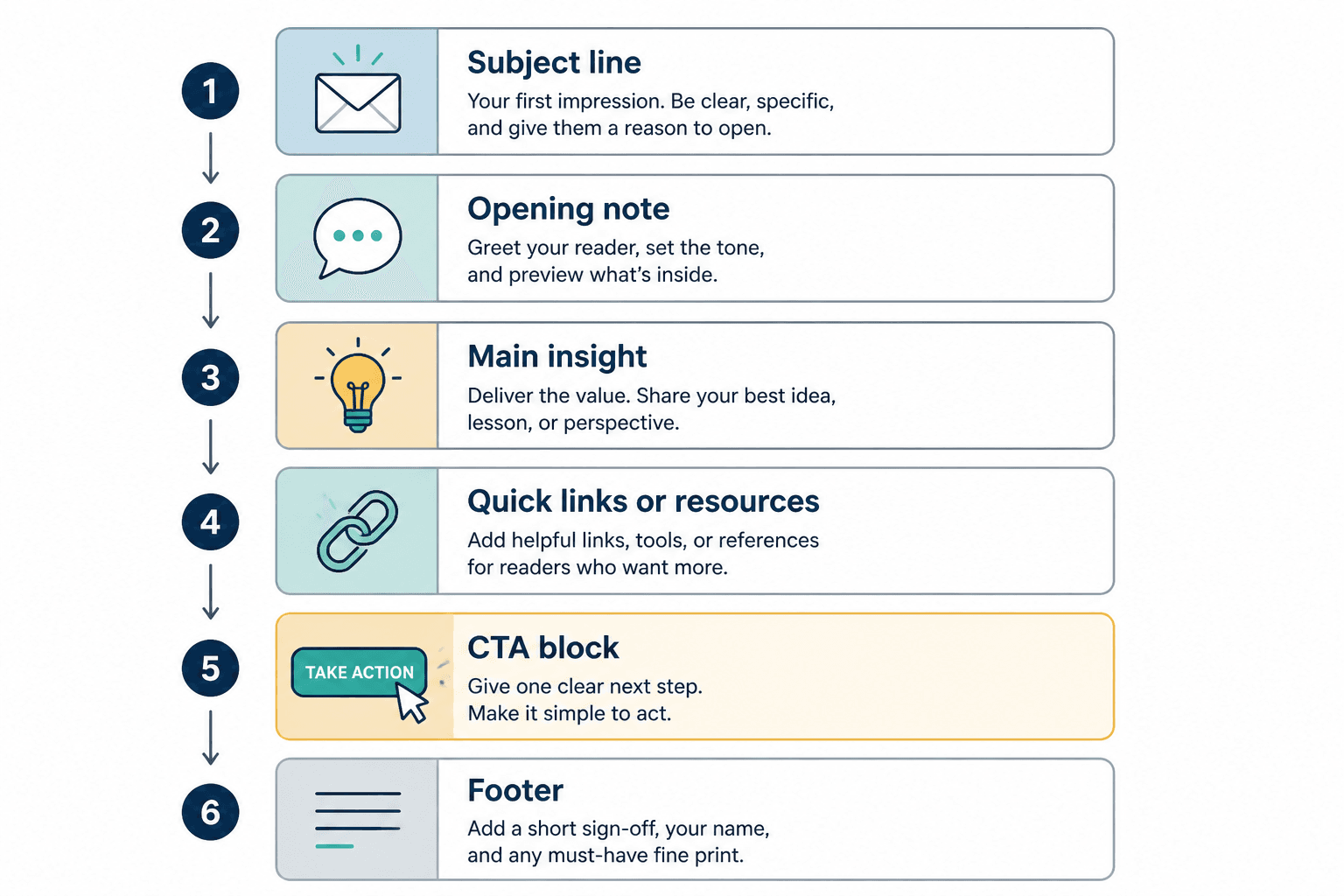
1. The opening note
This is your warm start. A few lines that frame the issue, introduce the main topic, or give a quick opinion. It should sound like a person, not a compliance department.
Good for:
- Setting context
- Making the newsletter feel personal
- Transitioning into the main idea
2. The main lesson or insight
This is the core of the email. One strong idea. Maybe a framework. Maybe a breakdown. Maybe a short story with a useful takeaway. It should carry the issue.
If every newsletter has no clear center, readers stop knowing why they subscribed.
3. The quick tips or tactical block
This section works well when you want readers to get immediate use from the email. Think short bullets, mini examples, swipe lines, or one tactical list.
Good for:
- Creators teaching something practical
- Consultants sharing expertise without writing a full essay
- Adding scannable value inside a longer issue
4. The curated links or resources section
This is useful when the links are filtered through your judgment. Not when you dump six random links with no explanation like a browser tab graveyard.
Each item should have a reason it is there.
5. The CTA block
A good newsletter usually has one clear next step. Reply. Read something. Check out an offer. Book a call. Download a resource. The CTA does not need to scream. It does need to be obvious.
If you need ideas for cleaner CTA sections, see simple newsletter sections and formats CTA blocks templates for busy creators.
Best newsletter templates by format
The best templates and tools for newsletter sections and formats depend on what kind of newsletter you are trying to send. A smart creator newsletter does not need the same structure as a media-style roundup. Here are the formats worth using.
Template 1: The simple authority newsletter
Best for coaches, consultants, service providers, and experts who want trust and leads.
- Opening note: 2 to 4 lines
- Main insight: one useful idea or lesson
- Quick example: a client pattern, rewrite, mini case, or practical application
- CTA: reply, read, book, or browse offer
Why it works: It is clean, easy to repeat, and strong for trust-building.
Sample skeleton:
- Subject: The real reason your newsletter feels flat
- Opening: “A lot of newsletters do not fail because the advice is bad. They fail because the structure is doing nothing to help the reader stay with it.”
- Main lesson: explain one format mistake and one fix
- Example: before and after of a messy section
- CTA: “If you want, reply with your current newsletter format and I’ll tell you what to cut.”
Template 2: The curated insights newsletter
Best for creators, analysts, marketers, and operators who want to become a trusted filter.
- Intro: one short opinion or theme for the week
- 3 to 5 curated items: links, trends, tools, examples, or observations
- Why it matters: one line of commentary for each
- CTA: share, reply, or check related resource
Why it works: Curation is useful when your taste is useful. That second part is where many newsletters fall apart.
Do not do this: “Here are 8 interesting links.” That is not curation. That is forwarding your tabs with lipstick.
Template 3: The story plus lesson newsletter
Best for personal brands who want more voice and connection without becoming unreadably sentimental.
- Hook: a sharp opening line
- Short story: something that happened, observed, or learned
- Lesson: what it means for the reader
- Action step: one thing to try
- CTA: reply or click through
Why it works: Story creates momentum. Lesson creates value. Together, they feel human without becoming diary sludge.
Template 4: The quick-win newsletter
Best for busy audiences who want something fast and tactical.
- One-sentence intro
- 3 quick tips, templates, or examples
- One warning or common mistake
- CTA block
Why it works: Very skimmable. Easy to send consistently. Good for readers who are inbox-tired and mildly suspicious of long email.
Template 5: The segmented newsletter
Best for brands or creators with broader offerings, as long as the sections are tightly controlled.
- Main note
- Feature section: one primary idea
- Community or spotlight section
- Resource/tool section
- Offer or CTA
Why it works: It can support a richer publication feel. But if your audience is small or your writing time is limited, this can turn into a maintenance headache fast.
If you want more section ideas and examples before locking in a format, read best newsletter sections and formats ideas and examples for creators.
How to choose the right format for your newsletter
Do not pick a format because it looks polished in someone else’s inbox. Pick it based on what you can sustain and what your audience actually wants from you.
| If your goal is… | Use this format | Why |
|---|---|---|
| Build authority and trust | Simple authority newsletter | Lets you teach clearly without clutter |
| Share useful finds and commentary | Curated insights newsletter | Makes your judgment the product |
| Build personality and connection | Story plus lesson newsletter | More voice, still useful |
| Stay consistent with limited time | Quick-win newsletter | Fast to produce and easy to read |
| Run a richer brand publication | Segmented newsletter | Supports multiple repeatable content blocks |
There is also a simple question that saves a lot of time: what do you want readers to expect every time they open?
If the answer is fuzzy, your format will probably be too.
Best tools for planning newsletter sections and formats
Now the useful part: tools. Not because you need a 14-app stack to send an email, but because a few good tools can make section planning, drafting, and reuse much easier.
The trick is to use tools for structure and speed, not as a substitute for judgment.
1. Notion or similar workspace tools
Best for building a repeatable section library.
You can create a simple database with:
- Newsletter issue title
- Format type
- Opening note
- Main section draft
- CTA block
- Status
- Repurposing ideas
This works especially well if you reuse the same 3 to 5 sections regularly. You can save block templates, store good past intros, and stop reinventing your process every week.
2. Google Docs
Still one of the easiest drafting tools for newsletters, especially if you want simplicity over workflow theater.
Good for:
- Writing clean drafts
- Collaborating with an editor or team member
- Saving a few master templates
- Keeping section variations in one place
If your current system is chaos in three apps, plain docs might actually be the upgrade.
3. Airtable or spreadsheet-based planning
Best for people running content systems with multiple newsletter types, recurring segments, or a backlog of ideas.
You can track:
- Section performance by issue
- CTA types used
- Topics covered recently
- Content repurposing status
- Section combinations that work best
This is more useful than flashy, and that is generally a good sign.
4. AI drafting tools
Used well, these can help with section variations, rough first drafts, CTA options, and content reformatting. Used badly, they produce newsletters that sound like a polite intern who has never had an original thought.
Good use cases:
- Generating section variations from your existing ideas
- Turning long notes into a cleaner structure
- Testing subject line options
- Summarizing a rough draft into scannable bullets
- Rewriting one section for tone or clarity
Bad use cases:
- Asking it to invent your perspective
- Publishing first drafts without editing
- Using it to fake expertise you do not have
- Expecting it to know your audience better than you do
If you want a fuller breakdown, read best AI tools for newsletter sections and formats.
5. Newsletter platform template builders
These are useful when you want recurring layout blocks inside your newsletter tool itself. Think reusable headers, recurring section labels, featured content modules, and saved email structures.
Useful for:
- Keeping issues visually consistent
- Speeding up assembly
- Reducing formatting errors
- Making recurring sections easier to maintain
But be careful. A nicer layout does not fix a weak section. Plenty of newsletters are beautifully formatted and deeply forgettable.
For platform-specific options, see best newsletter platforms and template tools for newsletter sections and formats.
The most useful template system is usually boring
This is worth saying because people keep overcomplicating it.
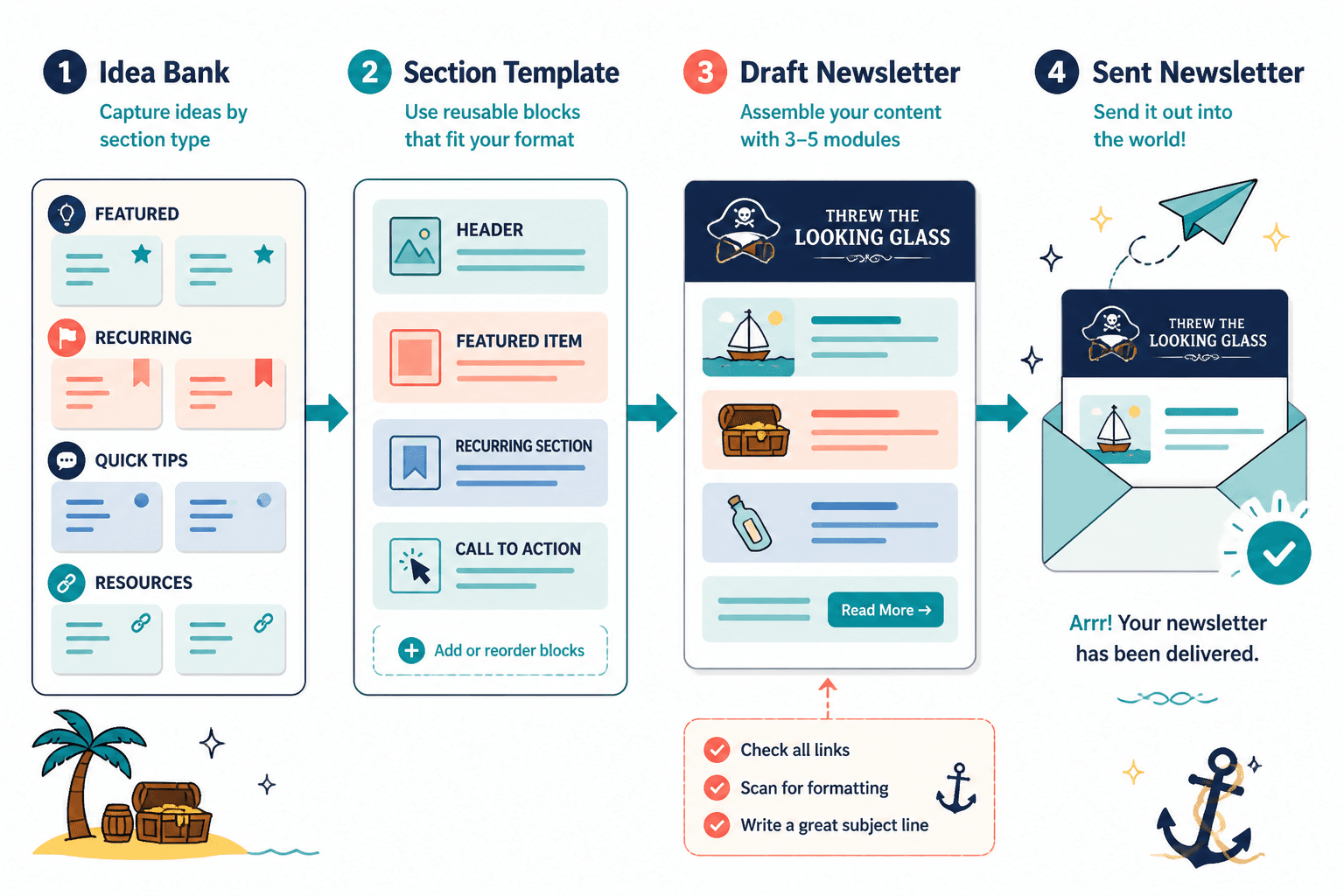
The best template system is usually not some cinematic dashboard with color-coded automations and six nested views. It is often just:
- One master newsletter template
- Three to five repeatable sections
- A place to store ideas by section type
- A short checklist before sending
That is enough for most creators. The more moving parts you add, the easier it becomes to spend all your time managing the system instead of writing the thing.
A practical template you can reuse every week
If you want one dependable newsletter format that works for a lot of creator businesses, use this:
- Subject line: one clear promise, question, or angle
- Opening note: 2 to 3 lines that frame the topic
- Main section: one lesson, story, or argument
- Tactical block: 3 bullets, examples, or quick tips
- CTA block: one action only
Example:
- Subject: Your newsletter does not need more sections
- Opening note: “A lot of newsletter formats look messy for the same reason bad kitchens do. Too much stuff on the counter.”
- Main section: explain why fewer sections improve clarity and consistency
- Tactical block: 3 signs your format needs trimming
- CTA: “Want the stripped-down version? Reply with ‘template’ and I’ll send the skeleton.”
This kind of structure is flexible enough to feel fresh and stable enough to keep your process sane.
How to build your own section library
If you send newsletters regularly, build a small internal library of repeatable section blocks. Not generic formulas from the internet. Your own best-performing patterns.
Create a document or database with section categories like:
- Opening note styles
- Main lesson frameworks
- Story-to-lesson transitions
- Curated link intros
- Quick tips blocks
- CTA variations
Then save examples that actually sounded like you.
This matters because many creators use templates that are technically fine but tonally off. The result is a newsletter that feels borrowed. Structure should reduce effort, not erase personality.
Common mistakes people make with newsletter templates
Templates help. They also create some very predictable problems.
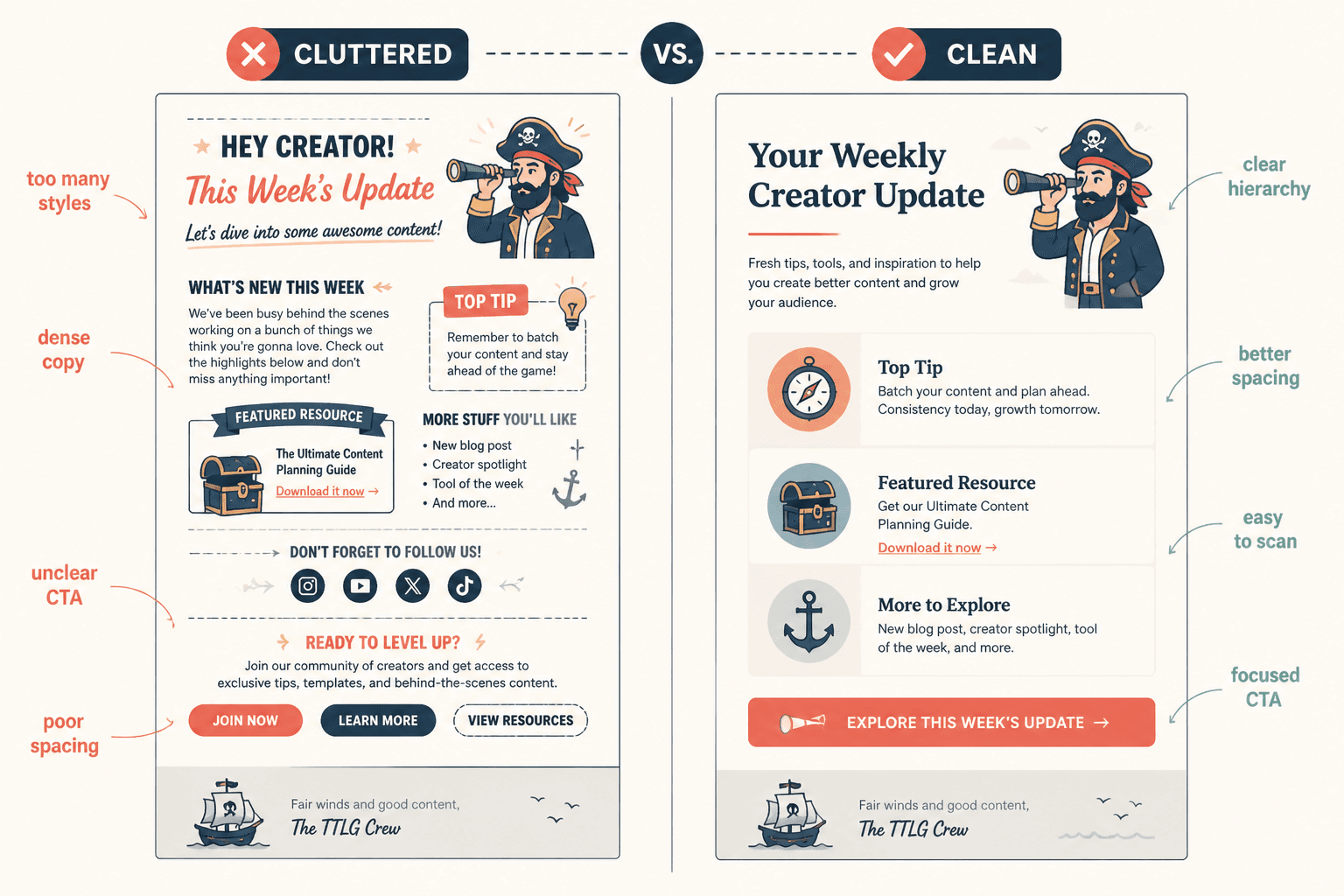
Using too many sections
More sections do not make a newsletter richer. They usually make it busier. If a section is not pulling its weight, cut it.
Making every issue look identical
Consistency is good. Sameness is dull. Keep the skeleton stable, but vary the angle, examples, pacing, and emphasis.
Relying on design to create value
A well-designed newsletter can improve readability. It cannot rescue vague thinking. If the sections are weak, prettier blocks will not save them.
Using AI to flatten your voice
AI can speed up your workflow. It can also make your newsletter sound like every other over-smoothed email in the inbox. Keep your edits sharp. Add opinion. Remove mush.
Forgetting the CTA
A lot of newsletters end like the writer just wandered off mid-thought. Give the reader a next step. Even if it is small.
A simple workflow for using templates and tools without making a mess
Here is a sane process.
Newsletter structure works best when each section has one clear job and supports the main point of the issue. Simpler formats usually outperform busier ones when the writing stays sharp.