
Most people treat internal linking and content updates like hygiene tasks. Important, sure. But boring. The kind of thing you do because some SEO checklist glared at you.
That is exactly why they leave money on the table.
If you want to know how to turn internal linking and updating into more leads or sales, the shift is simple: stop thinking of links and updates as maintenance, and start using them as conversion infrastructure. Not flashy. Not glamorous. Very effective.
A well-placed internal link can move the right reader from a useful article to a case study, a lead magnet, a service page, or a deeper trust-building piece. A smart update can turn an old post that quietly attracts traffic into something that actually nudges people forward. That is the difference between “we get visitors” and “our content helps close business.”
This article will show you how to use both together without turning your blog into a desperate maze of self-promotion. Because yes, you can build paths to leads and sales. No, you do not need to stuff every paragraph with weirdly aggressive links to do it.
For the main guide behind this topic, visit the parent guide.
Why internal linking and updating affect revenue more than people think
Traffic alone is not especially impressive. Plenty of sites get traffic from people who read one thing, shrug, and disappear forever.
The real job of your content is to help the right person keep going.
Internal linking helps you control that next step. Updating helps you improve the odds that the page still deserves attention in the first place. Together, they do three very useful things:
- They increase the number of relevant pages a reader sees
- They improve trust by making your site feel coherent and current
- They create cleaner paths from education to action
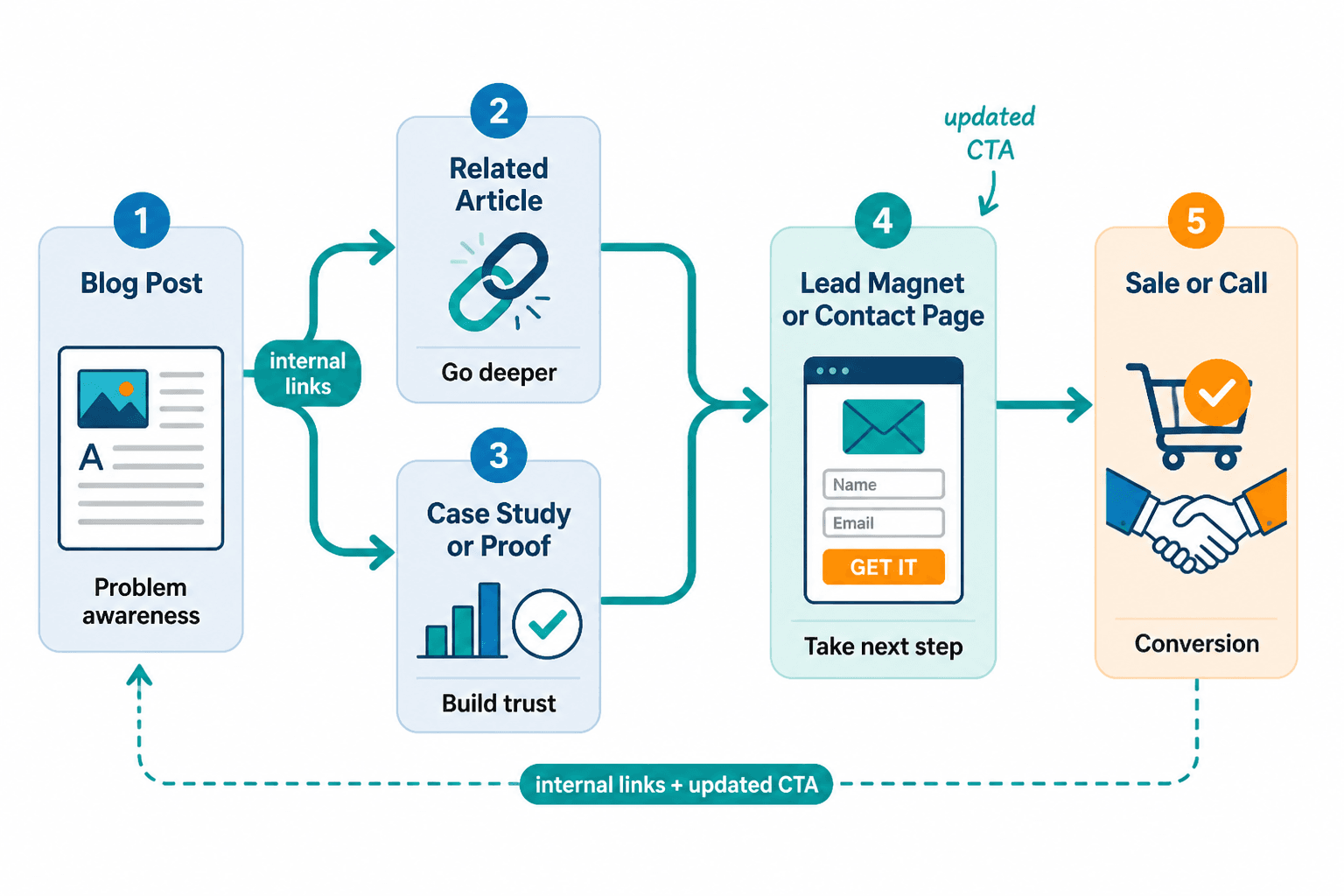
That matters because buyers rarely convert from one isolated blog post. They usually need a sequence: problem awareness, solution clarity, trust, proof, and then a next step that does not feel like a trap.
Internal linking helps build that sequence on purpose instead of by accident.
Updating gives you a second chance to improve old pages that already have rankings, backlinks, or decent traffic but weak conversion paths. Which, frankly, is often easier than publishing 30 new articles and praying one of them does something useful.
What people get wrong about internal linking and updating
There are a few repeat offenses here.
They link for SEO only
Yes, internal linking helps search engines understand your site structure. Great. But if your links do nothing for the human reader, you are doing half the job.
A link should answer one of these questions:
- What should I read next?
- How do I go deeper on this?
- Can I see an example?
- What do I do if I want help?
They update facts but not conversion paths
People refresh a date, clean up a few sentences, maybe swap a stat, and call it an update.
That is editing. Useful, but incomplete.
A revenue-minded update also asks:
- Does this article naturally lead to another useful page?
- Is there a relevant CTA here?
- Am I helping the reader move to the next stage?
- Does this piece still support the offer behind it?
They push too hard too early
Not every article should try to close a sale. Some should build awareness. Some should build trust. Some should handle objections. Some should help the reader compare options. If every page screams “book a call,” your site starts to feel less helpful and more clingy.
That is not a funnel. That is a man in a mall kiosk.
How to turn internal linking and updating into more leads or sales: the practical model
Here is the cleanest way to approach it.
Every article on your site should ideally play one of four roles:
- Attract: brings in search traffic or broad audience interest
- Educate: helps the reader understand the problem or solution
- Convince: builds trust, proof, and authority
- Convert: moves the reader to opt in, inquire, book, or buy
Internal linking should move people between those roles in sensible ways.
For example, an attract post should not dump people directly onto a hard sales page unless the match is extremely strong. Usually, the better move is attract to educate, educate to convince, convince to convert.
Simple. Not simplistic. There is a difference.
A basic content path that works
- Search-friendly article about a common problem
- Internal link to a deeper strategy article
- Internal link to examples, proof, or use cases
- CTA to lead magnet, consultation, service page, or product
That path gives the reader momentum. They do not have to hunt around your site wondering what matters next.
If you want a broader framework for structuring this category, your internal linking and updating system should sit inside a larger blog SEO writing structure, not off in a lonely spreadsheet pretending to be strategy.
Start with pages that already have attention
If you are trying to get more leads or sales, do not begin with the pages nobody visits.
Start with pages that already have one of these:
- Steady organic traffic
- Strong rankings for relevant terms
- Backlinks
- High time on page
- Good audience fit but weak conversions
These pages are your easiest wins. They already have attention. Your job is to make that attention go somewhere useful.
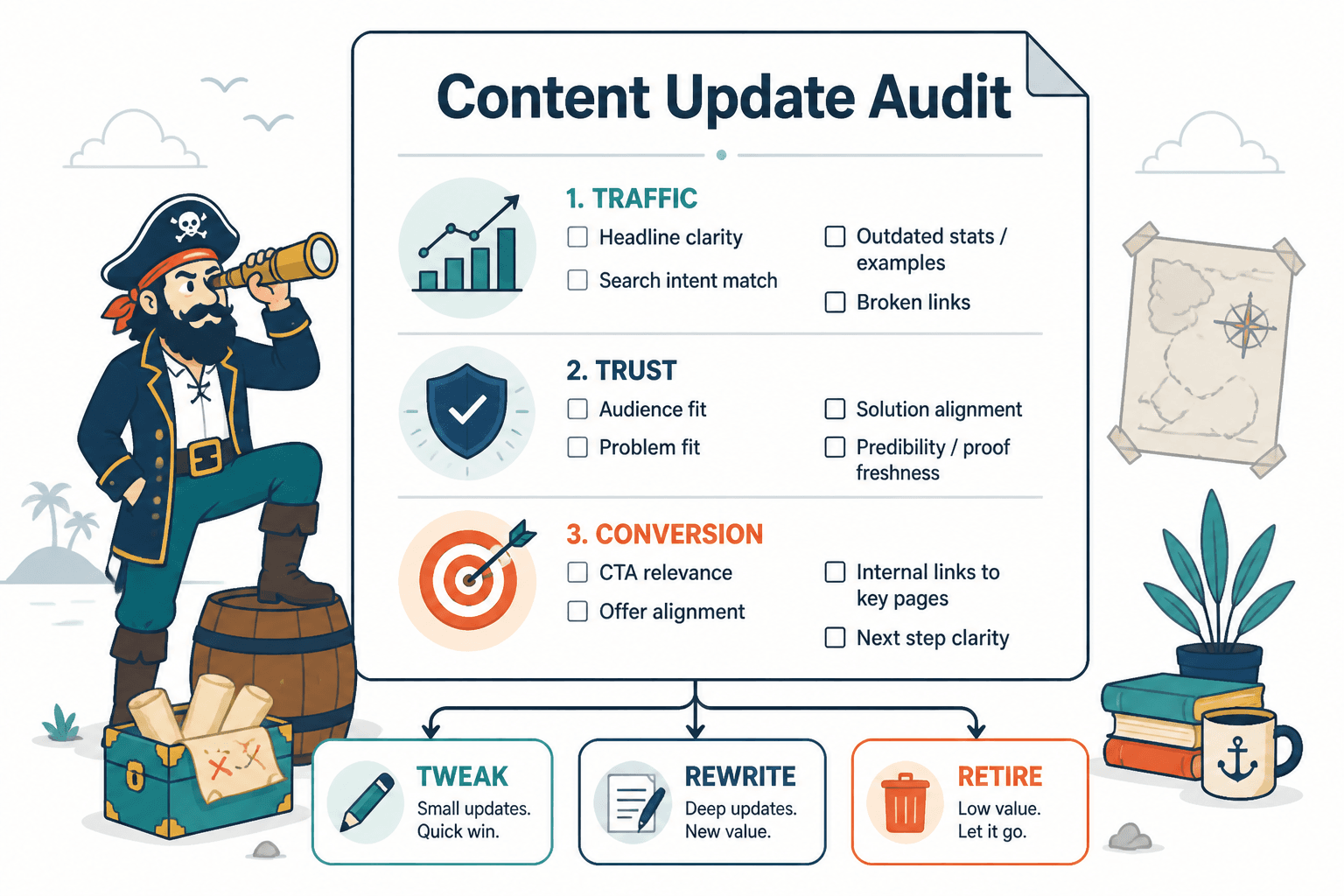
What to look for during the audit
- Articles with traffic but no internal links to related commercial or trust-building content
- Articles with outdated advice that no longer align with your current offer
- Articles with weak or missing CTAs
- Articles that mention a topic you cover in depth elsewhere but never link to it
- Posts that rank for broad terms but do nothing to qualify the reader
This is one reason updating old content is often underrated. You are not starting from zero. You are improving the conversion ability of traffic you already worked to earn.
If you want a more specific process for this, read how to turn old content into better internal linking and updating.
Match the link target to reader intent
Not all internal links should point to the same kind of page. This is where people get lazy. They add a few random “related posts” and assume the job is done.
Better question: what does this reader probably need next?
| If the reader is here for… | Link them to… |
|---|---|
| Basic understanding | A clearer strategy article or beginner-friendly explainer |
| Practical implementation | A step-by-step guide, checklist, or template article |
| Proof and trust | Examples, case-style content, or authority-building articles |
| Choosing help | A service page, booking page, or monetization-focused article |
| Comparing options | A framework article or “best fit” breakdown |
Intent matters more than volume. Five smart links beat 20 random ones every time.
Example
Say you have a post about improving blog traffic. A weak internal linking move would be tossing in generic links to your homepage, your about page, and three barely related posts.
A stronger move would be linking to:
- A post on updating old content for better performance
- A post on funnel ideas connected to blog traffic
- A post on monetizing content without wrecking trust
That sequence actually helps the reader connect traffic to business outcomes.
Use updating to realign old posts with current offers
One of the sneakiest reasons content stops driving leads is not poor traffic. It is drift.
Your business changes. Your offers evolve. Your positioning gets sharper. Meanwhile, old articles keep attracting readers into a version of your brand that no longer exists.
That creates friction. The article says one thing. Your offer says another. The result is confusion, and confused readers do not convert.
When you update older content, check for alignment in four areas:
- Audience: Is the post written for the same people you want now?
- Problem: Is it speaking to the pain points your current offer solves?
- Solution: Does the article naturally connect to your current method, service, or product?
- CTA: Does the next step still make sense?
Sometimes a small tweak is enough. Sometimes the old piece needs a substantial rewrite. And sometimes the kindest thing you can do is retire it instead of dragging it around like a dead houseplant.
Build link paths around offers, not just topics
Topical clusters are useful. But if your whole internal linking strategy is only “these posts mention similar words,” you are missing the commercial layer.
You also need offer-connected pathways.
That means identifying the content most likely to support a specific business goal, then building internal links toward it.
Example offer paths
- Service business: educational post → process article → examples or proof → inquiry page
- Coach or consultant: pain-point article → perspective article → FAQ or objections article → book a call
- Creator product: search article → implementation guide → template or toolkit article → product page
- Newsletter growth: useful article → related deeper article → lead magnet or subscribe CTA
This is where internal linking becomes quietly powerful. It helps readers self-select. The casual reader gets more useful content. The serious prospect finds the path toward working with you without feeling shoved.
If you need ideas for those paths, see best funnel ideas to pair with internal linking and updating.
Where to place internal links so people actually click them
Internal links are not decorative parsley. Placement matters.
The best spots are usually where the reader naturally wants the next piece of information.
Strong placements
- Right after introducing a concept that you explain in depth elsewhere
- After making a claim that would benefit from an example
- Inside a process, when the next step has its own full article
- Near the end of a section, when the reader is primed for the next stage
- In the conclusion, when a logical next action is clear
Weak placements
- Stuffing several links into the opening before the article has earned any trust
- Using vague anchor text like “click here”
- Linking every repeated phrase because the CMS lets you
- Dropping unrelated links in a final “you may also like” pile and hoping for miracles
The anchor text should tell the reader what they will get, not force them to guess. “See examples for coaches, consultants, and personal brands” works. “Read more here” does not.
Speaking of examples, this is a good place to point people toward internal linking and updating examples for coaches, consultants, and personal brands if they need to see what this looks like in practice.
Do not confuse more links with better conversion
A page with 47 internal links is not automatically strategic. It may just be cluttered.
Good internal linking reduces friction. Bad internal linking creates decision fatigue.
If every paragraph points somewhere else, the reader stops feeling guided and starts feeling yanked around your site by the sleeve.
So be selective. Ask:
- Is this link genuinely useful here?
- Does it support the reader’s current intent?
- Does it move them one step forward?
- Is there a stronger page I should link to instead?
Restraint helps. A lot.
Use soft conversion points before hard sales asks
If your content attracts top-of-funnel or problem-aware readers, a direct sales CTA is often too abrupt.
This is where internal linking can create softer, smarter conversion paths.
Instead of sending readers straight from an informational post to “hire me,” you can route them through pages that build trust first:
- Examples and use cases
- Breakdowns of your method or philosophy
- Articles handling common objections
- Lead magnets or newsletter signups
- FAQ-style content about results, fit, or process
That usually converts better because it respects the reader’s stage of awareness. It also feels less gross.
If trust matters in your business, and it probably does, read how to monetize internal linking and updating without wrecking trust.
A simple workflow for turning old content into a lead path
You do not need a dramatic content overhaul to make this work. You need a repeatable review process.
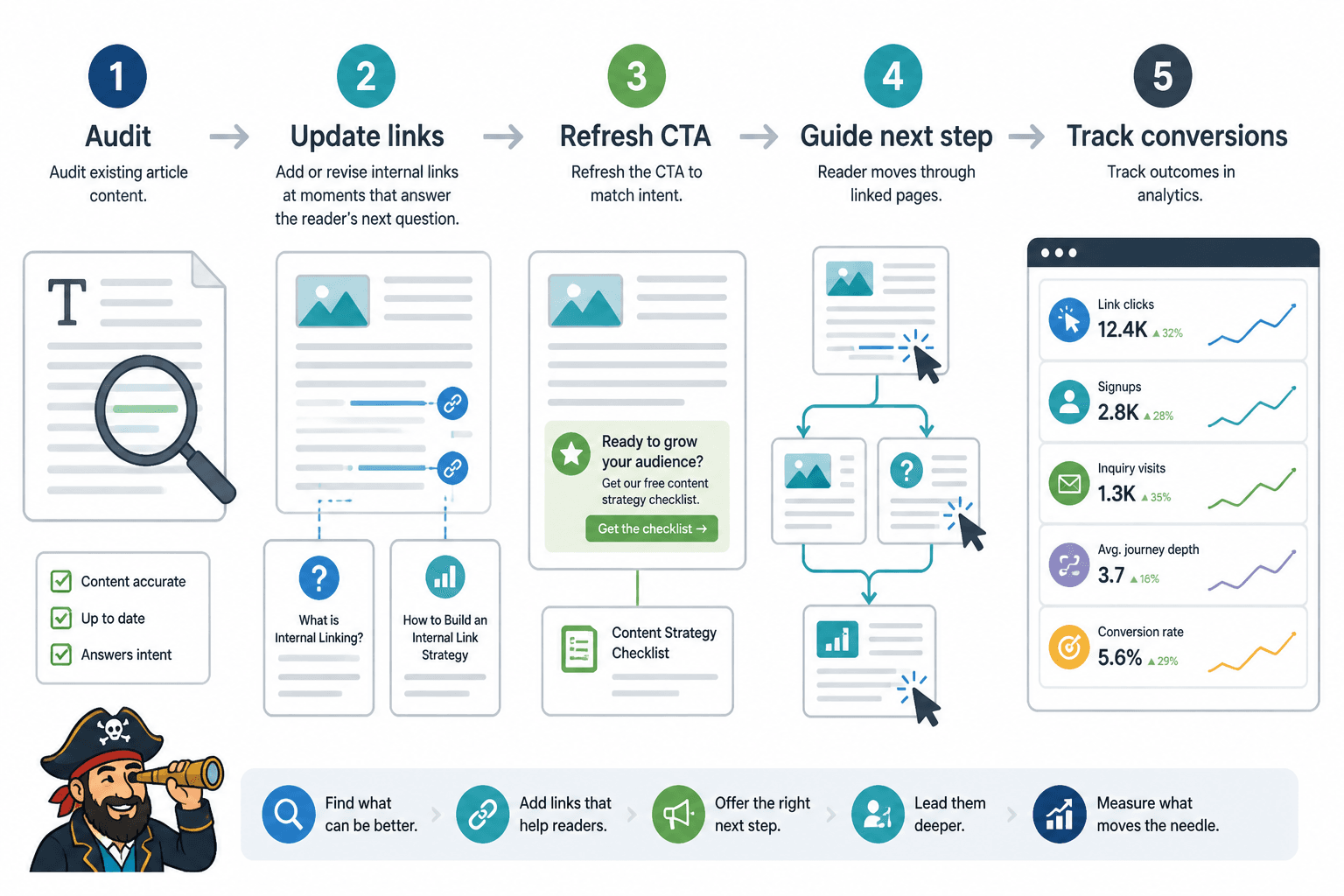
Step 1: pick a target offer
Choose the offer you want more leads or sales for. Service package, course, newsletter, consultation, template pack, whatever.
Step 2: identify the support content around it
Find the articles that naturally relate to that offer from different angles:
- Problem awareness
- Strategy
- Tactics
- Examples
- Objections
- Proof
Step 3: audit the top-traffic pages in that cluster
Look for weak links, outdated positioning, thin examples, and missing CTAs.
Step 4: add next-step links with intent
Place links where they answer the obvious next question. Not where they merely fit the keyword.
Step 5: refresh the CTA
Make the next step relevant to the article, not generic site-wide filler.
Step 6: track movement, not just rankings
Watch for changes in:
- Clicks to linked pages
- Lead magnet signups
- Inquiry page visits
- Time through the content journey
- Conversion rate from updated pages
Because if rankings improve but nobody takes action, congratulations on your very polished dead end.
Before and after: what this looks like on a real page
Before
An older article ranks for a useful search term. It gets traffic. It has one vague CTA at the bottom: “Contact us to learn more.” It links to a few general category pages and not much else.
What happens? People read it, maybe. Then they leave.
After
The updated version:
- Tightens the intro to match current audience pain points
- Adds a link to a deeper strategy article when a key concept appears
- Adds a link to practical examples after explaining the framework
- Updates the CTA to a relevant lead magnet or service-related next step
- Removes outdated references that no longer support the current offer
Same broad topic. Much better path.
This is usually how content starts generating more leads: not through one heroic article, but through a cleaner sequence of useful decisions.
Quick rules for links and updates that actually help sales
Internal linking improves when each update makes the next useful step clearer. Cleaner structure usually does more work than a bigger pile of links ever will.
Internal linking improves when each update makes the next useful step clearer. Cleaner structure usually does more work than a bigger pile of links ever will.